How to run Claude Code on remote server machines and keep the session alive
To run Claude Code on remote server machines, start it in tmux over SSH or a Claude Desktop SSH environment, and sign in with claude.ai, since Remote Control refuses API keys.

Five ways to put Claude Code to work on a server you control
To run Claude Code on remote server machines, put the claude process on the server and keep it alive after SSH disconnects, with tmux or Claude Desktop's background helper.
| Route | Where Claude Code runs | After an SSH drop | With your laptop shut | Sign-in | From a phone |
|---|---|---|---|---|---|
claude in tmux over SSH | the server | keeps running in tmux | keeps running | claude.ai login or API key | Remote Control, on a claude.ai login |
| Remote Control server mode | the server | keeps running in tmux | keeps running | claude.ai login only | claude.ai/code or the Claude app |
| Claude Desktop SSH environment | the server, under a background helper | keeps running | can stop within minutes of sign-in end | the Claude account in Desktop | not covered in the SSH docs |
| VS Code Remote-SSH or a Tunnel | the server, in the integrated terminal | keeps running in tmux | keeps running in tmux | same as the CLI | vscode.dev in a browser, through a Tunnel |
Local Claude Code that runs ssh | your laptop | each command reconnects | stops | your laptop's sign-in | Remote Control, while the laptop is on |
Anthropic's Remote Control docs say the computer running the session has to stay on and the claude process has to keep running, and a server does both by default. Claude Desktop's SSH docs say not to count on a task running overnight, which is why I read the laptop-shut column before any other. If no machine of yours stays on, I'd skip all five and use Anthropic's cloud sessions instead.
The sign-in decides whether Remote Control works
Claude Code on a server starts Remote Control only from a claude.ai login, which Anthropic's Remote Control docs list among its requirements.
Anthropic's authentication docs rank an approved ANTHROPIC_API_KEY above a claude.ai login, so a key exported in the server's shell profile takes over every session, and Remote Control doesn't support API keys. Run unset ANTHROPIC_API_KEY, then /status inside Claude Code to see which one is in use.
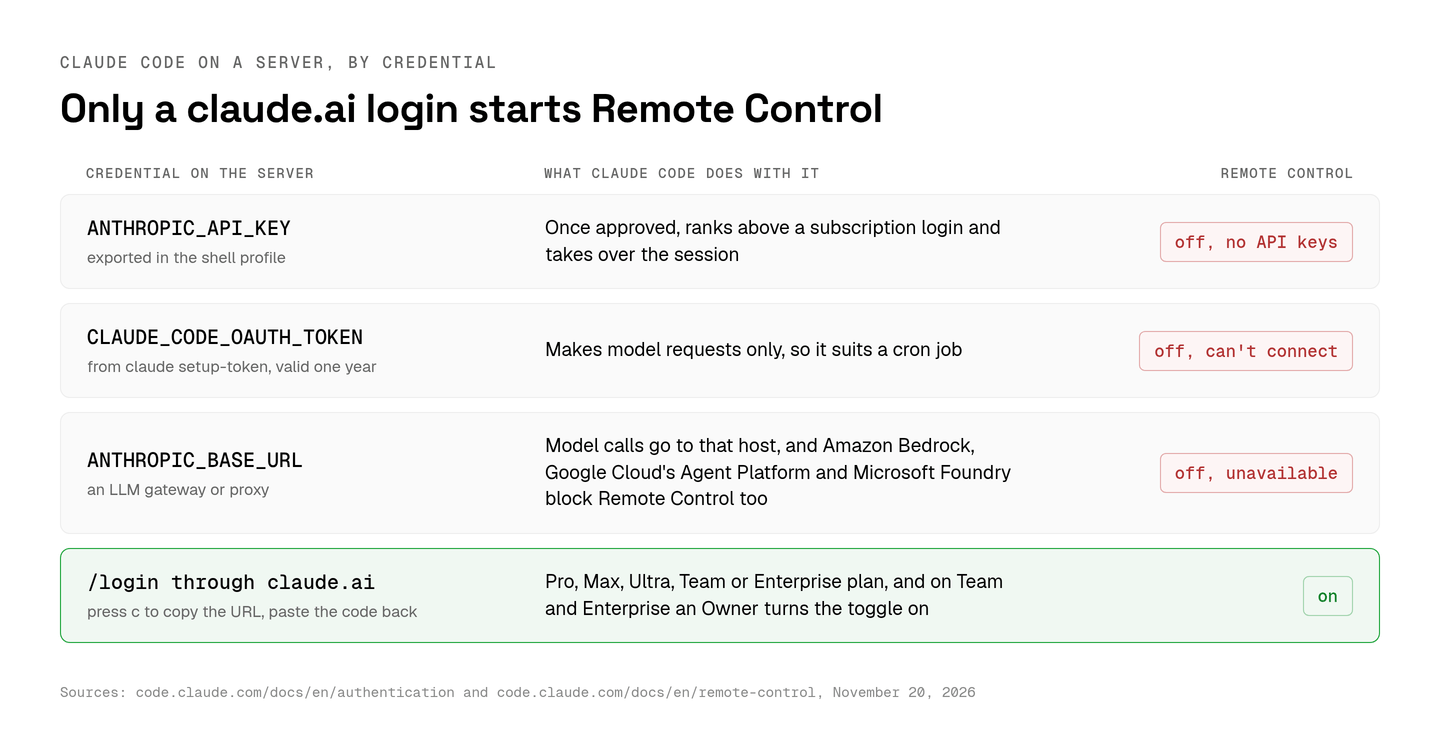
A server has no browser for the login page. The same docs cover that case: when no browser opens, press c to copy the login URL, finish signing in on your laptop and paste the code at the Paste code here if prompted prompt. On Linux the credentials land in ~/.claude/.credentials.json with mode 0600.
claude setup-token prints a one-year token for CLAUDE_CODE_OAUTH_TOKEN, which is fine for a cron job, but that token can only make model requests and can't start Remote Control. Pointing ANTHROPIC_BASE_URL at an LLM gateway or proxy, or running on Amazon Bedrock, Google Cloud's Agent Platform or Microsoft Foundry, leaves Remote Control unavailable too, per its requirements.
Remote Control needs a Pro, Max, Ultra, Team or Enterprise plan, and on Team and Enterprise an Owner turns on the Remote Control toggle in Claude Code admin settings first. Logins also expire. On v2.1.318 or later, claude auth status --text prints a Sign-in ends line, and a Remote Control session that outlives its login disconnects until you sign in again, per the authentication docs.
What ends a remote Claude Code session
A remote Claude Code session started outside tmux or screen dies with its SSH connection, which is why Anthropic's Remote Control docs say to start claude inside one.
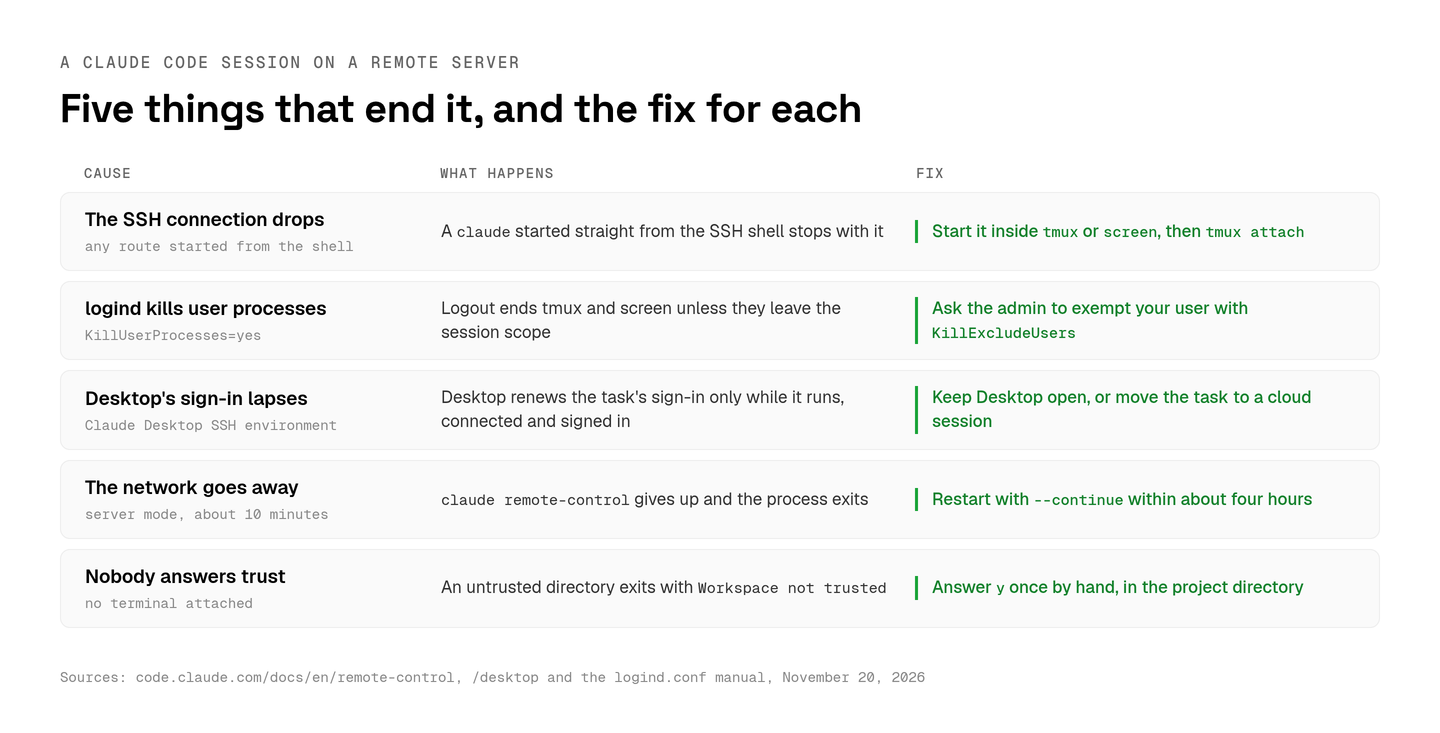
- The SSH connection drops.
tmux new -s claudestarts a session that outlives the connection,C-b ddetaches from it andtmux attach -t claudebrings it back, per the tmux getting-started guide. - logind ends your processes at logout. On machines with
KillUserProcesses=yes, the logind.conf manual warns that the setting breaks screen and tmux unless they move out of the session scope. Anthropic's Desktop docs suggest the fix I'd ask an admin for, an exemption for your user throughKillExcludeUsers. - Desktop's sign-in lapses. Claude Desktop keeps an SSH task running under a background helper after the connection closes, on Desktop v2.31226.0 or later. Desktop renews that task's sign-in only while it is running, connected and signed in, so a task can stop a few minutes after you close the laptop.
- The network goes away. In server mode,
claude remote-controlgives up after about 10 minutes offline and exits, while an interactive session keeps retrying until the network returns.claude remote-control --continuebrings the last session back for about four hours after the server stopped. - Nobody answers the trust prompt. In a directory you haven't trusted,
claude remote-controlasksTrust <directory>? [y/N], and with no terminal attached, as under a service manager, it exits withWorkspace not trusted. Run it once by hand and answery. The answer is never saved for your home directory, so start it from the project directory.
Server mode runs many sessions on one machine
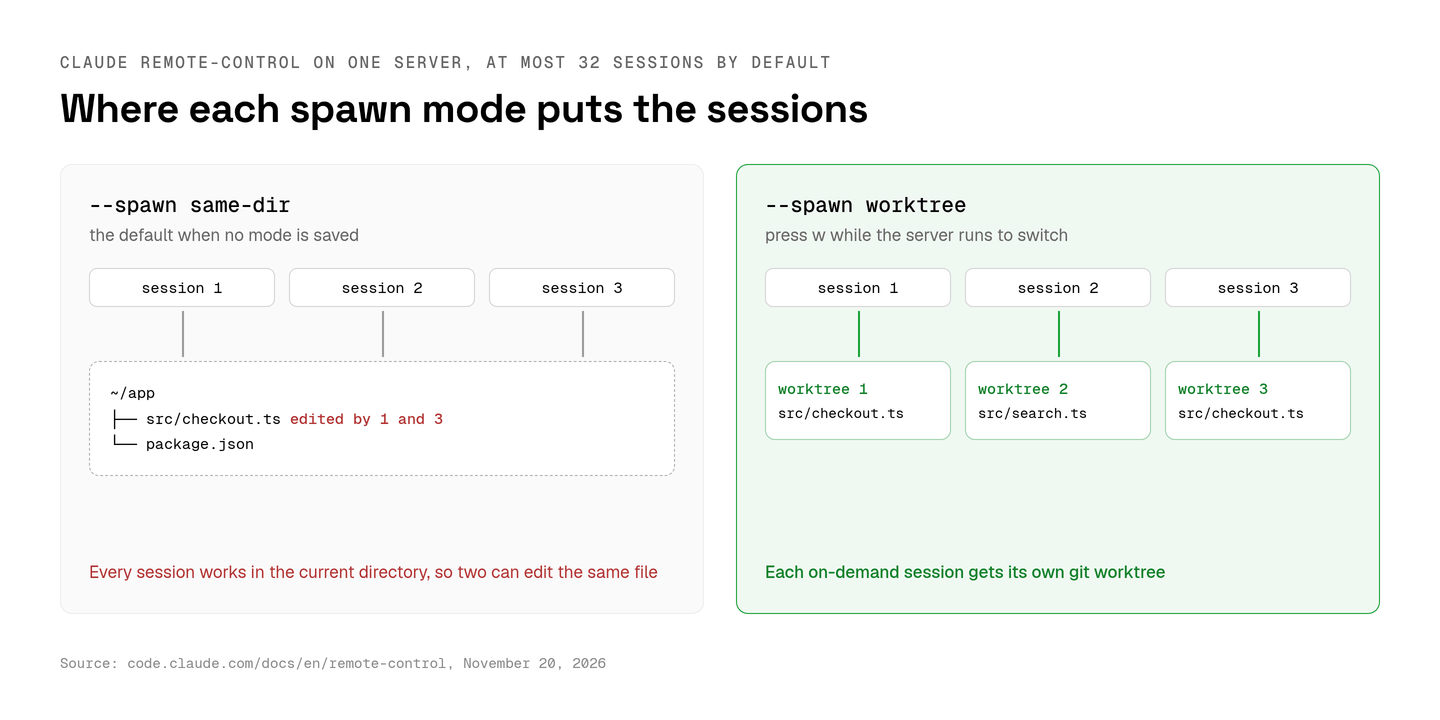
Server mode, started with claude remote-control or its alias claude rc, keeps one Claude Code process waiting for connections and runs at most 32 sessions by default.
The --spawn flag decides where those sessions write. The default, same-dir, puts every session in the current directory, where two of them can edit the same file. --spawn worktree gives each on-demand session its own git worktree, and pressing w while the server runs switches between the two modes. I'd start a shared server in worktree mode, for the same reason I give each parallel agent its own checkout.
The terminal prints a session URL, and the spacebar toggles a QR code that opens it in the Claude app on iOS or Android. A served session that crashes comes back when a connected device sends it a message, on v2.1.238 or later, with no server restart. Outside Remote Control, I'd add a Notification hook that reaches your laptop over SSH.
Claude Desktop's SSH environment installs Claude Code for you
Claude Desktop's SSH environment connects to a Linux, macOS or Windows machine and installs Claude Code there automatically on the first connection, per the Desktop docs.
You add one from the environment selector under New environment, on the SSH tab, with a name, a user@hostname or a host from ~/.ssh/config, a port (22 by default), an optional key and a worktree folder. The Desktop docs ask for an x86_64 or arm64 server with glibc 2.17 or musl, the SFTP subsystem and about 1 GB free in ~/.claude/remote/ on a filesystem that allows exec.
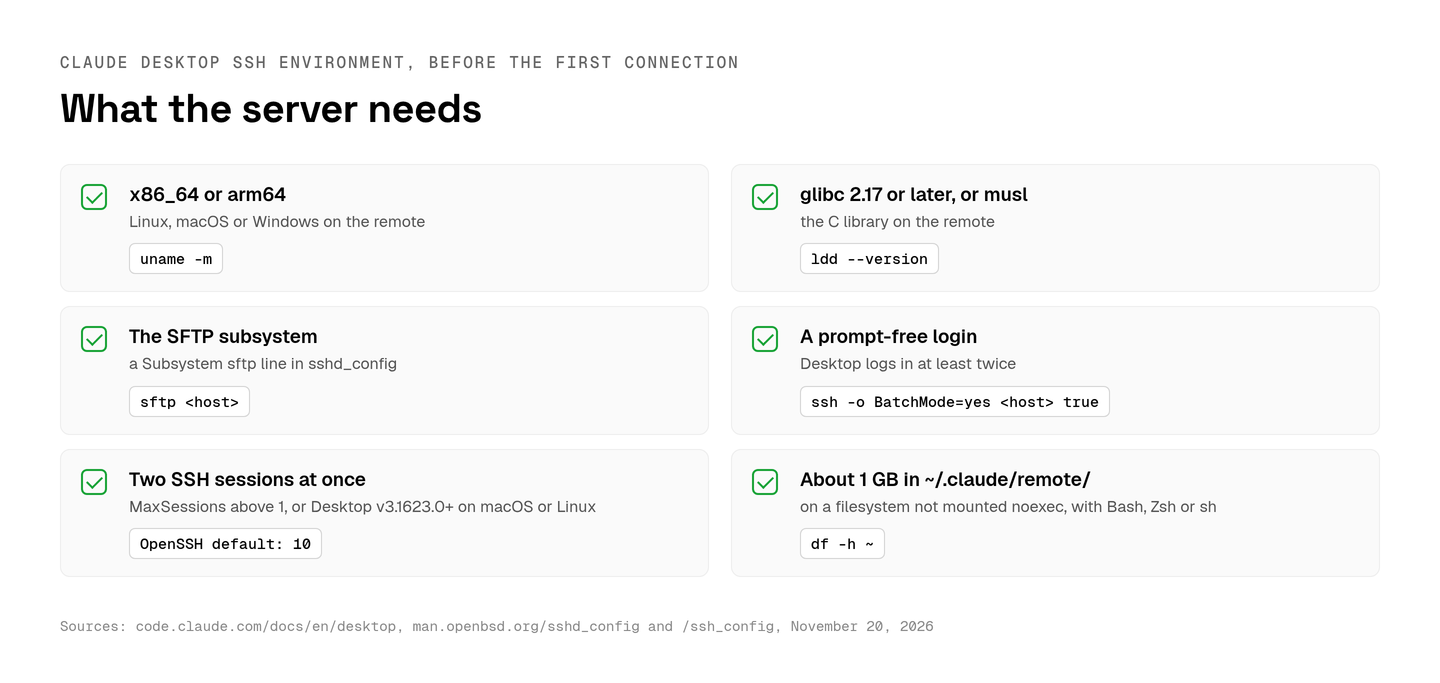
Desktop logs in at least twice, so the SSH login has to be prompt-free. ssh -o BatchMode=yes <host> true tests that, since ssh_config says BatchMode turns off password prompts and host key confirmation. A server with MaxSessions 1 needs Desktop v3.1623.0 or later on macOS or Linux, or a higher limit, and the sshd_config manual puts the default at 10. Proxy variables go in the env block of ~/.claude/settings.json on the server, and SSH sessions read skills from the remote ~/.claude/skills/.
VS Code Remote-SSH and Tunnels put the editor on the server
VS Code's Remote-SSH extension installs VS Code Server on the remote host and runs commands and extensions there, so claude in the integrated terminal runs on the server.
Remote-SSH supports x86_64 Debian 8+, Ubuntu 16.04+ and CentOS/RHEL 7+ hosts, macOS 10.14+ hosts with Remote Login turned on, and glibc 2.17 or later, which leaves Alpine out. The editor needs 1 GB of RAM and recommends 2 GB, while Claude Code's setup page asks for 4 GB or more, so I'd size the server for Claude Code and skip the out-of-memory failures a smaller box invites.
Microsoft's Remote-SSH page doesn't say what happens to terminal processes when the SSH link drops, so I'd run claude inside tmux in that terminal too.
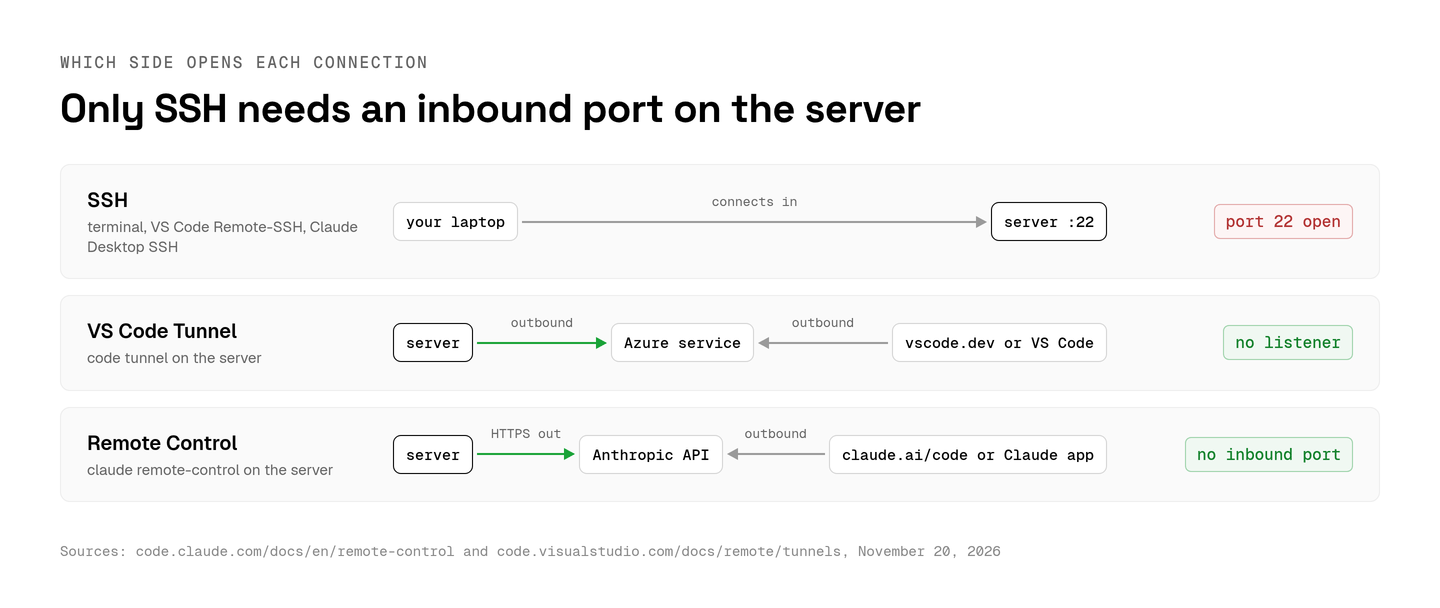
VS Code Tunnels skip SSH entirely. code tunnel on the server makes outbound connections to an Azure service and sets up no network listener, both ends sign in with the same GitHub or Microsoft account, and code tunnel service install keeps the tunnel running. vscode.dev connects from a browser, which makes a Tunnel the workable answer for VS Code on an Android tablet.
A security checklist for a Claude Code server
A Claude Code server keeps your Claude login in ~/.claude/.credentials.json next to your repository, so lock it down before the first session.
- Keys only.
PasswordAuthenticationandKbdInteractiveAuthenticationboth default toyesin sshd_config, so set both tonoonce your key works. - Root stays out.
PermitRootLogindefaults toprohibit-passwordin sshd_config, which still accepts a key, so I'd set it tonoand run Claude Code as an ordinary user. - No new inbound ports. Remote Control makes outbound HTTPS requests only, and a VS Code Tunnel sets up no listener, so SSH stays the only door in.
- Trusted Devices on. Trusted Devices is off by default. Turned on, it asks for an enrolled device and a sign-in no more than 18 hours old before anyone views or steers a session.
- Transcripts leave the box. While Remote Control is connected, Anthropic's servers store the transcript, tool activity included, and execution stays on the server. Zero Data Retention and HIPAA organizations can't enable Remote Control, and the
disableRemoteControlsetting turns it off. - Production secrets live elsewhere. I'd keep deploy keys off the box entirely, the boundary I argued for in how to sandbox coding agents.
How a team runs Claude Code in Aldena sandboxes
Aldena runs Claude Code inside each conversation's sandbox on a provider the team connects, such as Boat, so nobody keeps a tmux session alive on a shared box.
I built Aldena for the moment a second person needs the same agents. An owner or admin pastes the provider's API key once, on the team's providers page, and nobody manages a server after that. The sandbox starts with a conversation's first turn and sleeps 30 minutes after its last command. Its files stay until the conversation sits quiet for 7 days. The next turn wakes it, each new sandbox runs the project's setup script, and you never SSH into anything.
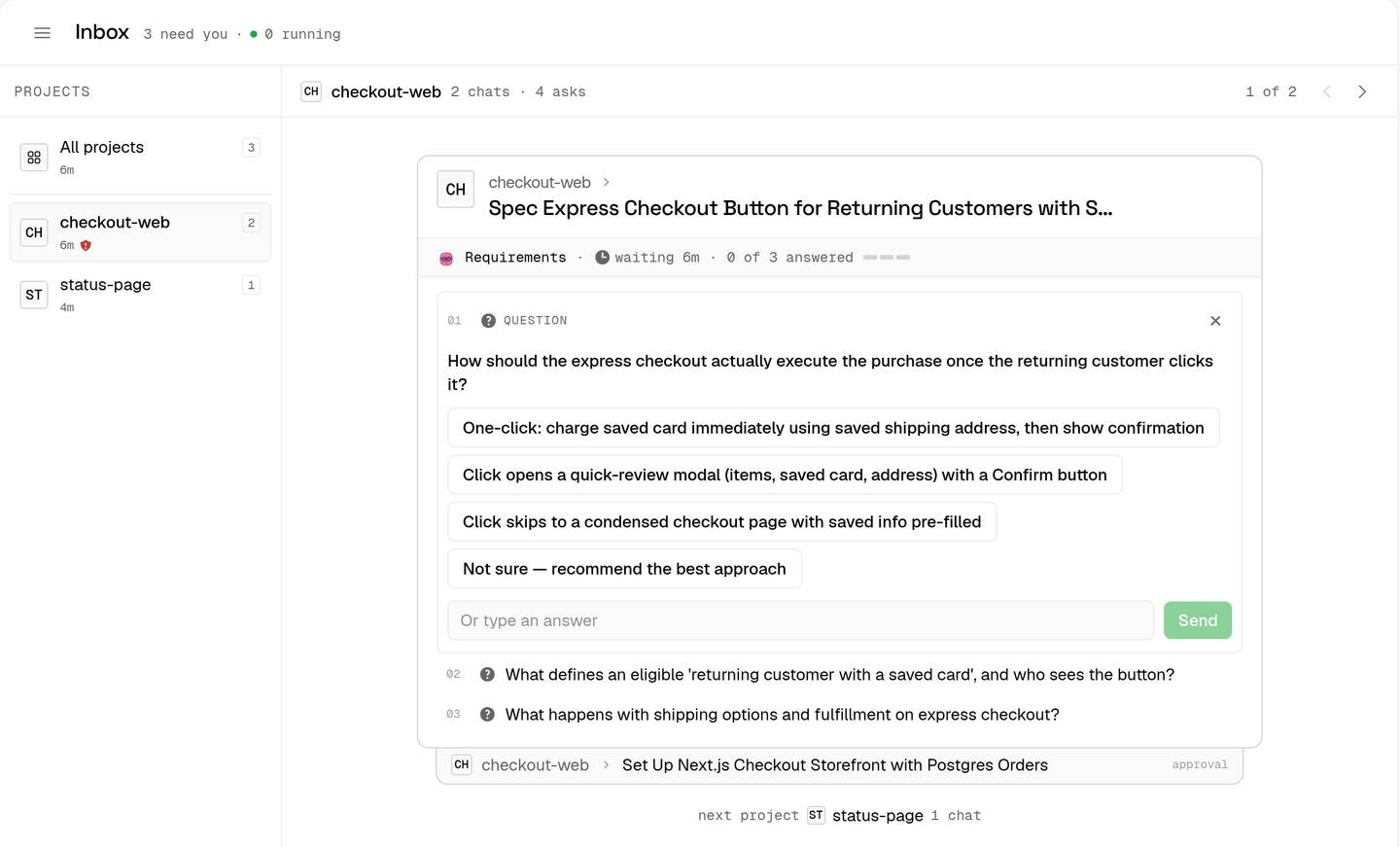
When an agent waits on a person, its chat lands in the team inbox, grouped by project and oldest first, and any member can answer within the seven days questions and approvals wait. That queue is the part I'd miss most on a shared VPS.
Claude Code runs on each member's own Claude plan, or on the team's Anthropic key for anyone who hasn't signed in. A member signs in once, in any project's Settings → Runtimes. Each project then stays on its Claude Code version until an owner or admin updates it there, and Aldena checks for new releases once a day. On your own server the native installer updates itself, so the version moves whenever Anthropic ships one, and on a team I want a person making that call. Boat bills the machine time per second to the team's own account while the sandbox runs, and Aldena bills only the team plan.
For one developer with one VPS, tmux and Remote Control are less to run, and I'd stay there. Aldena makes sense once several people share the agents and whoever is free should answer them.
The setup I'd start with on a fresh server
A fresh Linux server needs four steps for Claude Code: the native installer, a claude.ai login, a tmux session and server mode started inside it.
Run /login in that first claude session, press c to copy the URL, and quit once you're signed in. Then start tmux and run server mode from the project directory. Anthropic's setup page recommends the native installer and lists Ubuntu 20.04+, Debian 10+ and Alpine 3.19+ with 4 GB of RAM or more. Press C-b d to detach, close the laptop, and open the session from the Claude app.
spin up your first project.
one project per client, product, or piece of work, staffed with intake, requirements, build and code review agents.