Claude Code agents running out of memory? Check which memory first
Claude Code agents running out of memory have hit RAM, the context window or recall between sessions. The fix depends on which one ran out, from stopping one leftover process to a line in CLAUDE.md.

Claude Code agents running out of memory fail in three ways: Linux kills the process, autocompact thrashes on a full context window, or a new session forgets yesterday's correction. The fix for one does nothing for the other two. Worse, the blunt workaround from one GitHub thread, pkill -9 -f "claude", ends every healthy session along with the broken one. I checked each command and number below against Anthropic's docs and the linked issues on November 18, 2026.
Find out which memory ran out first
Anthropic's troubleshooting guide treats high memory use and a thrashing autocompact as two problems with two sets of fixes, so match the symptom to a row before changing anything.
| What you see | What ran out | First move |
|---|---|---|
Out of memory and Killed process for claude in dmesg, or exit code -9 | RAM on the machine | List every Claude process with its parent |
| The critical memory usage warning in one session | That session's heap, past 2.5GB | Restart it and run claude --continue |
| A session pinned at 100% CPU right after an update | Nothing yet; the release is the suspect | Compare claude --version with open memory issues |
| Claude Code says autocompact is thrashing | The context window | /compact with a focus, or hand the job to a subagent |
| A new session repeats a mistake you corrected yesterday | Recall between sessions | Write the decision into CLAUDE.md |
One Claude Code session grew from 467MB to 7.5GB in 20 seconds
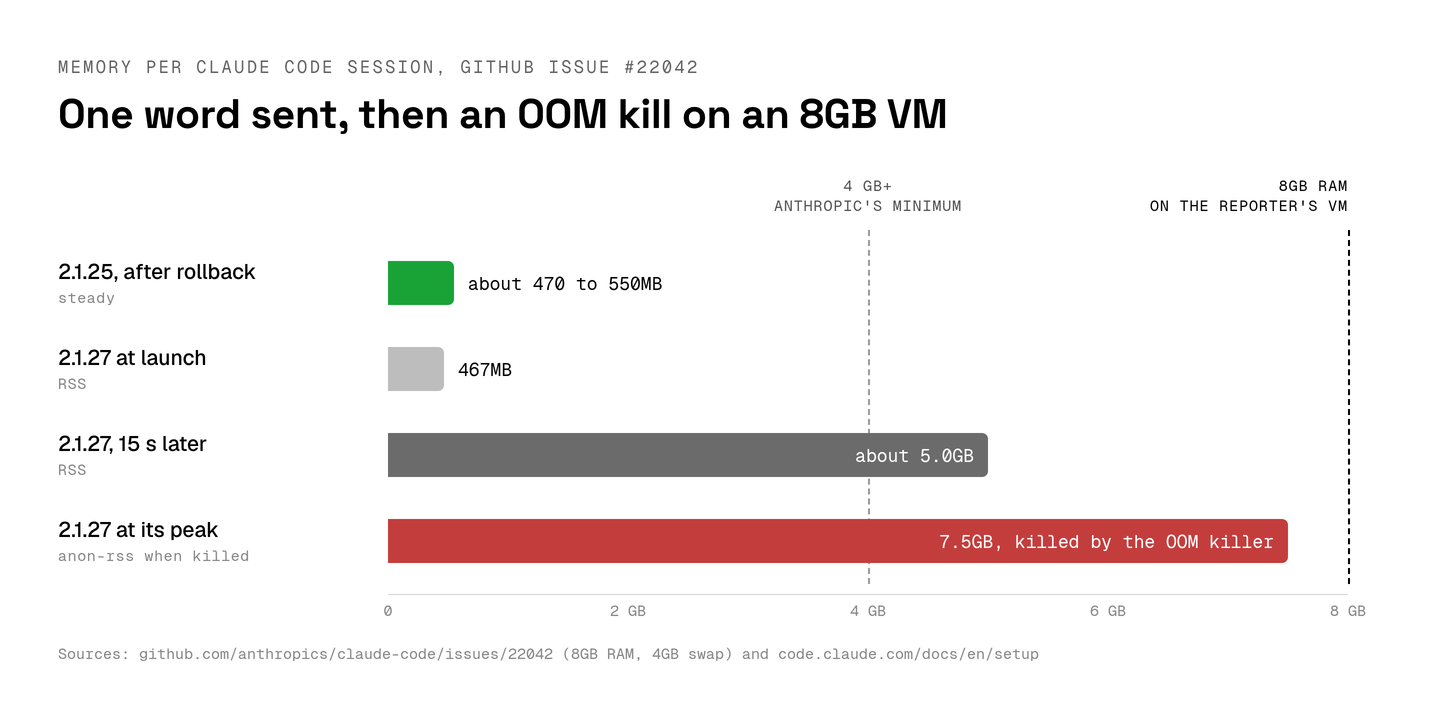
GitHub issue #22042 reports Claude Code 2.1.27 growing from about 467MB to 7.5GB within 20 seconds of a one-word prompt, until Linux killed it.
The reporter's VM had 8GB of RAM and 4GB of swap. Its dmesg log shows the kernel's OOM killer ending the claude process. By the reporter's account, the growth began when a second session started while the first was still running. A VM with 39GB froze the same way. Rolling back to 2.1.25 held each session at about 470 to 550MB. The issue's advice is blunt: "Maximum 2 concurrent Claude Code sessions per machine, running 2.1.25."
GitHub shows the issue locked as resolved on February 19, 2026, yet no maintainer in the thread names a fix version. Memory fixes kept shipping after that. The changelog entry for 2.1.323 fixes "a memory spike at the next prompt after Claude changed a very large file". Version 2.1.327 fixes "the screen staying blank or frozen after a brief out-of-memory error".
Anthropic lists 4 GB+ of RAM as the hardware requirement for Claude Code. Version 2.1.27 went through nearly twice that in 20 seconds.
So before I blame my own workload, I run claude --version and look for open issues with the perf:memory label on that version. If nothing matches, the troubleshooting guide suggests restarting with claude --safe-mode to check whether a plugin, MCP server or hook is behind the high memory use.
For a session that keeps growing, /heapdump writes two files. Anthropic says the -diagnostics.json is safe to attach to a GitHub issue. The .heapsnapshot holds the full conversation and any credentials the process held. I delete it once I'm done (and I never attach it anywhere).
Parallel sessions on one machine share one RAM budget
In a Claude Code agent team, each teammate "runs as a separate Claude instance," so every teammate you add draws on the same machine's RAM.
Sessions you start by hand in separate worktrees add up the same way. A worktree keeps their files apart; the machine stays shared.
Leftover processes count too. In an Aperant issue, Query.close() in the Python claude-agent-sdk hung at 100% CPU and left a Claude Code subprocess alive after every agent session. Memory piled up until the OOM killer ended processes mid-build with exit code -9. The issue closed in January 2026 with a suggestion to try the latest version. On any machine that runs SDK agents, leftovers are the first thing I'd look for.
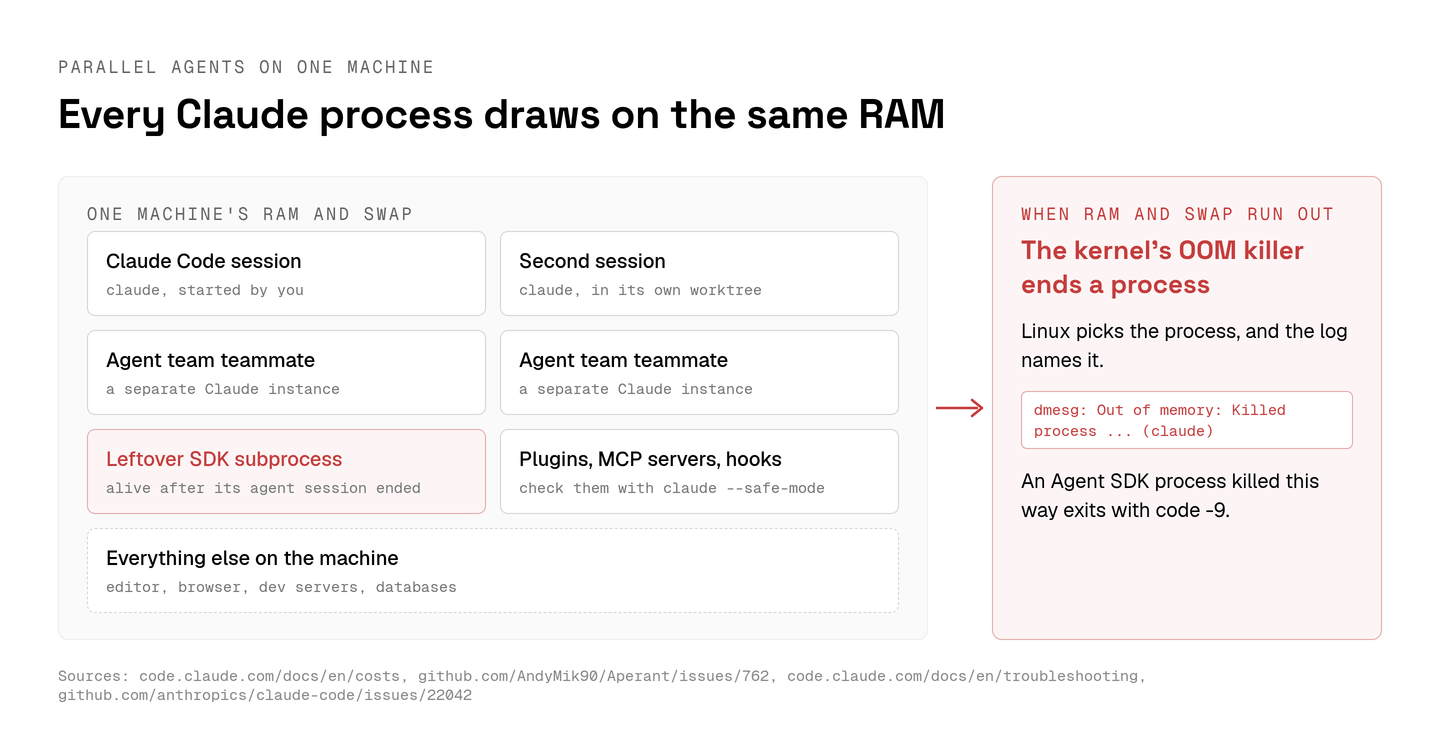
To see where the memory went, I list every Claude process with its parent, its age and its resident memory in kibibytes:
Killing every claude process takes the healthy sessions down too
The Aperant workaround, pkill -9 -f "claude", kills every process whose full command line matches claude, including every session that was working fine.
A leftover is easier to target. Its parent PID points at the app that started it. Once that app exits, the parent becomes init or the nearest subreaper, because Linux hands an exiting process's children to them. The etime column gives each process's age. A Claude process hours older than any session I have open stands out, and I stop that one by PID:
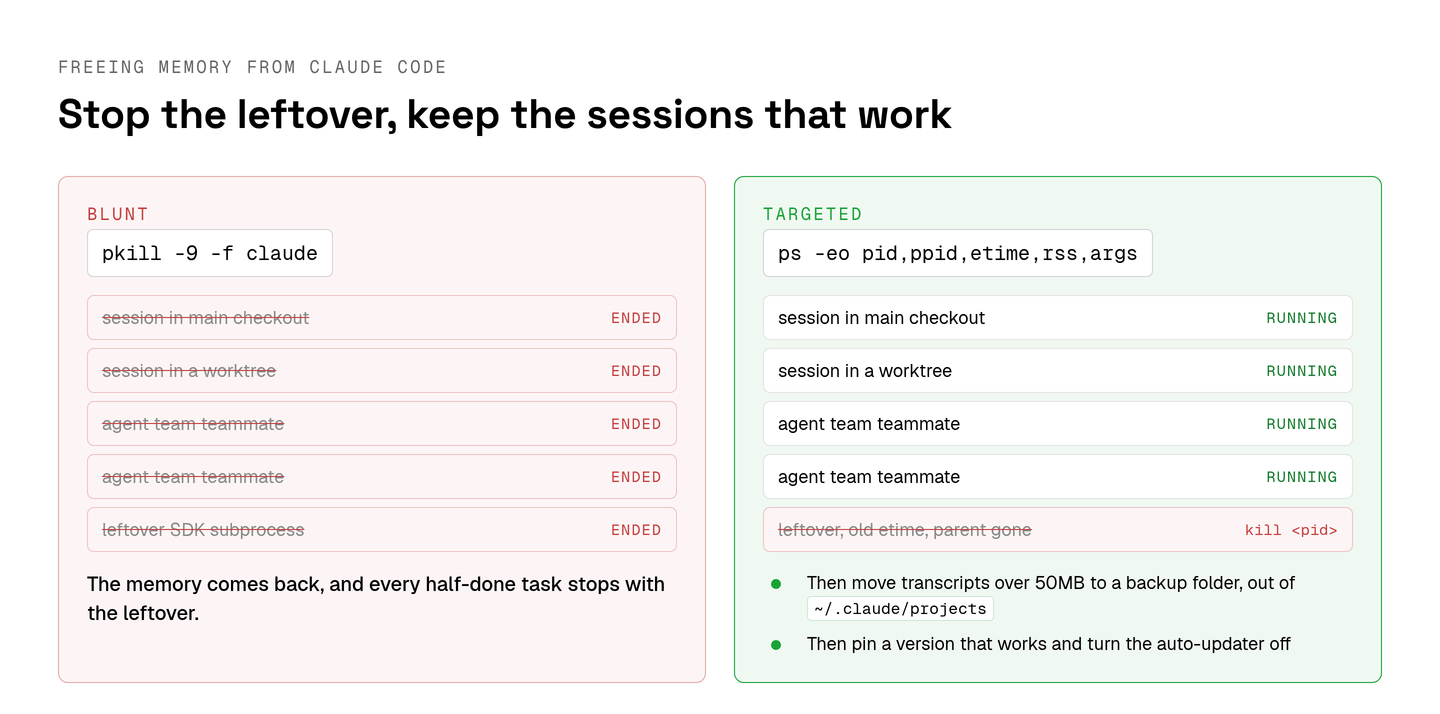
Transcripts came up in the #22042 thread as well. One commenter found a 3GB JSONL file full of duplicate entries and wrote that once they truncated it, "the issue disappeared." Another deleted every transcript over 50MB. Claude Code keeps each one at ~/.claude/projects/<project>/<session>.jsonl and deletes it after cleanupPeriodDays, 30 days by default. I move big transcripts aside instead, so I can put back a session I still want to resume:
A lower cleanupPeriodDays in settings keeps the folder from growing back, down to a minimum of 1 day.
Deleting all of ~/.claude, the other fix in that thread, costs more than it saves. The directory reference says removing ~/.claude/projects/ loses resume, continue and rewind for past sessions plus auto memory for every project. Your login lives in ~/.claude/.credentials.json, so it goes too. For one project, claude purge <path> --dry-run prints the deletion plan without deleting anything.
Then I pin a version that works. On a team I'd rather pick the day the CLI changes than learn it from a crash. Per the setup docs, curl -fsSL https://claude.ai/install.sh | bash -s 2.1.89 installs one version, and DISABLE_AUTOUPDATER set to "1" in the settings env stops the background update check. The stable channel is gentler. It serves a version about a week old and skips releases with major regressions. It's what I'd give a team that doesn't read release notes.
Context and recall run out in different ways
Each Claude Code session begins with a fresh context window, so a long session fills its own window while a new one knows only what CLAUDE.md and auto memory hand it.
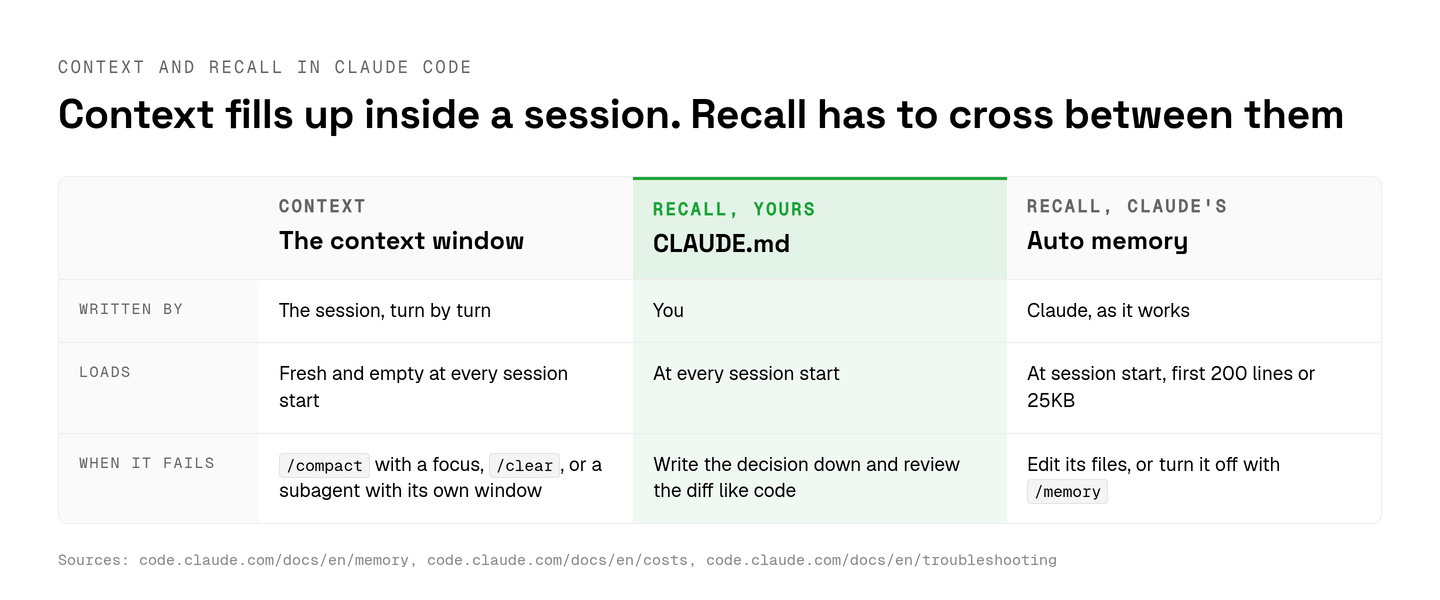
For a full context window, /compact takes a focus, such as /compact keep only the plan and the diff. /clear starts over between tasks. A subagent does a verbose job in its own context window. When Claude Code reports that autocompact is thrashing, the troubleshooting guide also suggests reading a big file in chunks instead of whole. And between unrelated tasks I'd rather /clear than /compact.
Recall between sessions comes from two sources that load when a session starts. CLAUDE.md is the file you write. Auto memory holds the notes Claude writes for itself, and only its first 200 lines or 25KB load. A correction that lives only in the chat ends with that context window unless auto memory saved it. I put the ones that matter into CLAUDE.md and share that file with the team like code. If auto memory fills up with noise, /memory turns it off. CLAUDE_CODE_DISABLE_AUTO_MEMORY=1 does the same from the environment.
How Aldena sizes the RAM each conversation gets
Aldena runs each conversation in its own sandbox on a provider the team connects, such as Boat, at a default size an owner or admin picks when creating the project.
Aldena is my product, so weigh this section with that in mind. A conversation is a chat plus every chat its agents hand work to. Every agent in it shares the one sandbox, Claude Code included.
| Boat size | vCPU | RAM | Note |
|---|---|---|---|
| small | 2 | 4 GB | |
| standard | 4 | 8 GB | |
| large | 8 | 16 GB | Not on Boat's free trial |
| x-large | 16 | 32 GB | Needs a Boat plan of $100 a month or more |
The project's settings keep the default under server, and any change there applies to new conversations. I size for the heaviest thing a conversation runs. Anthropic's floor for Claude Code is 4 GB, which is all of a small sandbox. A conversation that also builds the app and runs its test suite gets standard or larger from me.
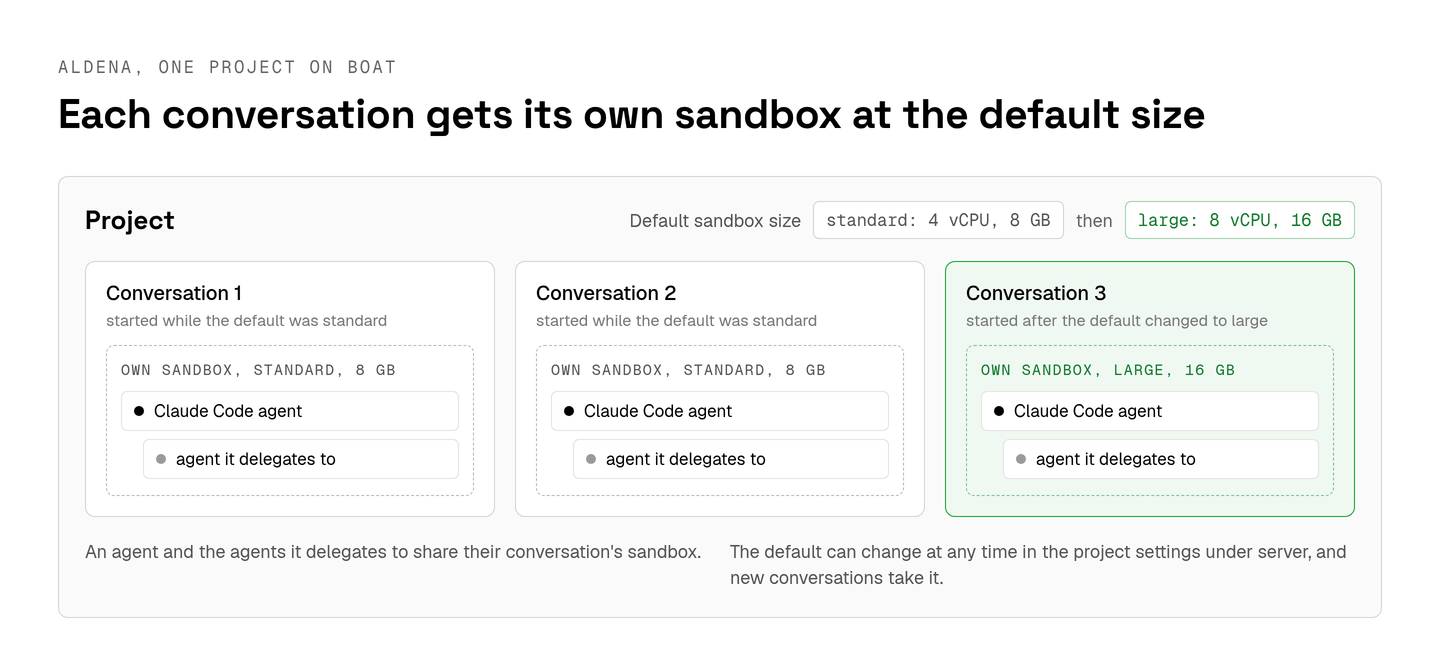
Boat bills machine time per second to the team's own account while the sandbox runs. Aldena adds nothing on top. The sandbox sleeps 30 minutes after its last command and wakes with the conversation's next turn, so a bigger size costs more only while it runs.
Each project stays on its Claude Code and Codex versions until an owner or admin updates it. A release like 2.1.27 reaches a project only when someone picks it. For recall, agent memory gives each agent a private memory of up to 50 entries and each project a shared one of up to 100, at 500 characters an entry. Both outlive the chat that wrote them. Writing past a cap fails until someone prunes an entry. The cap annoys me a little, and it's also what keeps that memory short enough to read.
Sandboxing coding agents covers what a sandbox keeps apart beyond memory. For one developer running two sessions, I wouldn't pay for any of this. I'd pin a version first, since rolling back to 2.1.25 steadied the sessions in #22042, then check ps for leftovers before anyone types pkill.
spin up your first project.
one project per client, product, or piece of work, staffed with intake, requirements, build and code review agents.