Claude Code in the cloud: cloud sessions, Vertex AI or a hosted sandbox
Claude Code in the cloud means Anthropic's cloud sessions, Claude on Google's Vertex AI or a third-party host, and only the Vertex route keeps the session on your machine.

Claude Code in the cloud means three different setups
Claude Code in the cloud covers three setups that differ in where the session runs, where the model runs and who sends the bill. When I searched the phrase on November 12, Google's first page held Anthropic's docs, a Vertex AI tutorial and a Hacker News launch for a hosting service. Each of them answered a different question.
| Setup | Where the session runs | Where the model calls go | Who bills you |
|---|---|---|---|
| Anthropic cloud sessions | a VM Anthropic manages, or your organization's self-hosted environment | Anthropic | Anthropic, inside your Claude plan's usage limits |
| Claude on Vertex AI | your own machine | Claude on Vertex AI, in your Google Cloud project | Google Cloud |
| A third-party host | the host's machine, or a sandbox on a provider account you connect | Anthropic, on your Claude login or an Anthropic API key | Anthropic for usage, plus the host's plan and the machine time |
I sort them by the first column. A session that has to keep working while I'm away from my desk rules out the Vertex row before price or git host come up.
Anthropic's cloud sessions move the whole session to Anthropic
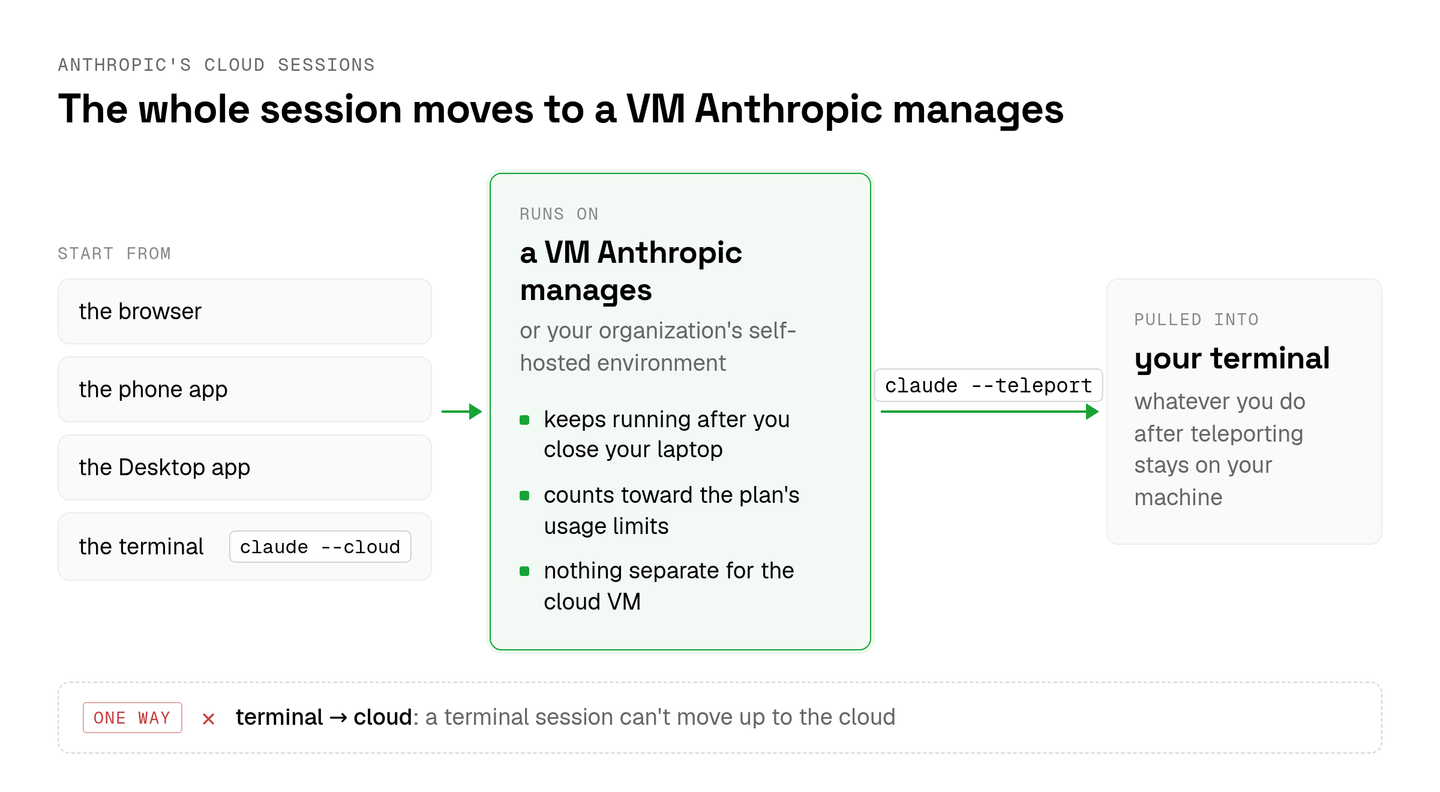
Anthropic's cloud sessions run Claude Code on a VM that Anthropic manages and keep running after you close your laptop, on Pro, Max, Ultra and Team plans. Anthropic's cloud sessions docs add Enterprise users with premium seats or Chat + Claude Code seats, and an organization can route sessions to its own self-hosted environment instead.
Each session counts toward the plan's usage limits alongside the rest of your Claude usage, and Anthropic charges nothing separate for the cloud VM. I can start one from the browser, the phone app, the Desktop app or the terminal with claude --cloud, then pull it into my terminal with claude --teleport.
The handoff runs one way from the CLI, so a terminal session can't move up to the cloud, and whatever I do after teleporting stays on my machine.
For one developer whose code is on GitHub, this is the setup I'd try first.
The Vertex AI route moves the bill and leaves the session on your laptop
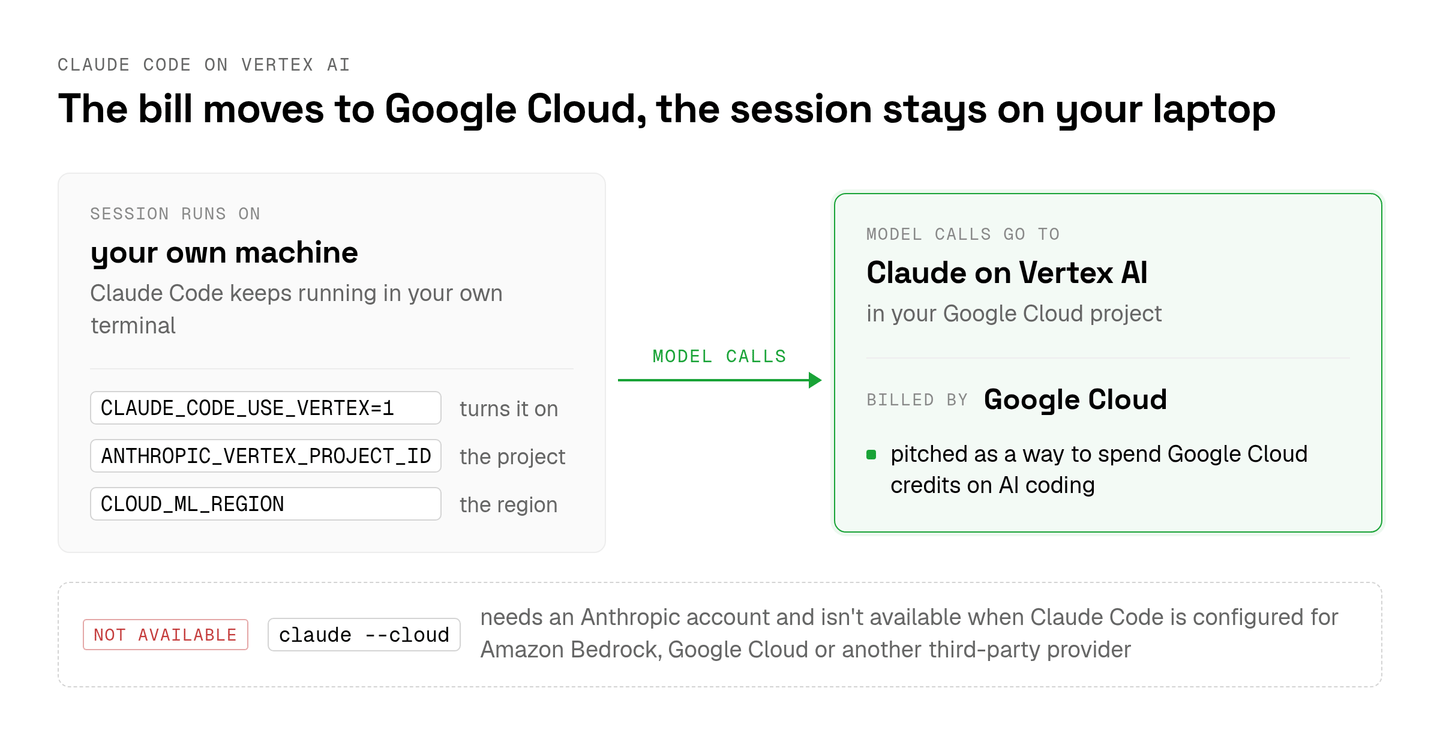
Claude Code on Vertex AI sends its model calls to Claude in your Google Cloud project, which bills them, while the session keeps running in your own terminal. Timothy Olaleke's guide on dev.to turns it on with CLAUDE_CODE_USE_VERTEX=1 and names the project in ANTHROPIC_VERTEX_PROJECT_ID and the region in CLOUD_ML_REGION. Its title pitches the route as a way to spend Google Cloud credits on AI coding.
The two routes don't mix. Anthropic's docs say --cloud needs an Anthropic account and isn't available when Claude Code is configured for Amazon Bedrock, Google Cloud or another third-party provider. So a team that bills Claude through Google Cloud keeps every session on its developers' machines.
Third-party hosts put your Claude login on someone else's machine
A third-party host such as AgentWrap runs the Claude Code CLI on its own machine with your Claude login, and commenters on its Hacker News launch in August 2025 pushed back on that.
The author pitched it as a way to ship from a phone and run features in parallel. The replies asked why anyone would give a stranger access to their Claude account and noted that nobody could check what the host did with the subscription. Others pointed to Claude Code GitHub Actions and GitHub Copilot's coding agent instead.
Aldena belongs in this row too, and I'd put the same questions to it. From any host I'd want to know whose cloud account runs the machine, whose plan or key pays for the model, and where a teammate sees what a session is waiting on.
Five checks before a team rolls out cloud sessions
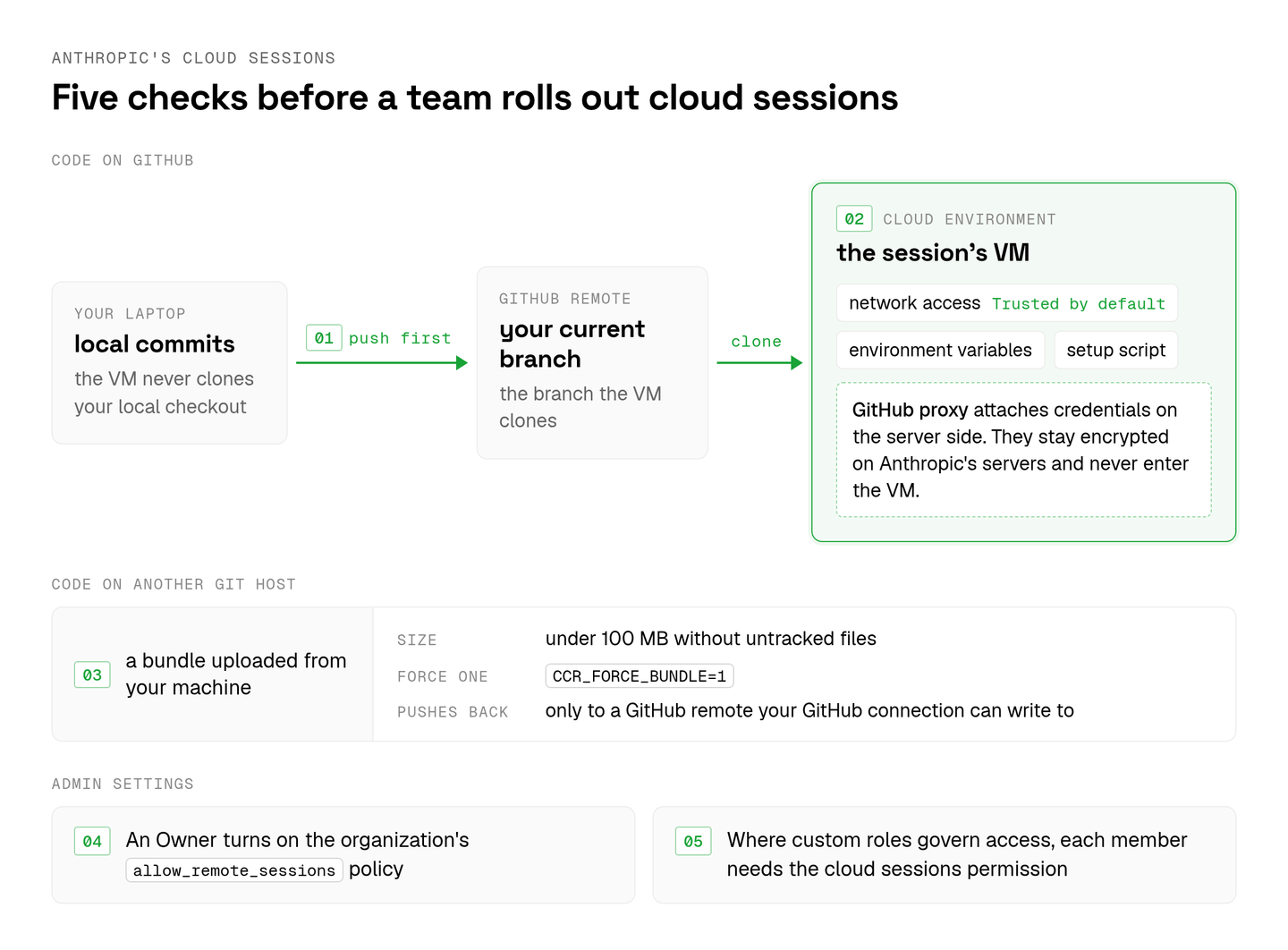
Anthropic's cloud sessions clone and push directly only on GitHub, so a team whose code lives on another git host needs the workaround below before its first session.
- For code that isn't on GitHub, the docs describe a bundle uploaded from your machine (
CCR_FORCE_BUNDLE=1forces one). It has to stay under 100 MB without untracked files, and a session started from a bundle pushes back only to a GitHub remote your GitHub connection can write to. - The VM clones your GitHub remote at your current branch, never your local checkout, so commits that exist only on a laptop need a push first.
- An Owner has to turn on the organization's
allow_remote_sessionspolicy in the Claude Code admin settings. - Where custom roles govern access, each member also needs a role with the cloud sessions permission.
- Each session runs in a cloud environment that sets its network access, environment variables and setup script, and the default environment starts with Trusted network access. GitHub credentials stay encrypted on Anthropic's servers and never enter the VM, because a GitHub proxy attaches them on the server side, the pattern I argued for in how to sandbox coding agents.
A team's cloud sessions need decisions one developer never makes
Two cloud sessions editing the same files can overwrite each other, as eSEOspace's guide to Claude Code on the web found when parallel sessions lost edits during a site rebuild.
One developer avoids that by remembering what each session is doing. A team can't hold that in one head, so somebody has to decide which sessions may touch which part of the repository.
I'd also want to know where a session's question goes when the engineer who started it is at lunch. I think that queue of questions and pull requests is where a Claude Code for teams rollout goes wrong first.
A team that runs Codex next to Claude Code has a second vendor's cloud to fit into the same plan, and I covered OpenAI's side in does ChatGPT have a coding agent.
How Claude Code in the cloud works in Aldena
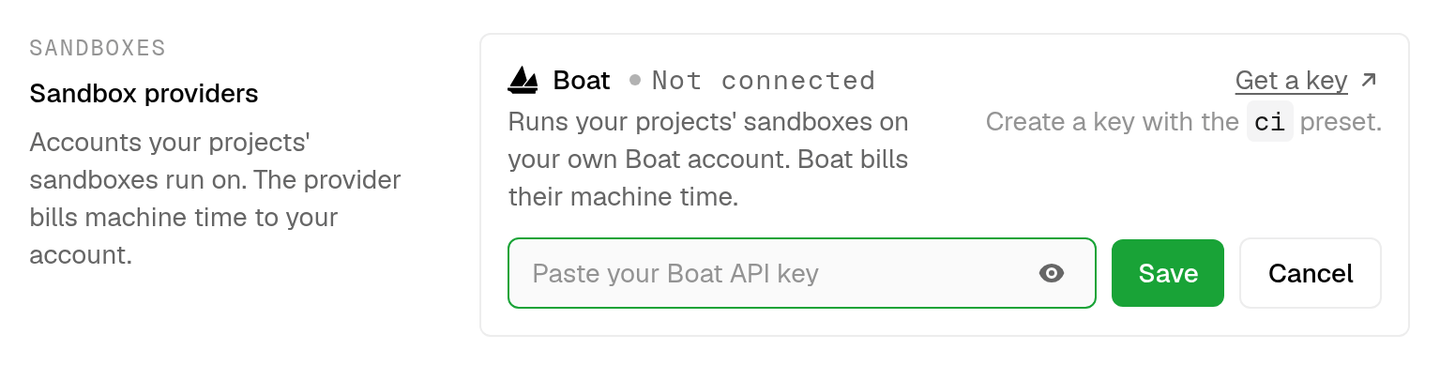
Aldena runs the team's own Claude Code in each conversation's sandbox, on a sandbox provider such as Boat that an owner or admin connects once with an API key.
The owner or admin picks a sandbox size when creating a project, from small (2 vCPU, 4 GB RAM) to x-large (16 vCPU, 32 GB) on Boat, and can change it later in Settings → Server. Each conversation's sandbox starts with its first turn, sleeps 30 minutes after its last command and keeps its files until the conversation's next turn wakes it. Boat bills that machine time to the team's own account by the second, and Aldena bills only its team plan.
Claude Code runs on each member's own Claude plan, or on the team's Anthropic key for anyone who hasn't signed in. Codex runs on the team's OpenAI key, which OpenAI bills directly. Each agent gets its runtime when it's hired, so one project can hold Claude Code and Codex agents side by side.
Each project stays on its Claude Code and Codex versions until an owner or admin updates it in Settings → Runtimes, and an update switches every sandbox in the project before its next turn. On a team, I'd rather pick the day the CLI changes than find out from a failed run.
In Aldena each member decides whether to sign their Claude plan in. A member signs in once, in any project's Settings → Runtimes, and the sign-in turns on for that project's team, while a member who never does runs Claude Code on the team's Anthropic key instead. The sandbox runs on the provider account the team connected, two projects never share a filesystem, and environment variables and connector credentials are set per project for that project's agents only.
The GitHub and Bitbucket connectors both clone a repository into the sandbox and push the branches agents build, so a Bitbucket team skips the bundle workaround. Pull requests on either host go through that host's MCP server.
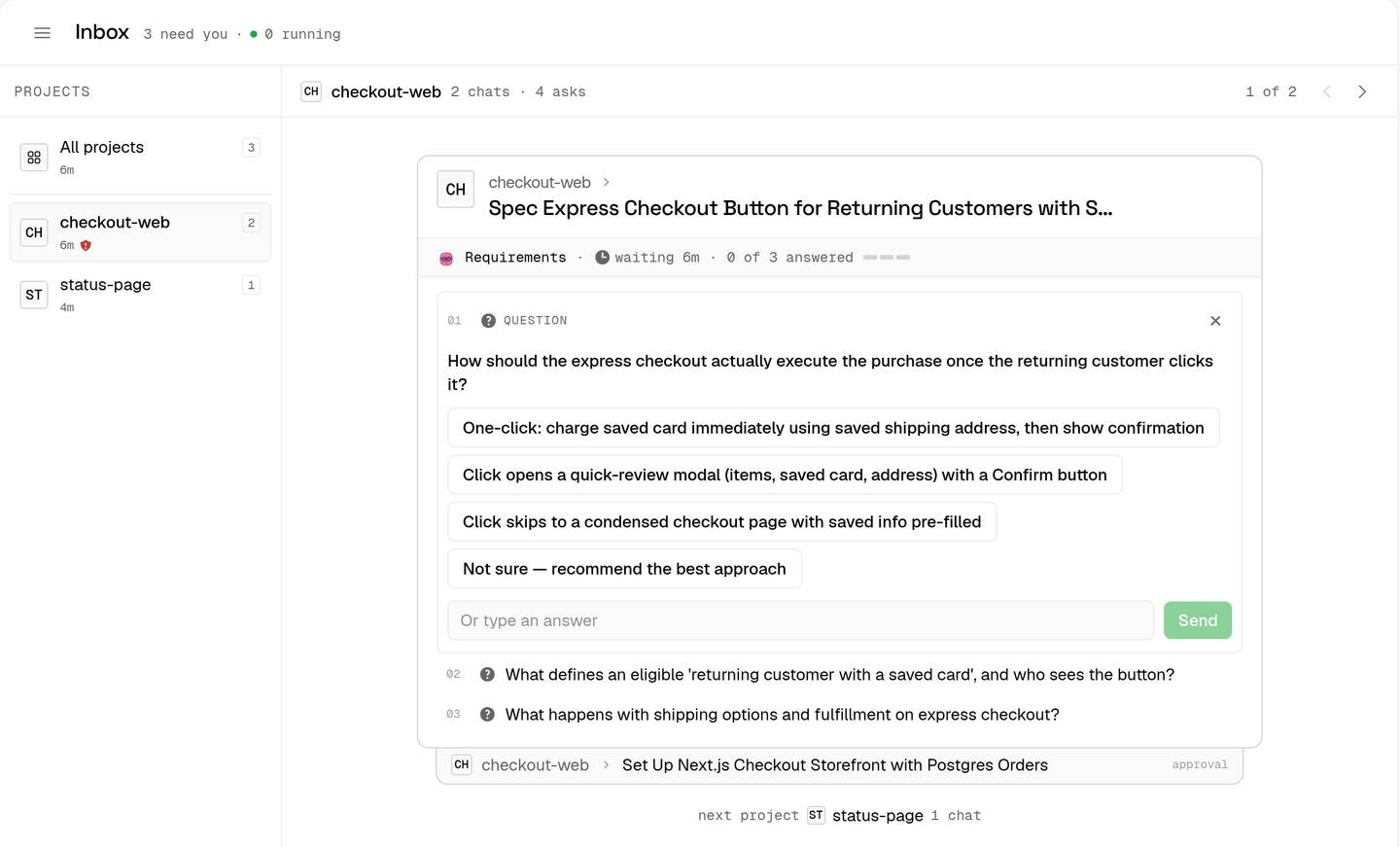
Every chat whose agent waits on a person lands in the team Inbox, grouped by project and oldest first, and any member can answer it for seven days while the engineer who started it is at lunch. The concierge page keeps the list I'd otherwise hold in my head, with recent agent chats across my projects and their status, and from there I can message an agent or stop its run.
For the overwrite problem, the Delivery agent works one report at a time down the org chart, so two agents never edit the same checkout at once.
spin up your first project.
one project per client, product, or piece of work, staffed with intake, requirements, build and code review agents.