How to know when Claude Code needs input, across every session you run
To know when Claude Code needs input, add a Notification hook on permission_prompt whose alert names the waiting session, and route it home when Claude runs over SSH.

A Notification hook tells you when Claude Code needs input
To know when Claude Code needs input, add a Notification hook on the permission_prompt matcher, which fires once a permission prompt has waited about six seconds.
For a long time my alert system was tabbing through sessions. The usual find was one parked on a permission prompt while I read a diff in another tab, idle the whole time I thought it was working.
Claude Code also ships a built-in alert, which fires when Claude finishes a task or pauses for a permission prompt while you appear to be away. Per Anthropic's terminal setup page, Ghostty, Kitty and iTerm2 show it as a desktop notification (iTerm2 only after you turn its alert settings on). Apple Terminal gets at most a silent bell, and other terminals get nothing. Setting "preferredNotifChannel": "terminal_bell" in ~/.claude/settings.json sends the terminal bell instead, whatever the terminal.
Hooks run alongside that built-in alert rather than replacing it. You need one in Warp, the VS Code terminal or anything else outside those three, or when the alert has to reach your phone.
Match permission_prompt and leave Stop alone
The permission_prompt matcher catches a tool approval or a sandboxed command's network request, and elicitation_dialog catches a form from an MCP server, both after about six seconds.
Those two block. Claude has stopped, and nothing moves until somebody answers. Matchers accept a pipe for alternation, so "matcher": "permission_prompt|elicitation_dialog" covers both in one entry.
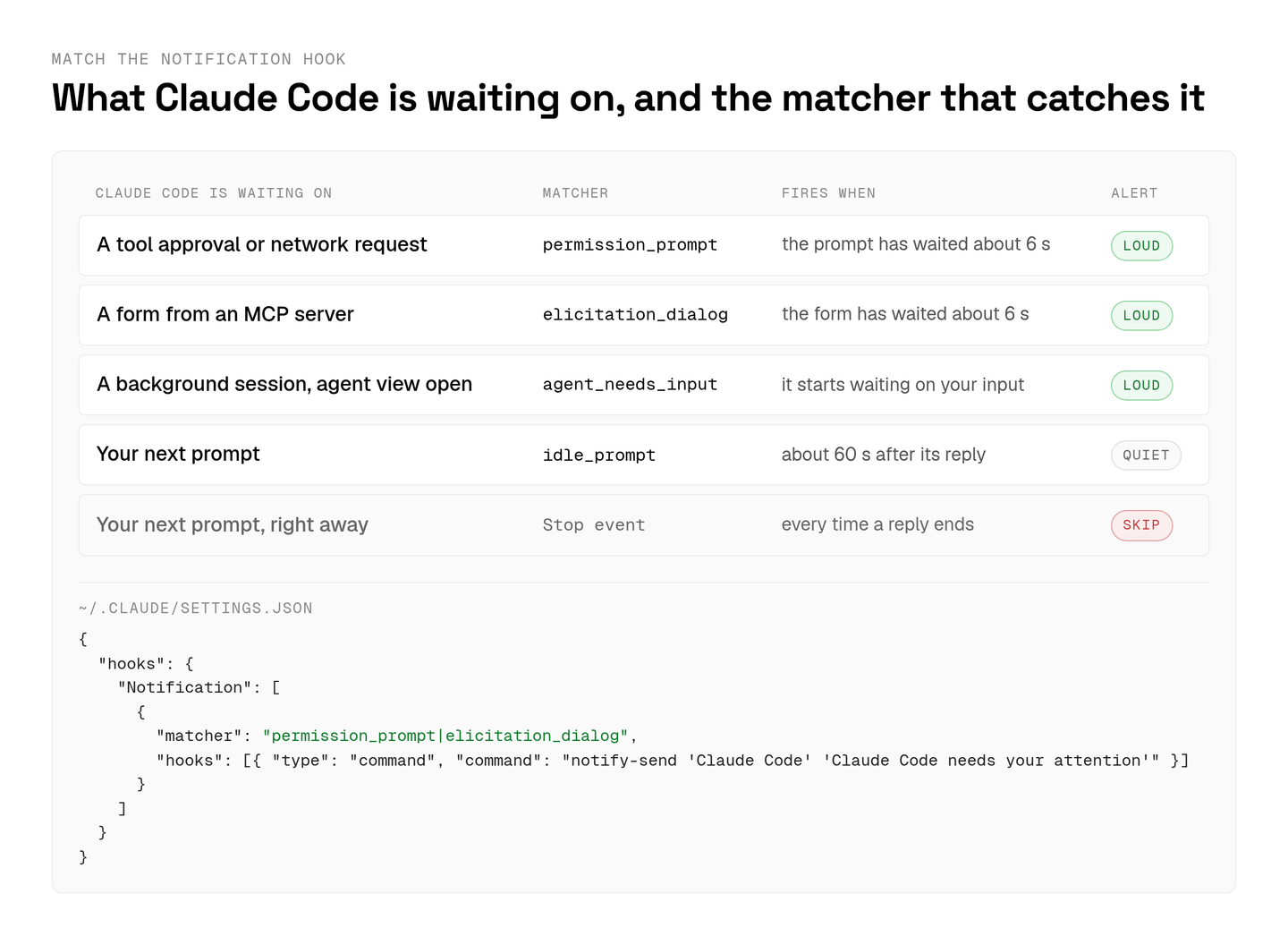
Stop is the tempting choice, and I think it is the wrong one. The Stop event runs every time Claude finishes responding, including the replies you watched arrive, so a hook on it pings you about work you already saw.
idle_prompt sits between the two. It fires when Claude finished about 60 seconds ago and you haven't typed since, so it is your turn and nothing is blocked. I give it a sound and no popup. If you run background sessions in agent view, add agent_needs_input as well. It fires when a background session starts waiting on you while agent view is open in a terminal.
An empty matcher fires on every notification type, auth_success included, so I keep the list explicit. The hook goes in ~/.claude/settings.json to cover every project, or in a repository's .claude/settings.json to share it with everyone who clones it.
Desktop commands for macOS, Linux and Windows
Anthropic's hooks guide gives one desktop notification command each for macOS, Linux and Windows, and each command has a condition where it shows nothing.
On a Mac the guide uses osascript -e 'display notification "Claude Code needs your attention" with title "Claude Code"'. That goes through Script Editor, and it fails silently until Script Editor has notification permission, so turn that on in System Settings before you trust it.
Linux gets notify-send 'Claude Code' 'Claude Code needs your attention', which needs a desktop notification daemon. Headless servers and most containers don't run one. Neither does an SSH session.
Windows is a PowerShell one-liner, powershell.exe -Command "[System.Reflection.Assembly]::LoadWithPartialName('System.Windows.Forms'); [System.Windows.Forms.MessageBox]::Show('Claude Code needs your attention', 'Claude Code')", and it opens a dialog box that can land behind your terminal. From WSL, powershell.exe has to be on your PATH. In Windows Terminal I'd skip the dialog and send an OSC 9 sequence instead, since a dialog hidden behind the window defeats the point.
For a sound on macOS, the terminal setup page uses afplay /System/Library/Sounds/Glass.aiff, and I put that on idle_prompt.
Over SSH and inside tmux, the alert needs a route home
Claude Code over SSH runs its hooks on the remote machine, so a desktop command fires on a box with no desktop and shows nothing.
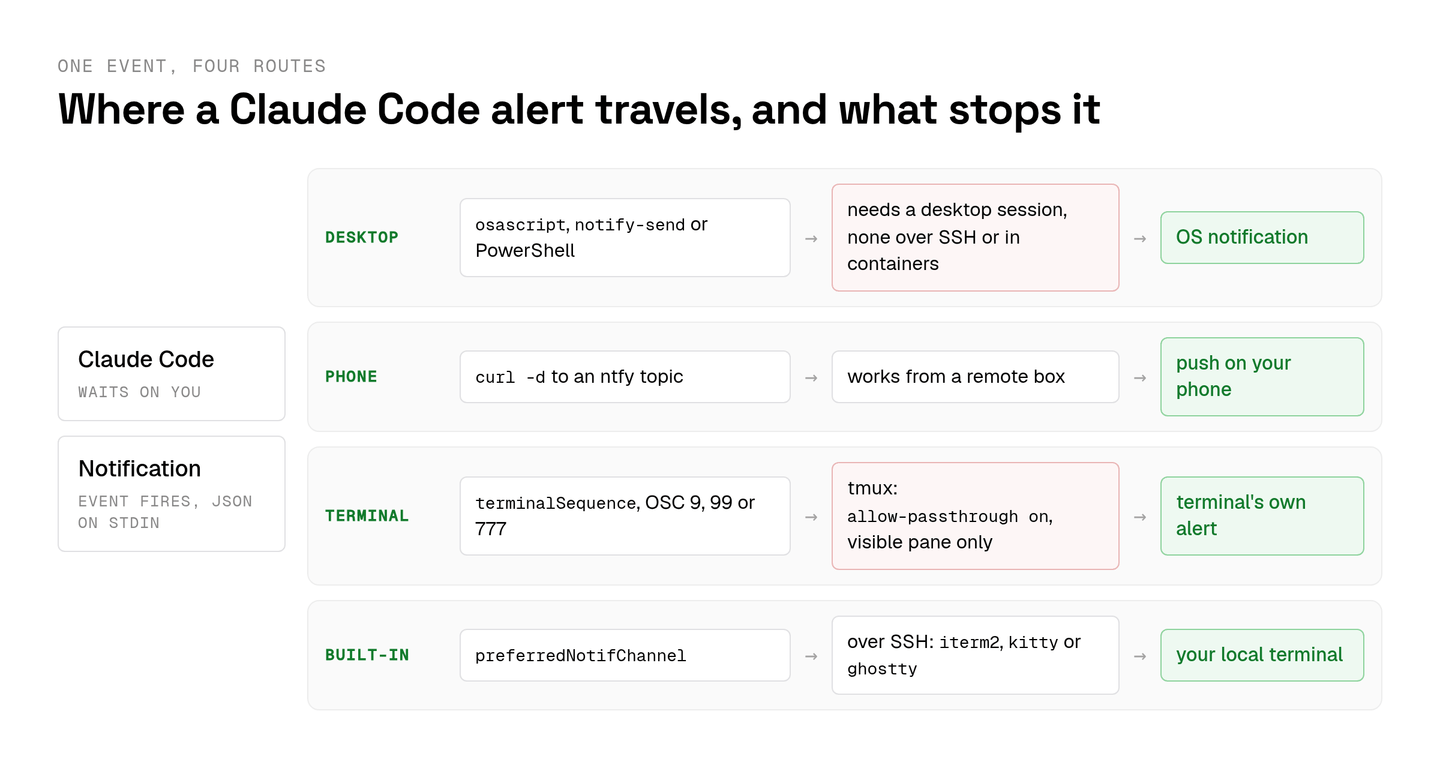
The built-in alert can make the trip on its own. Set preferredNotifChannel to "iterm2", "kitty" or "ghostty" on the remote machine, matching the terminal on your laptop, and the desktop notification reaches your local machine.
A hook gets there with an escape sequence. Hooks have no /dev/tty, so the hook prints JSON with a terminalSequence field and Claude Code writes the sequence for it. The field accepts OSC 0, 1, 2, 9, 99 and 777 plus a bare BEL. OSC 9 reaches iTerm2, ConEmu, Windows Terminal and WezTerm, OSC 99 reaches Kitty, and OSC 777 reaches urxvt, Ghostty and Warp. It works only in an interactive session, and only from a hook without async.
My phone gets a push from curl -d "Claude Code needs input" ntfy.sh/your-topic, which goes through ntfy from any machine with internet access. ntfy topic names are public, so pick one nobody will guess.
Inside tmux, Anthropic's tmux notes say escape sequences need tmux 3.3 or later with set -g allow-passthrough on in ~/.tmux.conf. With on, only panes tmux is showing can send them, so a session in a window you aren't looking at stays quiet. tmux 3.4 accepts all in place of on for every pane of a session you're attached to. For Claude Code on a cloud machine I'd use the phone push, because it doesn't care which terminal you opened.
A useful alert names the session that is waiting
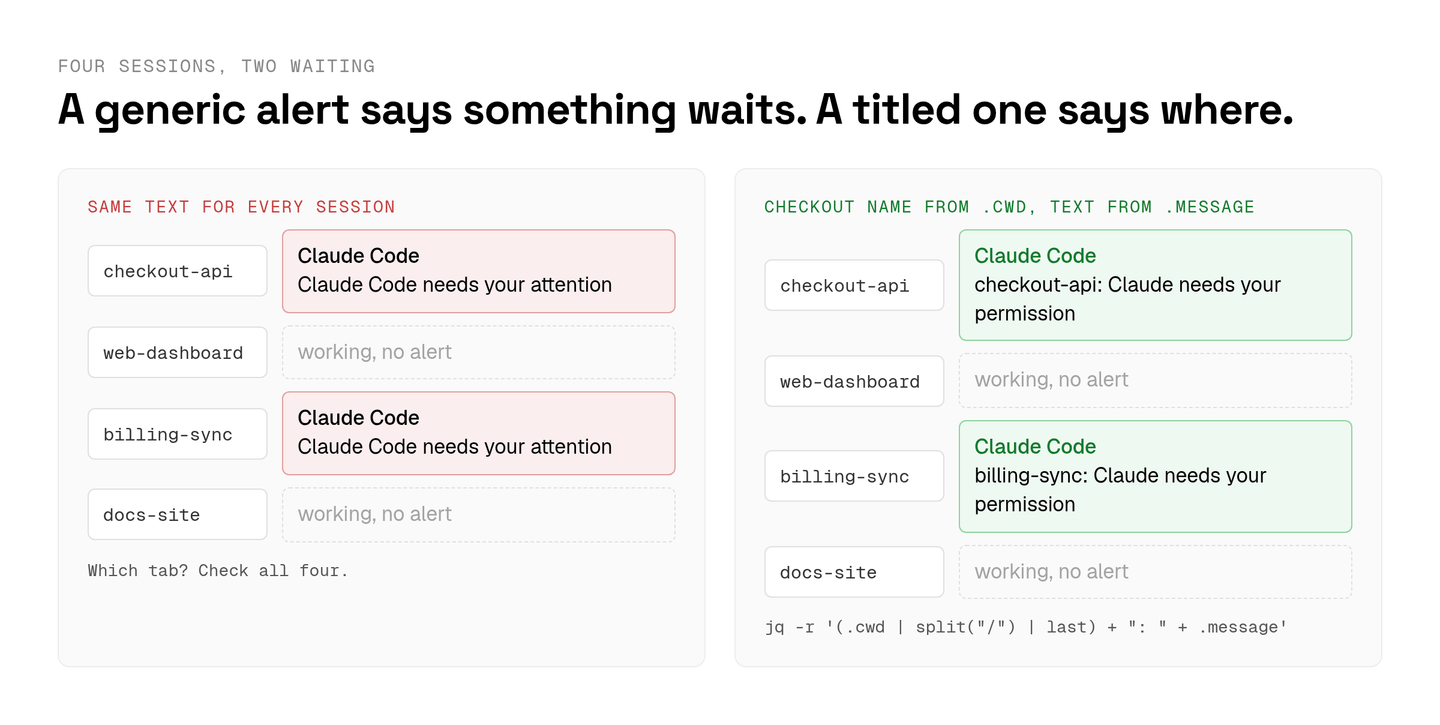
Every Claude Code Notification event passes JSON on stdin that includes the session's cwd and Claude's message, so the alert can name the session that is waiting.
My own setup fell apart on generic text once I was running several Claude Code agents at once. Two popups that both said "Claude Code needs your attention" told me two sessions were waiting and nothing about which two, and I was back to tabbing.
One jq call fixes it. On Linux the hook command becomes notify-send "Claude Code" "$(jq -r '(.cwd | split("/") | last) + ": " + .message')", which puts the checkout's folder name in front of Claude's own message, for example "checkout-api: Claude needs your permission". Name each folder after its task and the alert reads like a line from your to-do list.
Claude Code v2.1.295 and later go a step further for interactive sessions. They report each session's state through the OSC 7501 Program Status Protocol, so a terminal that implements it can show whether that tab is working, waiting on you or done. Inside tmux it doesn't work, and a background session reports its status in agent view instead.
How Aldena shows which agent needs you
Aldena puts every chat whose agent is waiting on a person into the team inbox, first in the sidebar with a count, grouped by project and oldest first.
Aldena is my product, so weigh this section accordingly. For one developer at one terminal, I'd set up the hooks first. A team has a different problem. Agents across many projects stop to ask things all day, and the question belongs in a place any teammate can answer from.
An Aldena agent runs on the team's own Anthropic, OpenAI or OpenRouter API key, or on Claude Code or Codex inside the conversation's own sandbox, and its questions land in that inbox either way. Every tool an agent can call carries an allow, ask or deny policy, and asking a person is the one tool that can never be switched off. A paused run is durable, so you can answer an hour later and the agent resumes with everything it had. Questions and approvals from one turn arrive together as one batch, any member of the team can answer them, and they wait seven days.
The aldena page marks a conversation waiting on your decision as needing you. Ask it what the agents are doing and it lists recent chats across projects as running, waiting on you, finished, failed or stopped, with the text of any open question. It reports only when you ask, and it doesn't watch runs in the background.
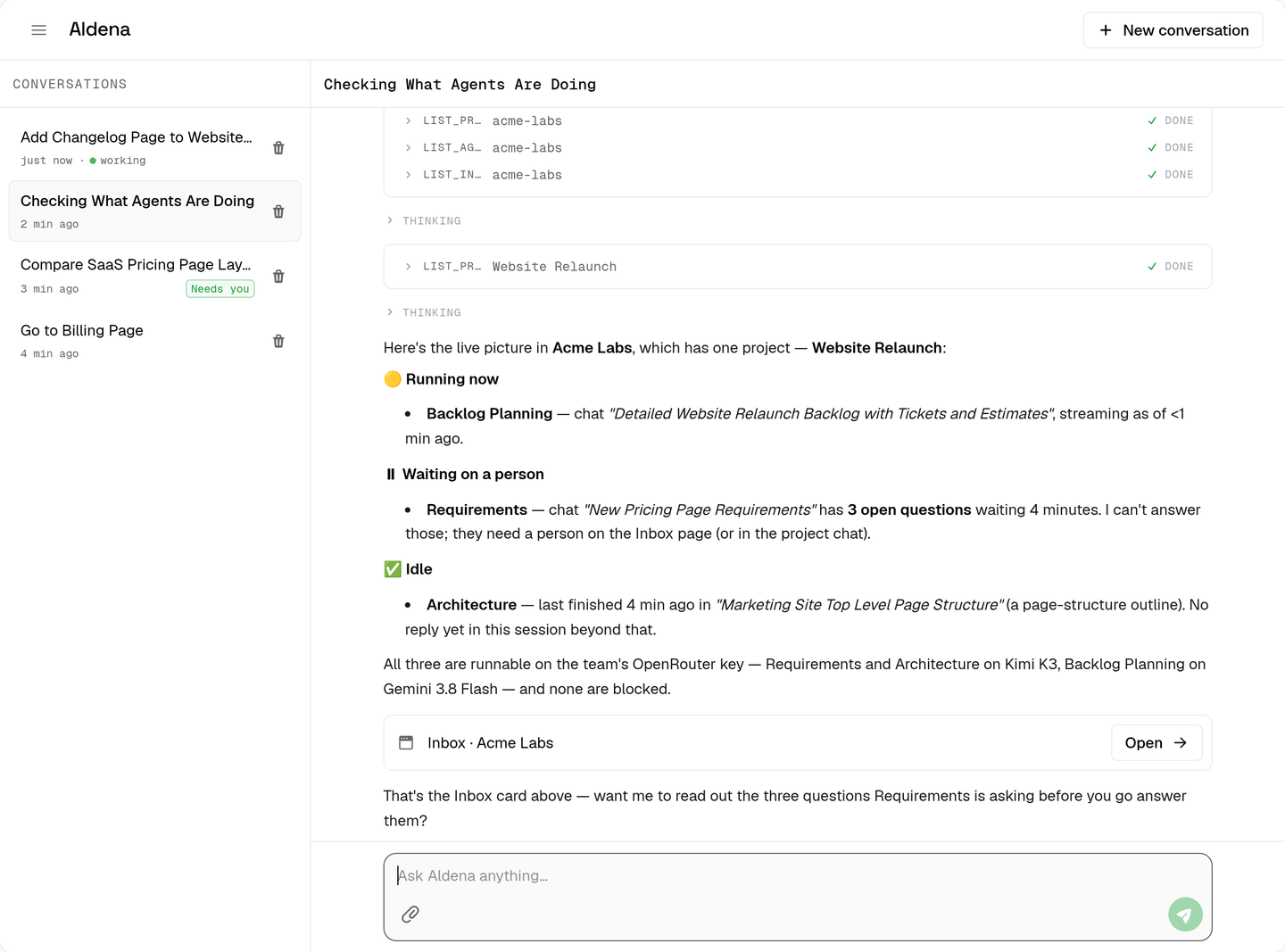
For a push outside the app, a read-only key for the REST API can read the team inbox. The API has no webhooks, so I'd wire it up with a small script that polls the inbox and runs your own notify-send or ntfy line. On the Solo plan each read endpoint allows 60 requests a minute, and a request over the limit gets a 429 with Retry-After and runs nothing, so a poll every 30 seconds spends only 2 of those 60.
The setup I run
Two Claude Code Notification hooks make up my setup, one matching permission_prompt|elicitation_dialog for a titled desktop alert and one matching idle_prompt for a short sound.
Sessions on a remote machine send the permission alert to ntfy instead, since nothing there has a desktop. Stop gets no hook. I tried one for a day, and by evening I was dismissing alerts unread, including the one permission prompt that mattered.
spin up your first project.
one project per client, product, or piece of work, staffed with intake, requirements, build and code review agents.