
Why Claude Code permission prompts appear after you allowed the tool
Claude Code permission prompts still appear after an allow rule when a write hits a protected path such as .git, a Write(path) rule never matches, or find runs -delete.

Why Claude Code still prompts after you allowed the tool
Claude Code permission prompts appear after an allow rule when the call lands in a case the rule can't cover, such as a write under .git or a find with -delete.
I checked every rule and mode on this page against Anthropic's docs on November 19, 2026.
In a GitHub issue from April 2026, the reporter, on v2.1.111, had Write(.claude/**), Edit(.claude/**) and a bare Write in ~/.claude/settings.json. Claude Code still asked "Do you want to create test-permission.md?" for a file in the project's .claude/ folder. That prompt had two causes at once. .claude is a protected directory, and a Write(path) rule never matches anything.
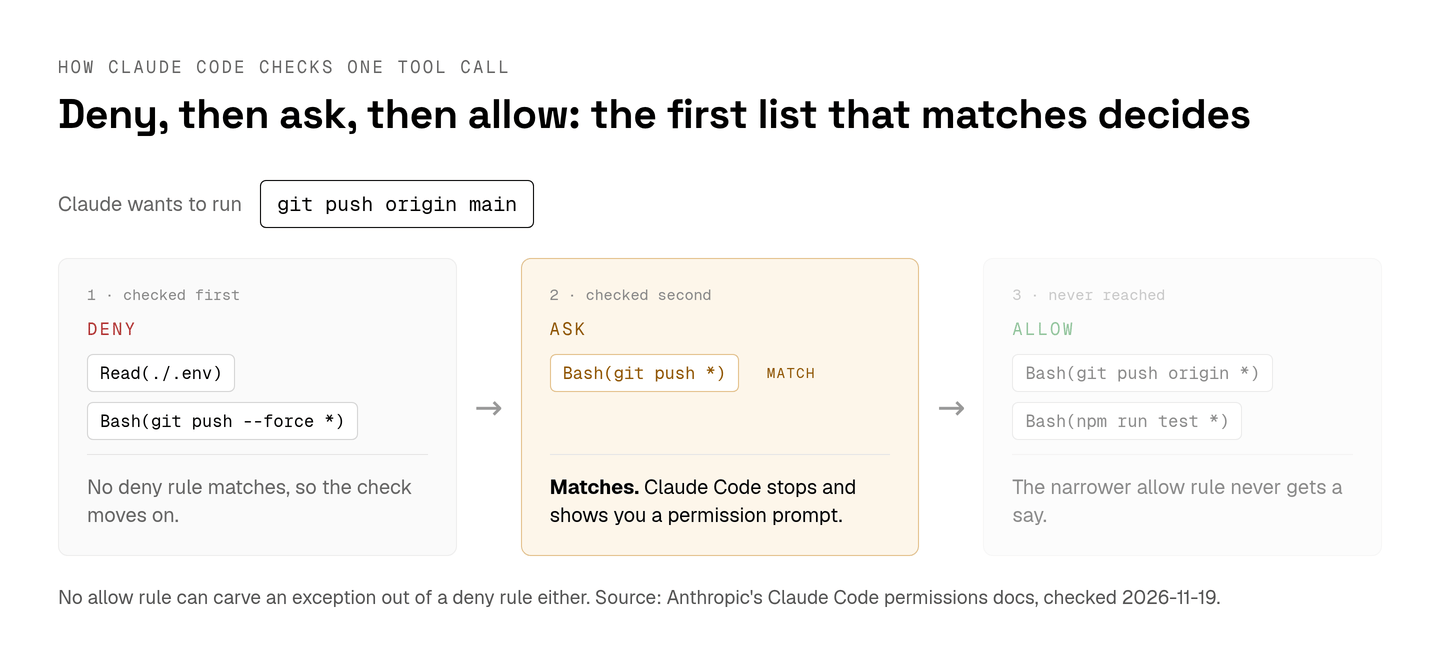
The rules themselves run in a fixed order. Claude Code checks deny rules first, then ask, then allow, and the first match decides. A broad ask rule therefore beats a narrower allow rule for the same command, and no allow rule carves an exception out of a deny rule. The checks happen in Claude Code itself, outside the model, so every unexpected prompt traces back to a rule that didn't match or to a check no rule can override.
| The prompt you keep seeing | Why the allow rule misses it | What covers it |
|---|---|---|
A write under .git, .claude, .vscode or .husky, or to .bashrc, .gitconfig or .mcp.json | Allow rules never pre-approve protected paths | Auto mode's classifier, or your answer in default and acceptEdits |
A file write despite Write(src/**) | Write(path), Glob(path) and Grep(path) rules are accepted and never match | Edit(src/**) for writes, Read(src/**) for reads and searches |
find . -name '*.log' -delete despite Bash(find *) | Prefix rules can't approve find with -exec, -delete, -rm, -fprint or -files0-from | An exact rule with no *, such as Bash(find build -type f -delete), or a PreToolUse hook |
watch npm test despite Bash(npm test *) | Prefix rules can't approve exec wrappers such as watch, setsid, ionice and flock | An exact rule with no *, or a hook |
npm test && git push despite Bash(npm test *) | Every subcommand after &&, ; or a pipe needs a rule of its own | A rule for each subcommand |
git push origin main despite Bash(git push origin *) | A matching ask rule wins over any allow rule | Narrow or delete the ask rule |
| The same file edit you approved yesterday | "Don't ask again" on a file edit ends with the session, and on a Bash command it's permanent per project | An Edit(...) allow rule in a settings file |
A rule in a freshly cloned .claude/settings.json that does nothing | Project allow rules wait for the workspace trust dialog, while deny and ask rules apply at once | Accept the trust dialog for that folder |
| A prompt with no "don't ask again" option | Claude Code offers that option only when the prompt can show everything the rule would allow | Approve once, or add the rule yourself in /permissions |
| Prompts come back in auto mode | The classifier blocked 3 actions in a row or 20 in total, so auto mode paused | Approve the prompted action and auto mode resumes |
I'd leave the first row alone. A write to .git/hooks or .bashrc runs code the next time git or a shell starts, and I want a person to read that call first. Rows two and three are pure noise. One rule fixes each.
The six permission modes and what each still asks
Claude Code has six permission modes, from default, which runs only reads without asking, to bypassPermissions, which still stops for explicit ask rules and rm on critical paths.
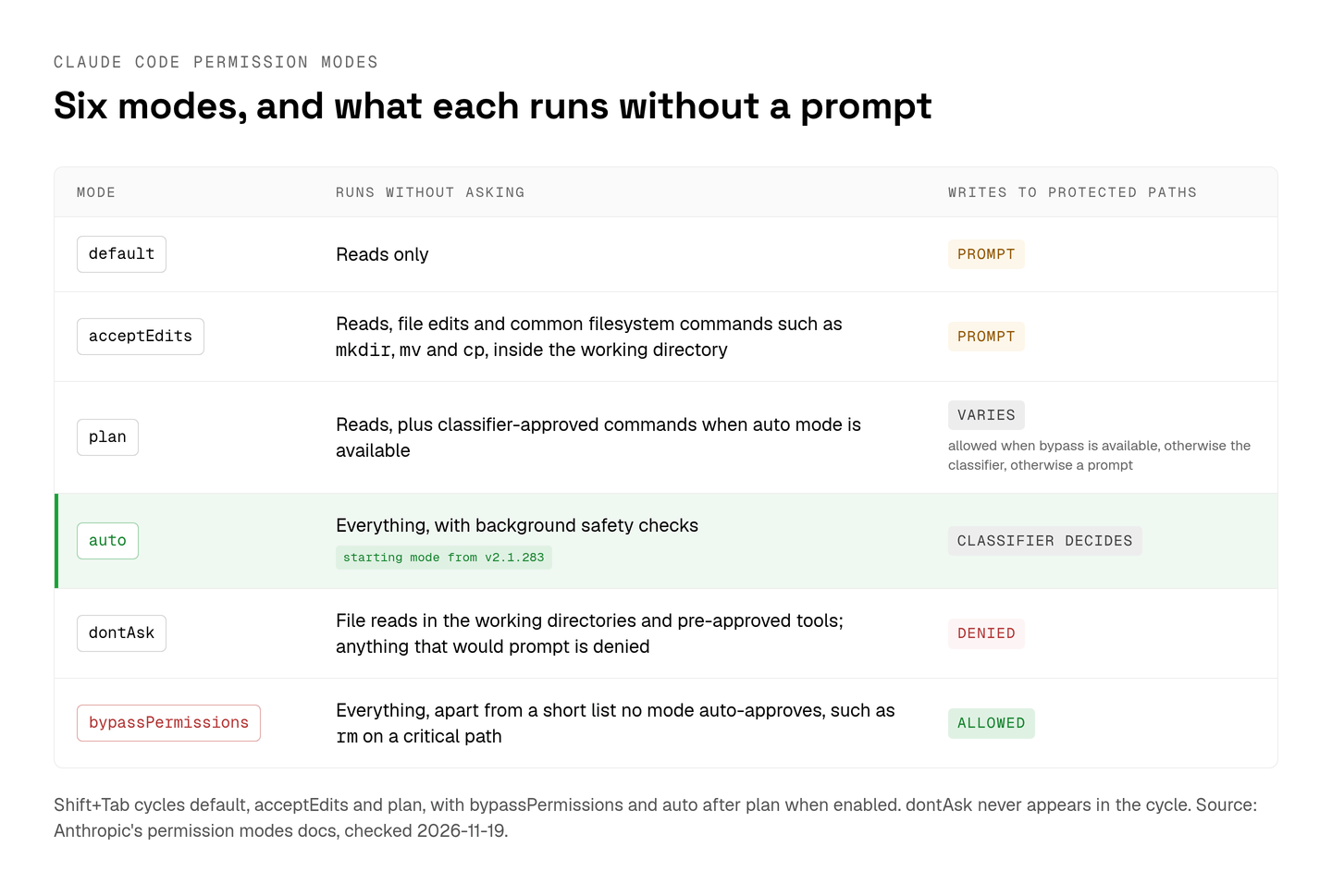
Since v2.1.283, auto is the starting mode for interactive terminal and VS Code sessions. The same page warns that auto mode "reduces permission prompts but does not guarantee safety," and an explicit ask rule still forces a prompt in it.
Shift+Tab cycles modes inside a session. From auto, the first press goes to default, and the cycle then runs through acceptEdits and plan, with bypassPermissions and auto after plan when they're enabled. dontAsk never appears in the cycle; you start it with --permission-mode dontAsk or set it as permissions.defaultMode.
dontAsk is the mode for CI. It runs file reads inside your working directories and pre-approved tools and denies anything that would prompt. For an unattended run that has to stay in another mode, permissions.denyInsteadOfPrompting set to true in user or managed settings turns each would-be prompt into a denial, and the session keeps working.
/permissions, alias /allowed-tools, opens the rules dialog, where you view allow, ask and deny rules by scope, add or remove them and review recent auto mode denials.
On my own machine I run auto and fix the noisy rows of the table with rules. In a repository whose commands can touch a live database, I drop to default.
Cut the prompts you approve on reflex
Claude Code's /fewer-permission-prompts skill cuts the prompts you approve on reflex by scanning your transcripts for common read-only Bash and MCP calls and adding them to .claude/settings.json.
That's the file a team commits, so read the diff before it reaches everyone who clones the repository.
An r/ClaudeAI thread from September 2026 puts a time on that reflex. "For me it's about an hour," its poster writes. "After that I'm clicking approve on autopilot, which means the prompts aren't protecting much anymore." I agree with the diagnosis. My fix is fewer routine prompts, so the ones left get read.
Rules you write by hand go in one of three files, and the file decides who the rule binds. ~/.claude/settings.json covers every project on your machine, and .claude/settings.json travels with the repository once you commit it. .claude/settings.local.json covers only you in one project, and Claude Code keeps it out of git when it creates the file on your first "Yes, and don't ask again".
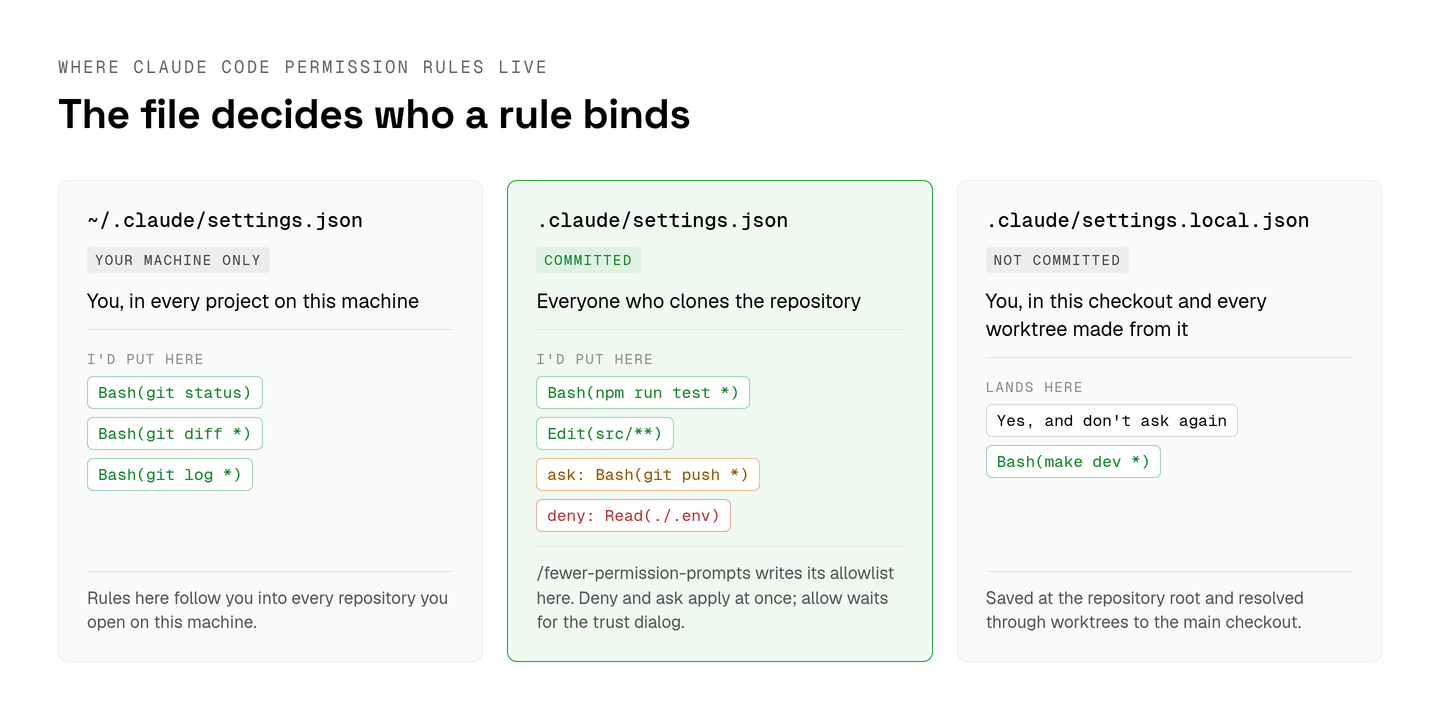
For a Node service, I'd commit a project file like this one:
The Edit rules stand in for the Write rules that never match, and the ask rule puts every push in front of a person. The deny rules apply as soon as someone clones the repository, before any trust dialog. A command only you run, such as make dev, belongs in the local file.
Bypass mode belongs in a sealed container
Claude Code's bypassPermissions mode, the same as the --dangerously-skip-permissions flag, belongs in what Anthropic's docs call "isolated environments like containers, VMs, or dev containers without internet access."
The mode ignores allow rules and approves every call apart from deny rules, explicit ask rules, rm on a critical path such as your home directory and a few other checks no mode skips. It refuses to start as root or under sudo outside a recognized sandbox. A bypassPermissions default in .claude/settings.json or .claude/settings.local.json doesn't take effect, so the session starts in default.
The docs add that bypass "offers no protection against prompt injection or unintended actions." Administrators can switch it off for everyone by setting permissions.disableBypassPermissionsMode to "disable" in managed settings.
If the box has network access or holds real secrets, I keep bypass off and rely on the project file's ask and deny rules. In a throwaway container with no network, I'm happy to let it run a long refactor.
A Claude Code permission prompt waits on whoever started the session
In Claude Code, a permission prompt waits in the session that raised it, and with agent teams every teammate's prompt goes to the lead session.
Anthropic's page is frank about the cost: "Teammate permission requests bubble up to the lead, which can create friction." A new teammate also starts in the lead's permission mode, and agent teams are still experimental.
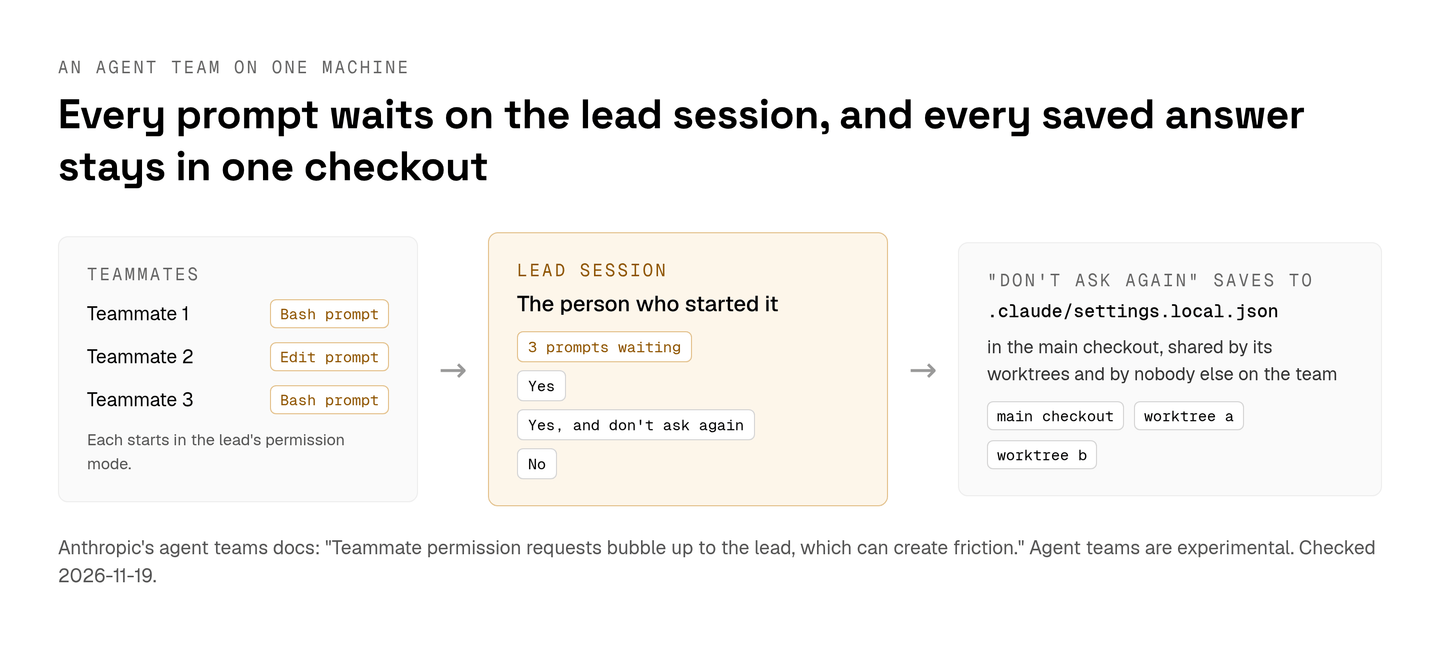
The saved answers stay personal too. "Yes, and don't ask again" writes to .claude/settings.local.json at the repository root, and a worktree uses the file at the main checkout's root. Every worktree you run in parallel shares it, and the rest of the team never sees it. A Notification hook on permission_prompt at least tells you when a session is parked on one.
For one developer, I think this is the right shape. The person who started the session knows what the command is for, and the local file keeps personal shortcuts out of the repository. It strains once a team's agents raise prompts any teammate can answer, because each prompt still waits on whoever started that session and each saved answer stays in that person's checkout. Shared rules in the committed file close part of that gap. The approvals themselves still wait where they were raised.
How approvals work in Aldena
Aldena gives every tool an agent can call an allow, ask or deny policy, set per project in the project's Permissions tab.
Allow lets the agent use the tool without stopping, ask pauses the run and shows you the exact call before it happens, and deny makes the tool unavailable. The tab groups tools by where they come from: the built-in ones for files, commands, web access and memory, the subscribe and git tools of each connected integration, and the tools of each MCP server. A whole group takes Allow all, Ask all or Deny all, and single tools override it.
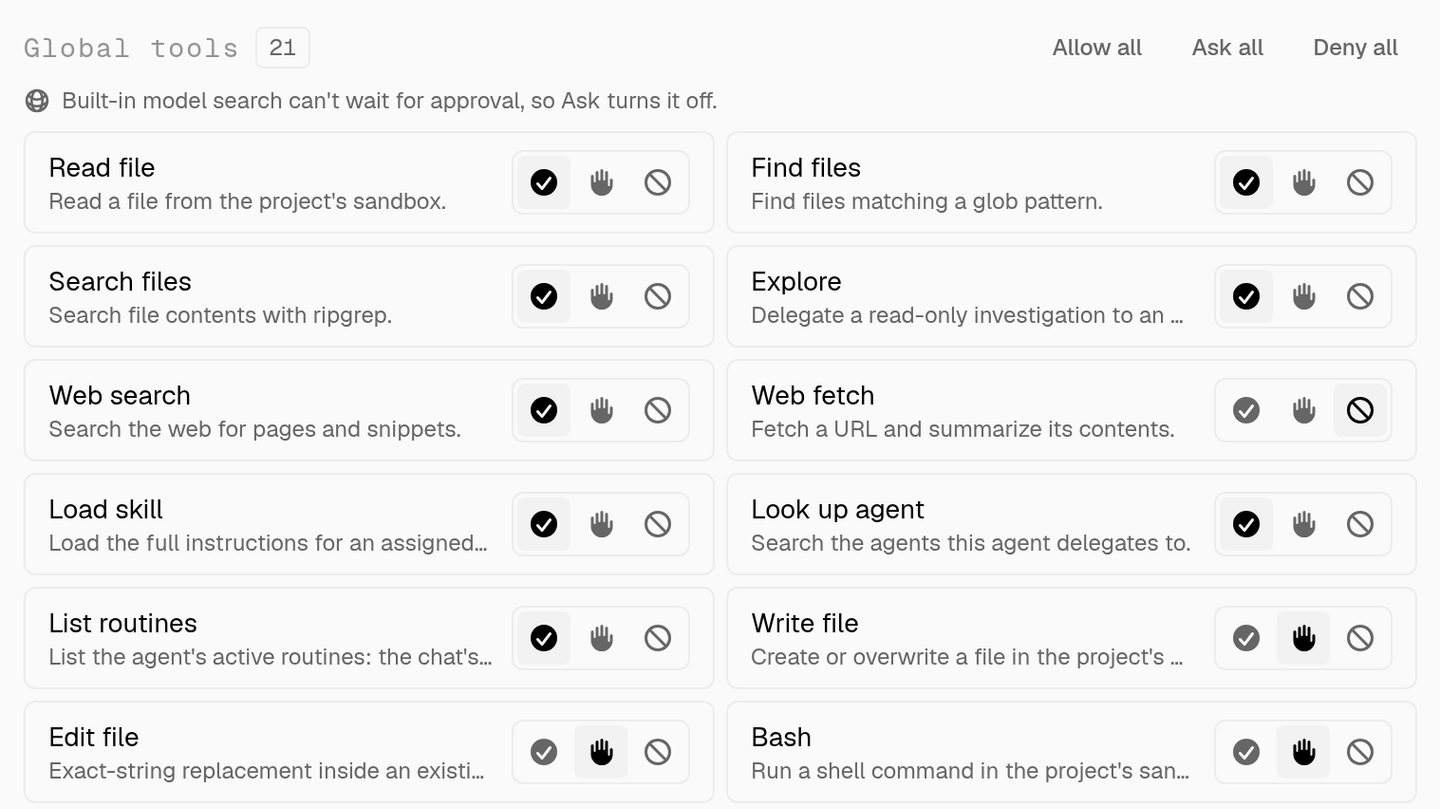
Each tool an MCP server exposes gets its own row. Read-only MCP tools default to allow and every other MCP tool defaults to ask, which are the defaults I'd have picked by hand. A denied MCP tool is never named in the system prompt or returned by mcp_search, so the agent can't ask for it. Asking a person a question is itself a tool, and the one tool that can never be switched off.
When an ask tool comes up, you answer Allow once, Always allow or Deny, and the run continues from where it paused. Always allow writes the policy back, so a decision already made isn't put to you twice. Allow once covers only the call in front of you.
Every project chat whose agent waits on a person lands in the team inbox, the first item in the team sidebar. Any member of the team can answer, from there or from the project's chat. Questions and approvals from one turn arrive as one batch, each call on its own card, in order. In a batch, Always allow runs the rest of the batch's calls to that tool without asking again, and Deny answers only that call.
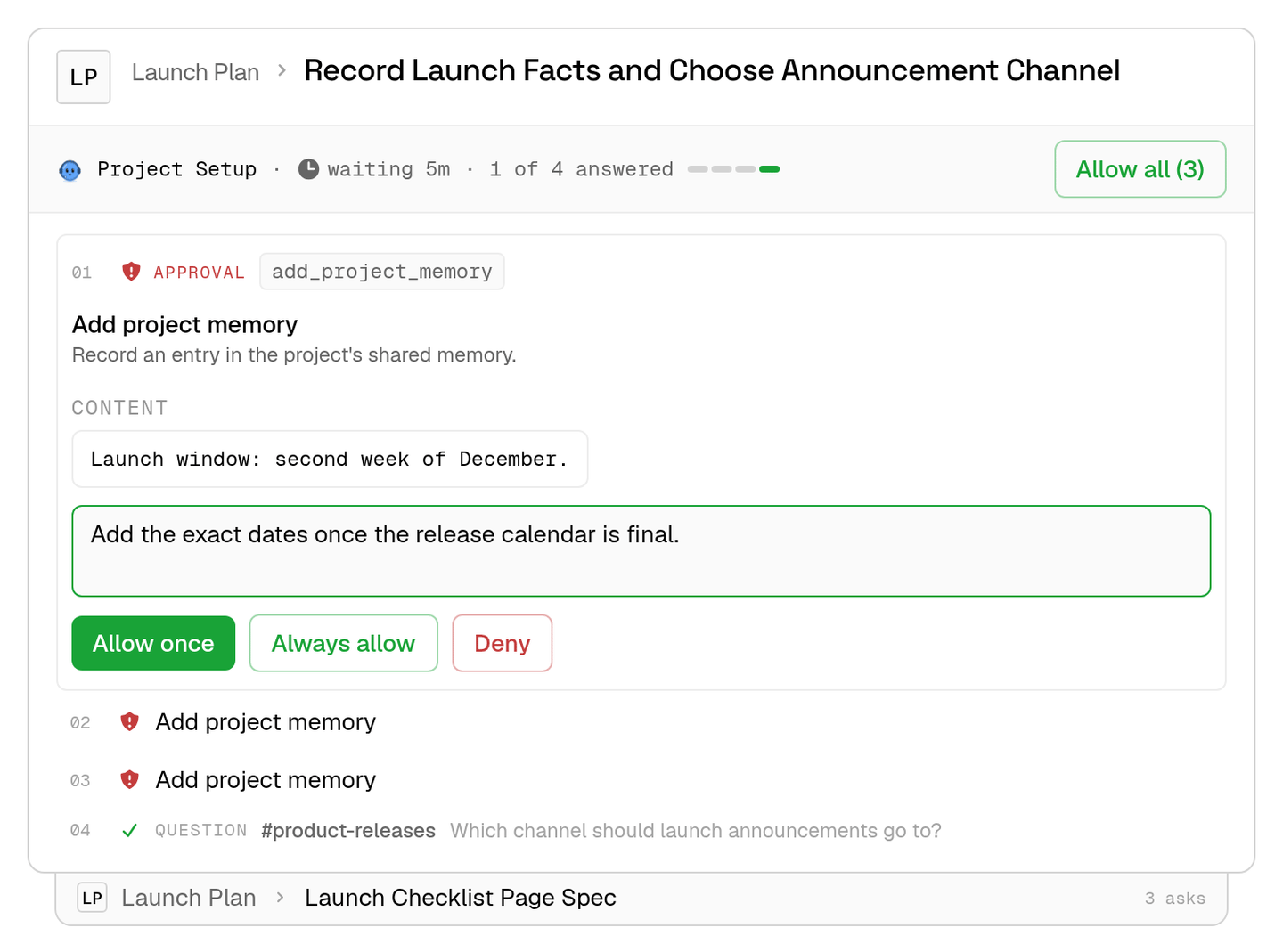
On a team, the inbox is the part I'd care about most, because any member can clear an approval and Always allow writes the answer into the project's policy. Questions and approvals wait seven days for an answer. A paused run is durable, so an answer a day later resumes the agent at the step it paused on, with everything it had.
Policies stop at the project too. Agents in one isolated project run code in a sandbox on a provider the team connects, such as Boat, and have no tool that reads another project's sandboxes, secrets or history.
The prompts I keep on purpose
Claude Code's prompts for git push, writes under .git or .claude, rm on a critical path and edits outside the working directory are the four I'd keep.
Each guards a change that's hard to take back or code that runs later. When one of them comes up, I take the one-time approval, since "don't ask again" on a Bash command stays for the whole project.
With Bash(git push *) as an ask rule in the committed file, even a "Yes, and don't ask again" won't silence the push prompt. An allow rule in your local file doesn't outrank an ask rule from a project file, according to the settings docs.
spin up your first project.
one project per client, product, or piece of work, staffed with intake, requirements, build and code review agents.