ai employees: what the term means and what it does not
an ai employee is an agent with a role, permissions, memory, and a review gate. I draw the line against chatbots, RPA and copilots, and show a real deployment.

the term is marketing, the thing underneath is real
"AI employee" started as a marketing phrase. Vendors reach for it because "autonomous multi-step agent with tool access" does not sell. "Employee" makes a bigger promise. You hand over a job, not a single task.
I run aldena, a platform where you hire teams of agents into shared workspaces. So I sell inside this category, and I have every reason to stretch the term. This post does the opposite. I want a definition strict enough that most products sold under the label fail it.
An ai employee is a software agent that holds a job rather than a prompt. It owns a defined scope of work. It has its own tools, and permissions decide what those tools may touch. It keeps memory between tasks. It sits somewhere in a reporting structure, so it has someone to escalate to. And it costs money you can assign to that role in a budget.
Five properties, and I hold products to all five. Remove any one and the product is something else using the name.
The synonyms all point at the same thing. Call it an ai worker, a digital worker, ai staff, or an ai teammate. The marketing differs, the product does not. There is no technical difference between those words. Pick the one your finance team accepts and move on.
what an ai employee is not
A definition gets sharper when you name what it excludes. Three products sit next to this one, and all three get sold as it.
a chatbot with a first name
A chatbot waits for you to speak to it. Everything it knows lives inside one conversation and disappears when that conversation ends. A human name and a portrait change how the demo feels. They do not change what the software does.
So run a two-day test. Tell it something on Monday. If Tuesday's session starts blank, you are paying for a chatbot. Most products sold as ai employees today fail right here.
an rpa bot with better marketing
Robotic process automation, or RPA, is a set of recorded rules. When the invoice field matches, move the row. RPA is genuinely useful and has moved money reliably for a decade. But it runs tasks, and it never claimed to hold a job.
The difference shows up at the exception, meaning any input nobody wrote a rule for. An RPA bot hits one and stops, or worse, applies the rule anyway. An ai employee should notice the exception, think about it, and either fix it or escalate it with the context attached.
That word, escalate, is the difference. Automation has error handling. Employees have managers.
a copilot
A copilot speeds up work you are already doing. It completes your code and drafts your reply while you sit there. You are present for every keystroke, so you are also the entire review process.
An employee is judged by a different standard. The work has to happen while you are away, and you need a record of it afterwards. A copilot never meets that standard. It only runs while you are watching.
the comparison in one table
| chatbot | rpa bot | copilot | ai employee | |
|---|---|---|---|---|
| works while you are elsewhere | no | yes, on schedule | no | yes |
| handles the unscripted case | improvises in text | halts or misapplies a rule | you catch it live | resolves it or escalates with context |
| remembers last month | no | no state beyond its rules | your repo remembers, it does not | durable memory it reads before each run |
| bounded by permissions | rarely | by whatever credentials it got | by yours | per tool, set by you |
| where mistakes get caught | by the customer, usually | in the exception queue | by you, in the moment | at a review gate before anything ships |
The last row matters most, and it is the row the marketing skips.
the human comparison, and what it leaves out
Every page ranking for this term runs the same table. A human costs $50,000 a year and works eight hours a day. The agent costs $25 a month and works around the clock. Those are the figures those pages carried when I read them in 2026, and they are not mine.
Teammates.ai's guide to AI employees is the best-executed version of the genre. Google's own AI Overview cites it for this query. Their page advertised onboarding in five minutes, fluency in more than fifty languages, and 78 percent of support tickets resolved without a human. Those numbers are Teammates.ai's, they were on the page in 2026, and I cannot check them.
I will be fair to that page though. It also says plainly that creative work, strategy, and relationships stay human. That is more honesty than most of its competitors manage.
Those tables leave out the rows that decide whether a deployment survives:
- Liability. No country treats an agent as a person. Everything it produces under your direction is legally yours, mistakes included. A human employee carries part of the accountability. An agent hands all of it back to you.
- Judgment on the new. An agent handles the twentieth case of a known problem well. It handles the first case of a new problem with full confidence and no idea that it is wrong.
- Compounding knowledge. A person gets better in ways nobody planned. An agent keeps exactly what its memory system saved, and nothing else.
The people who run these tools have noticed. A long-running r/AI_Agents thread asking whether anyone actually uses these products keeps reaching the same verdict. They behave like very fast interns who need supervision.
I think that is the most accurate one-line review this category has had. I do not want to argue with it. I want the supervision built into the product, instead of left to whoever happens to be watching the screen.
what deploying one actually looks like
The category's favorite claim is deployment in minutes. Connect your tools, upload some docs, go live. The connection part is true. Signing in with OAuth, the standard connect-your-account flow, really does take five minutes.
But connecting tools is not deploying an employee. Handing a new hire a laptop is not onboarding either. Deployment is a set of decisions, and you cannot skip them:
- Write the role down. Write what it owns, and write what it refuses to do. A role with no refusals is a general assistant, and general assistants wander off the job.
- Bound its access. Decide which systems it can reach, and what it may do inside each one. Decide before it runs, not after the first surprise.
- Place the stopping points. Decide which actions run freely, which pause for a person, and which are banned outright. Skipping this step is how a deployment turns into an incident.
- Give it checkable work first. High volume, clearly specified, easy to verify. If checking the output takes longer than doing the work yourself, you have moved the bottleneck, not removed it.
Once you have made those four decisions, the five-minute claim looks small. The software setup was never the hard part. I wrote separately about hiring a first ai employee. The short version is one role, checkable output, and a gate.
how this works in aldena
Aldena is my attempt to turn those four decisions into mechanics, so they stop depending on anyone's discipline.
An ai employee in aldena is hired into a room. A room is a separate workspace for one project, with its own server, its own credentials, and its own integrations. GitHub, Jira, Slack, and the rest of the connectors are attached inside one room. An agent working on one client's project cannot reach another client's.
That is decision two, bounding access. The structure enforces it, so nobody has to remember a rule.
The roster is a short list of prebuilt roles, and each role ships with its refusals already written. Vera, the analyst, asks clarifying questions before she writes a spec. Magnus, the engineering manager, hands out work and drives review, but never writes code himself. Argus reviews the diff, meaning the exact code change, and reports what he finds without editing anything.
Those refusals are what make a hand-off between two agents mean something. That is decision one, done for you.
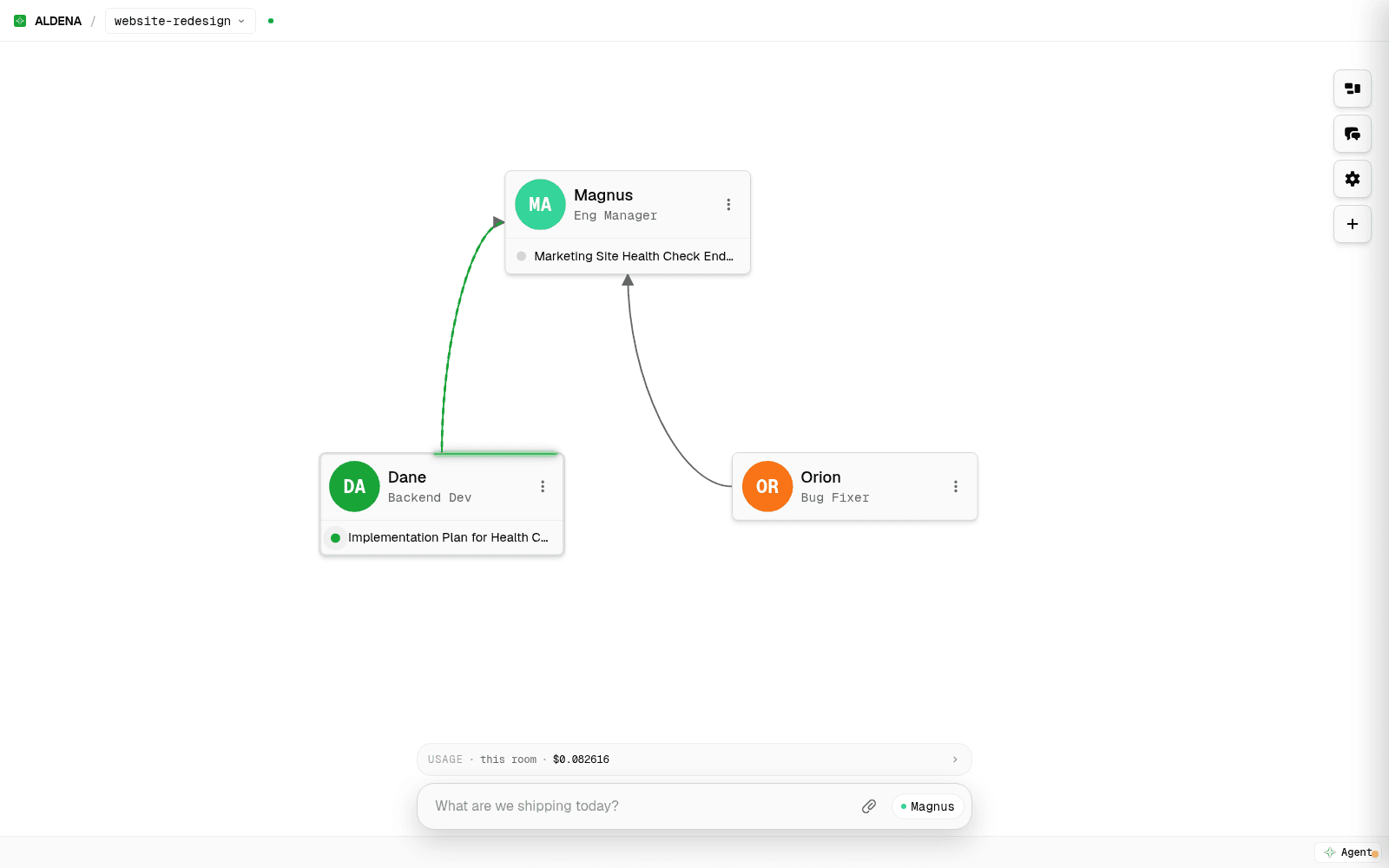
The org chart is a canvas you draw on. Draw a line from an agent to its manager. After that, work travels down the line and results travel back up. An agent can reach its own direct reports and its own manager, and nobody sideways. The lines light up while work moves, so you watch it happen instead of reading logs afterwards.
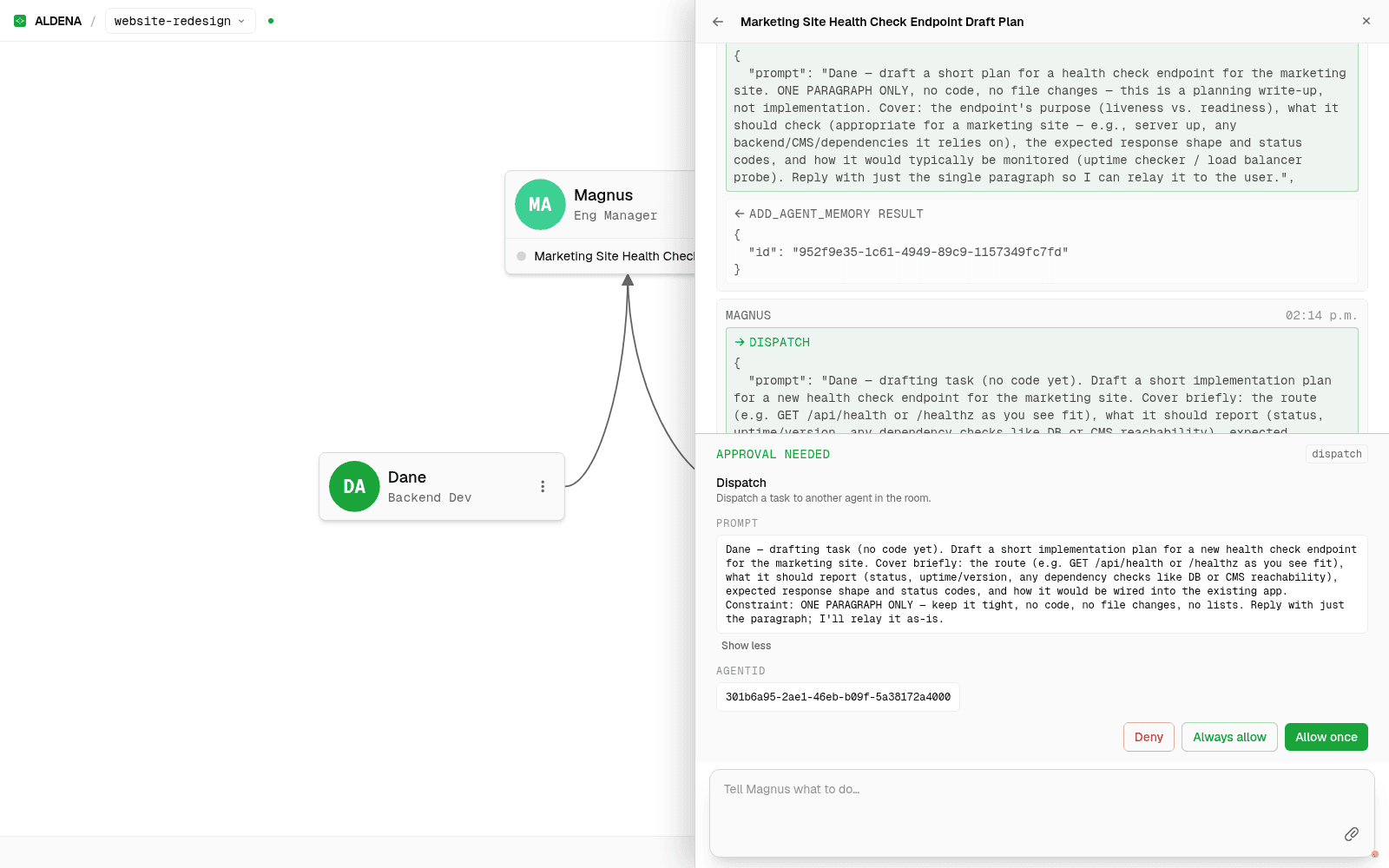
Decision three, the stopping points, is the approval gate. Every tool an agent can call carries a policy of allow, ask, or deny, and you set it per room. On ask, the run pauses and shows you the exact call before it happens. The pause is saved, so you can answer an hour later and the run will continue from the same step.
One rule has no exceptions. An agent can always ask a human a question, because that tool sits outside the policy list and cannot be denied. The review gate on code is built a different way. The delivery role is written to open the pull request and stop, and merging is a write tool that pauses like the rest. Engineering work ends as a pull request waiting for you, with the diff, the test results, and the reasoning attached.
Memory is the part the intern comparison misses. Each agent keeps its own private memory entries, and each room keeps a shared set on top of that. Both sets are capped, and every entry has to be short. You read all of it in a Memory tab, with the author and the timestamp on each line.
The agent that learned your default branch last week starts this week already knowing it. When it believes something wrong, you can find the exact entry and have it removed.
Cost belongs in a definitional guide too. Starter and Business are the two self-serve plans, both beginning with a card-required 14-day trial before monthly per-seat renewal. Enterprise is priced case by case. The live renewal prices are on the pricing page. Model usage and server time are metered on top at published rates.
That is more than the $25 a month the comparison pages advertise, and less than a salary. The subscription is the smallest of the three costs. Usage and your own review time are the big ones.
Putting several of these together into a real team is its own subject. I covered it in how to build an ai agent team.
where ai employees genuinely fail
A definition also has to say where the thing fails. Work with an unwritten spec fails first. When the requirements live in someone's head, the agent guesses a spec and builds against it with full confidence. You find out at review time, if you are lucky.
New problems fail next, for the reason above. The agent is confident and has no idea it is wrong. Relationship work, questions of taste, and anything needing a licensed signature stay human. An agent can draft the filing. It cannot file it.
The hardest limit is trust. Trust never transfers to an agent the way it transfers to a person. A human employee eventually earns the right to work unsupervised. An agent only earns wider allow policies, and the accountability stays with you either way.
That gap does not close with today's systems. Any vendor who tells you otherwise is selling the word, not the thing.
the questions that keep coming up
can you actually hire an ai employee?
You can subscribe to software that behaves like one. You cannot hire an ai employee the way you hire a person. There is no contract, no employment law, and no liability that attaches to the agent. That makes "hiring" a useful comparison and a false legal claim. You are buying a role, a queue of work, and a bill.
how much does an ai employee cost?
Entry prices advertised by vendors in 2026 run from about $25 a month to four figures, depending on the vendor and the tier. The advertised number is rarely the real cost of hiring an agent. Usage charges for models or minutes sit on top. Your own review time is a third cost, and every vendor prices it at zero. Budget for all three.
will ai employees replace my team?
The work that moves to agents is high volume, clearly specified, and easy to check. A job is a bundle of tasks, and most bundles hold a core of unwritten judgment. That core stays human. What changes is the ratio. Fewer hours go to the checkable volume, and more go to the parts that were never written down.
which ai employee is best?
Asking which ai employee is best is the wrong question. A solo persona stops being useful quickly, because real work needs hand-offs.
Compare the supervision each product gives you instead. Ask what it remembers and what it can touch. Ask what happens when it is wrong, and whether two of them can work the same problem. I wrote separately about what to look for in an ai employee platform.
the lunch test
Everything above comes down to one test. Hand the software a task, go to lunch for an hour, and look at what you come back to.
Look for work that is done, escalated, or waiting at a gate you chose. If you also find a record of everything in between, you have an ai employee. If you come back to a chat window waiting for your next message, you have a tool.
Tools are fine, and I use plenty of them. Just read the label before you pay employee prices for one.
spin up your first room.
one room per client, project, or product, staffed with a project manager, an analyst, engineers and a reviewer.