start using Slack with your agents
sign up, open a room, and authorise Slack from its connectors settings.
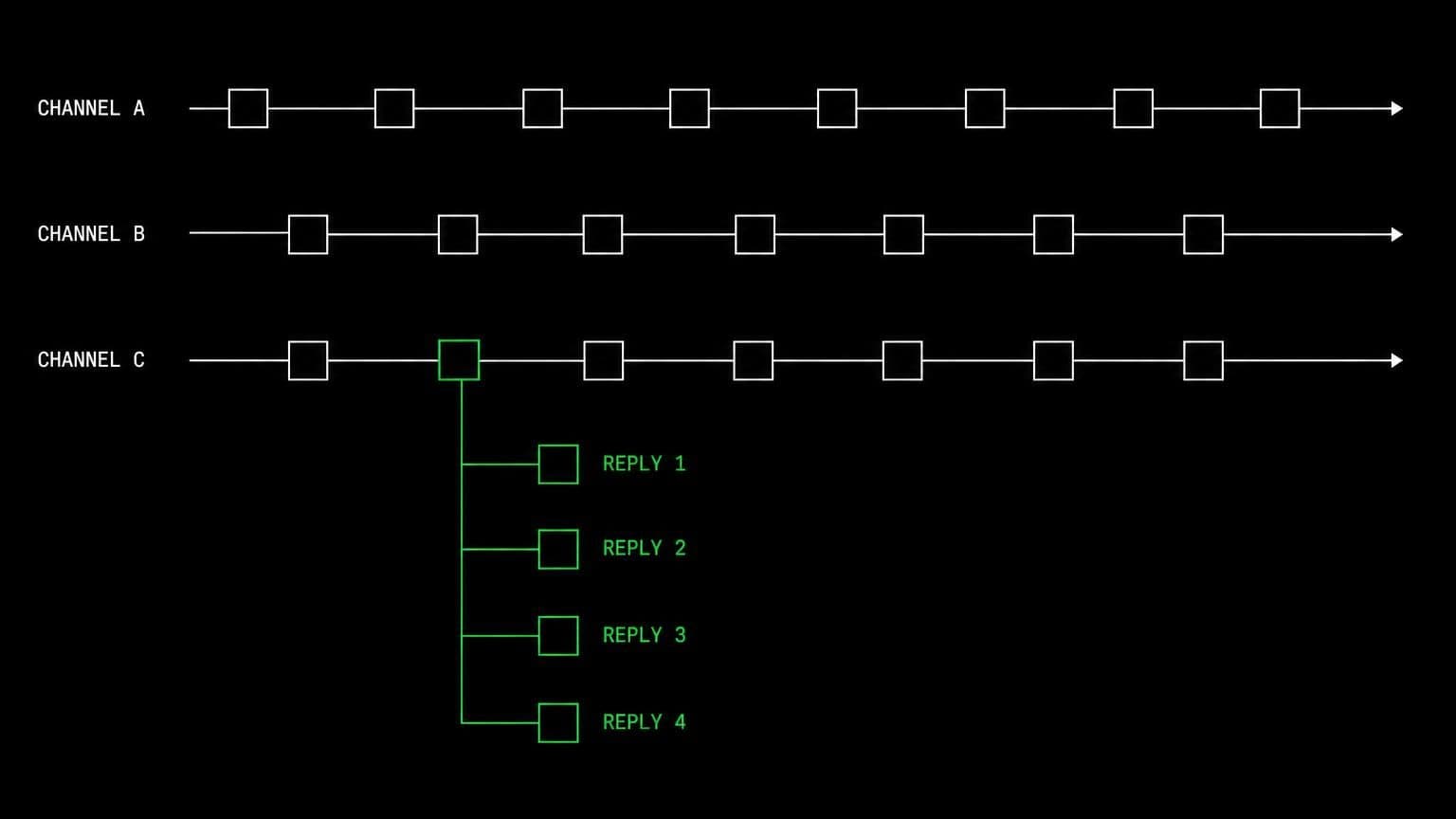
ai agent for slack: read the channel, answer in the thread
connect slack to a room and its agents read channels and threads, search the workspace, post and schedule messages, react, and wake on the events you choose.
- read tools
- 12
- write tools
- 6
- scopes
- 5
slack is where the question gets asked, and it is usually not where the answer lives. connecting slack to a room puts both in the same place: the agent reads the thread, does the work on the room's server or through another connected tool, and replies where the question was asked.
reading the workspace
slack_read_channel pulls recent messages, slack_read_thread follows the replies, and slack_read_file opens a text file someone dropped in. slack_search_channels, slack_search_users and slack_search_emojis find things by name, slack_list_channel_members says who is in the room, slack_read_user_profile resolves a person, and slack_get_reactions reads what people signalled without typing.
searching as the bot, or as you
there are two search paths and the difference matters. slack_search_public searches public messages. slack_search_public_and_private searches as the installing user and reaches every private channel and dm that person can see. that second one is an opt-in scope, off by default, marked privileged, and worth leaving off unless the room genuinely needs it. whoever connects slack grants it against their own account, so the room settings only ever offer it to the member whose connect attempt is in flight.
answering and organising
slack_send_message posts to a channel or a thread, slack_schedule_message queues one for later, and slack_add_reaction acknowledges something without adding noise. slack_create_conversation opens a new public or private channel behind its own opt-in scope. all four are mutating tools, so they stop and ask before they run.
example tasks
- 01
answer the question in the support thread once you have checked the code.
the agent reads the thread, looks at the repository on the room server for the real behaviour, and replies in the same thread rather than starting a new one.
slack_read_threadbashslack_send_message - 02
post the deploy summary to releases every friday at 5pm.
a scheduled task runs the summary on a cron, and the message is queued into slack for the exact time rather than whenever the run happens to finish.
scheduleslack_search_channelsslack_schedule_message - 03
watch alerts and wake up when something mentions the payments service.
the channel subscription wakes the agent in this chat on each message, and it reads the surrounding thread before deciding whether it is worth your attention.
slack_subscribeslack_read_channelslack_read_thread
what it will not do
workspace administration, user management, and app configuration are outside the tool set. an agent cannot delete or edit someone else's message, and it cannot read a private channel the bot was never invited to unless you deliberately turned on the search as you scope.
what agents can call
every Slack tool an agent in a connected room can reach, split by whether it only reads or changes something. read tools are allowed by default, write tools stop for your approval, and the room's tool permissions can move any of them either way.
slack_read_channelRead recent messages in a channel.
slack_read_threadRead the replies of a message thread.
slack_read_fileRead the contents of a text file shared in Slack.
slack_read_user_profileRead a workspace user's profile.
slack_list_channel_membersList the members of a channel.
slack_search_channelsFind channels by name.
slack_search_usersFind workspace users by name or email.
slack_search_emojisFind the workspace's custom emoji.
slack_get_reactionsRead the reactions on a message.
slack_search_publicSearch public messages as the installing user.
slack_search_public_and_privateSearch public and private messages, including DMs, as the installing user.
slack_get_granted_scopesRead the connection's granted scopes.
slack_send_messagePost a message to a channel or thread.
slack_schedule_messageSchedule a message to be posted later.
slack_add_reactionAdd an emoji reaction to a message.
slack_create_conversationCreate a new public or private channel.
slack_subscribeSubscribe the agent to events on a Slack channel or the workspace.
slack_unsubscribeCancel one of the agent's Slack event subscriptions.
what you grant
scopes are chosen when the room connects Slack, and they can be changed later by reconnecting. anything marked off by default stays off until someone deliberately turns it on.
- Read messages & channelson by default
Read channel and thread messages, list channels and their members, look up users and emoji, read reactions, and read text files shared in the workspace.
- Post messages & reacton by defaultneeds read
Post and schedule messages, add reactions, and join public channels the bot is not in yet.
- Create channelsoff by defaultneeds read
Create new public or private channels in the workspace.
- Search messages as youoff by defaultprivileged
Search Slack messages as the installing user, using their own account: the private variant reaches every private channel and DM that user can see. Anyone in this room can run those searches. Leave off unless you want that.
- Event subscriptionson by default
Let agents subscribe to Slack events (messages, reactions, mentions, membership, files, channel and workspace changes) and receive a notification in the chat where they subscribed.
how to connect Slack
connecting Slack takes one oauth round trip, started from inside the room that needs it.
- open the room's connectors settings
connections belong to a room, not to your account and not to the team. open the room that needs Slack and go to its connectors panel. connecting it in one room leaves every other room untouched.
- authorise with a real account
any member of the room can start the oauth flow, and they authorise as themselves, so Slack records a real identity on every action instead of an anonymous shared bot.
- choose the scopes for this room
the scopes are ticked before you are handed to Slack, so the consent screen asks for exactly what the room needs and nothing more. a scope that depends on another cannot be ticked alone. the granted set is fixed once the connection exists, so widening it later means reconnecting.
- the room's agents pick up the tools
every agent in that room can now call the Slack tools the granted scopes cover. mutating tools still stop for approval, and disconnecting takes the tools away again in one click.
data handling and security
the objection to an agent with write access is noise: a wrong edit, a wrong comment, a wrong merge. the answer is that nothing mutating happens without a person, and nothing crosses a room boundary.
- one connection, one room
the Slack credential is stored against the room it was authorised in. no tool in another room can read it, and there is no team-wide connection to inherit by accident.
- scopes bound at the tool layer
a Slack tool that needs a scope the room did not grant is not offered to the agent at all, so a model cannot talk itself into an action nobody authorised.
- approval before anything changes
mutating tools pause the run and wait for a human. you allow once, allow always for that room, or deny, and the agent carries on with the answer.
- an audit trail you can read
every call is a message in the room's chat with its arguments and its result, in the order it happened, so a surprising change is traceable rather than mysterious.
- revocation is one click
disconnect Slack and the tools disappear from the room immediately, along with the stored credential and any event subscriptions the agents had opened.
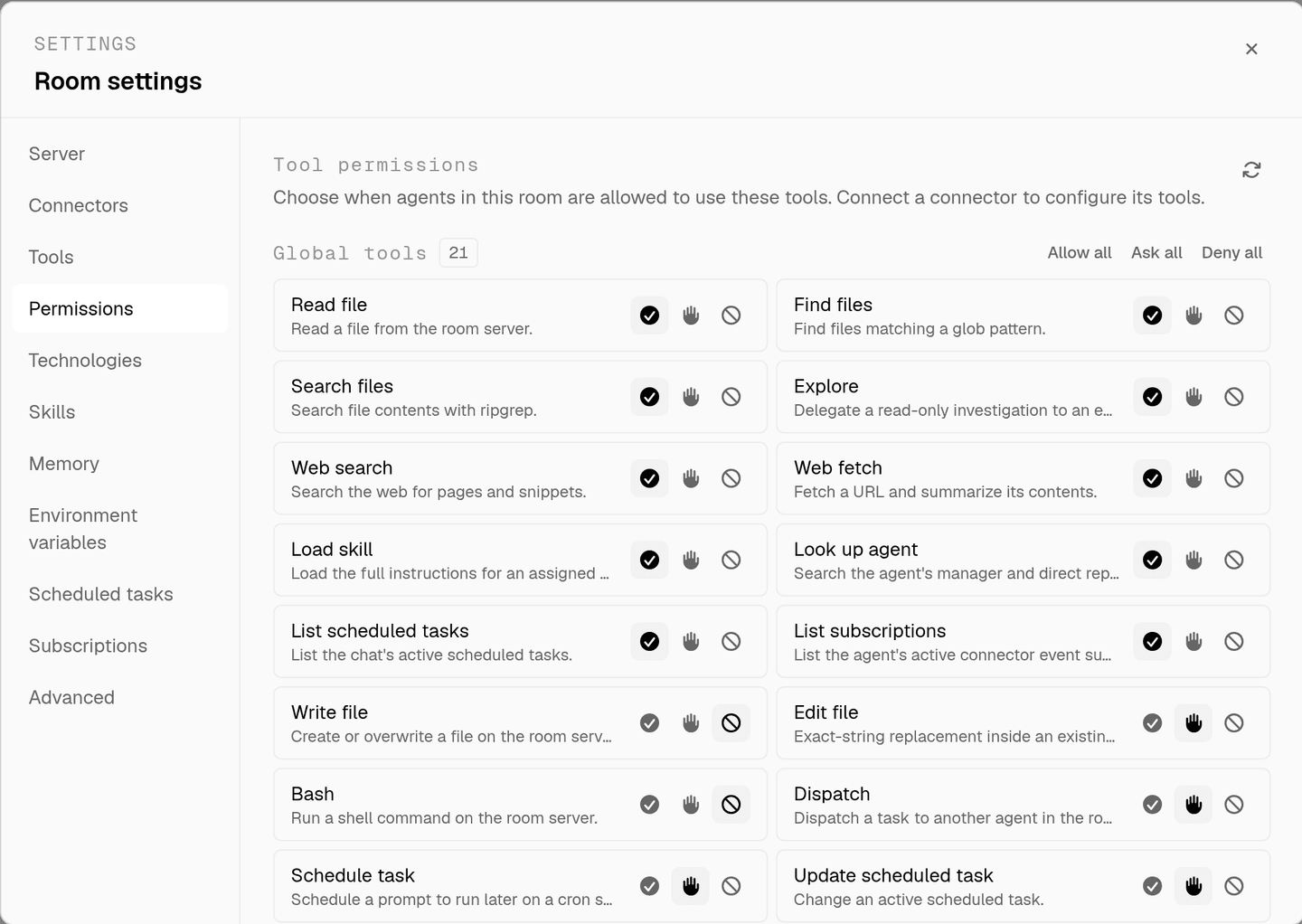
the full approval model, including what agents ask you mid-run, is on human in the loop, and room isolation is on isolated rooms.
faq
can an ai agent post messages in slack?
yes, with the post messages and react scope. slack_send_message posts to a channel or a thread and slack_schedule_message queues one for later. both are mutating tools, so the agent asks before the first send unless the room already allows it in its tool permissions.
will the agent read private channels and dms?
only if you turn on search messages as you, which is off by default and marked privileged. that scope searches as the installing user, so the private variant reaches every private channel and dm that person can see, and anyone in the room can run those searches. most rooms leave it off.
does the agent need to be invited to a channel?
the bot reads and posts where it has access, and the post messages and react scope lets it join public channels it is not in yet. private channels still need an invite, which keeps the boundary in slack's hands rather than the agent's.
how does an agent notice a message without polling?
slack_subscribe attaches it to a channel or the whole workspace. messages, reactions, mentions, membership changes and file events then wake the agent in the chat where it subscribed, so a question in support can be answered without anyone forwarding it.
can an agent create slack channels?
slack_create_conversation exists behind the create channels scope, which is off by default. leave it off and the tool does not exist in the room. turn it on and creating a channel still stops for your approval before it runs.
spin up your first room.
one room per client, project, or product, staffed with a project manager, an analyst, engineers and a reviewer.