start using Sentry with your agents
sign up, open a room, and authorise Sentry from its connectors settings.
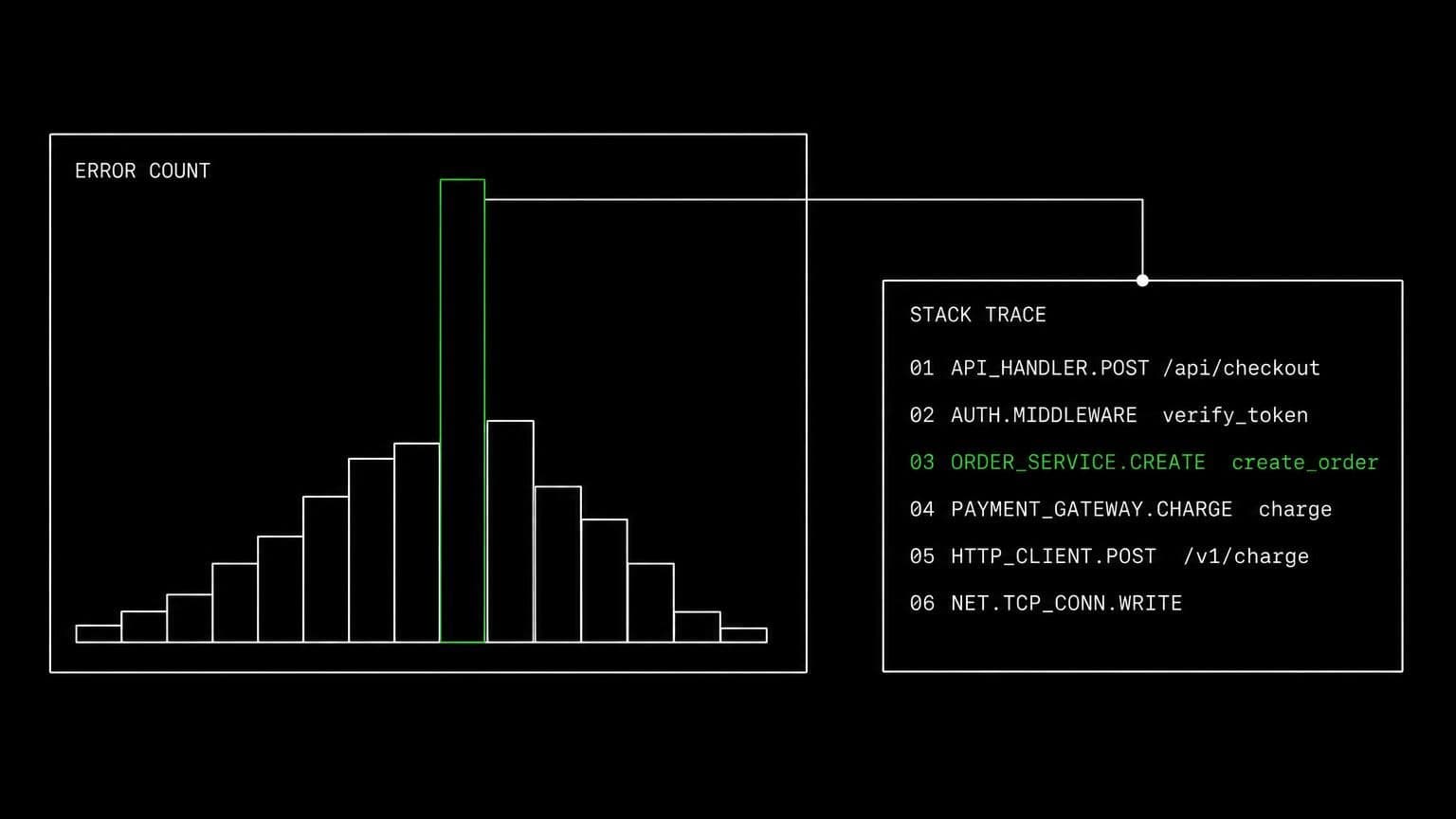
ai agent for sentry: read the error, find the cause, ship the fix
connect sentry to a room and its agents search issues and events, read stack traces, replays and profiles, resolve or assign, and fix the code the trace names.
- read tools
- 15
- write tools
- 7
- scopes
- 4
an alert tells you something broke. it rarely tells you what to change. connecting sentry to a room closes that gap, because the agent that reads the stack trace also has the repository on a machine it can run.
reading the whole picture
sentry_search_issues takes sentry query syntax and sentry_get_resource reads one issue by short id with its status, assignee and culprit. sentry_search_events queries the errors, logs, or spans dataset with optional aggregation, and sentry_search_issue_events lists the individual events under one issue. sentry_get_issue_tag_values answers which release or which browser, sentry_get_event_attachment pulls an attachment into the chat, and sentry_get_replay_details and sentry_get_profile_details bring in the session replay and the profile behind a slow transaction.
knowing where it is looking
sentry_whoami, sentry_find_organizations, sentry_find_teams, sentry_find_projects, sentry_find_releases and sentry_find_dsns describe the connected organization. a room connects to exactly one organization, so an agent cannot wander into a neighbouring account's error stream by accident.
acting on it
sentry_update_issue resolves, ignores, unresolves or assigns, and it asks before it runs. the heavier changes, creating teams and projects, editing project settings, and minting client keys, sit behind a scope that is off by default, because a new dsn is a credential.
example tasks
- 01
the checkout error spiked after this morning's release. find out why.
the agent reads the issue and its recent events, checks which release the tag values point at, then reads the matching commit in the repository on the room server.
sentry_search_issuessentry_search_issue_eventssentry_get_issue_tag_valuesgithub_get_commit - 02
fix the top unresolved error and resolve it once the pr is merged.
it reads the trace, reproduces the failure on the room server, opens the pull request, and marks the issue resolved only after you approve both steps.
sentry_get_resourcebashgithub_create_pull_requestsentry_update_issue - 03
watch the api project and wake up on anything new.
the project subscription wakes the agent in this chat on new issues and errors, and it reads the events before deciding whether it is worth interrupting you.
sentry_subscribesentry_get_resourcesentry_search_issue_events
what it will not do
an agent cannot delete a project or an issue, change organization billing, or manage members. it reaches exactly one sentry organization, the one the room connected, and the project and dsn tools stay absent unless you deliberately turn their scope on.
what agents can call
every Sentry tool an agent in a connected room can reach, split by whether it only reads or changes something. read tools are allowed by default, write tools stop for your approval, and the room's tool permissions can move any of them either way.
sentry_whoamiRead the Sentry identity the room's installation acts as.
sentry_find_organizationsRead the one Sentry organization the room is connected to.
sentry_find_teamsList the connected organization's teams.
sentry_find_projectsList the connected organization's projects.
sentry_find_releasesList the connected organization's releases.
sentry_find_dsnsList a project's client keys (DSNs).
sentry_get_resourceRead one issue by short id, with its status, assignee, and culprit.
sentry_search_issuesSearch the organization's issues with Sentry query syntax.
sentry_search_eventsQuery the errors, logs, or spans dataset, with optional aggregation.
sentry_search_issue_eventsList the individual events belonging to one issue.
sentry_get_issue_tag_valuesRead the values an issue has seen for one tag key.
sentry_get_event_attachmentList an event's attachments, or download one into the chat.
sentry_get_replay_detailsRead one session replay's metadata.
sentry_get_profile_detailsRead one profile's metadata for a transaction event.
sentry_get_granted_scopesRead the connection's granted scopes.
sentry_update_issueResolve, ignore, unresolve, or assign an issue.
sentry_create_teamCreate a team in the connected organization.
sentry_create_projectCreate a project under one of the organization's teams.
sentry_update_projectChange a project's name, slug, platform, or event resolution age.
sentry_create_dsnMint a new client key (DSN) for a project.
sentry_subscribeSubscribe the agent to events on a Sentry project or a single issue.
sentry_unsubscribeCancel one of the agent's Sentry event subscriptions.
what you grant
scopes are chosen when the room connects Sentry, and they can be changed later by reconnecting. anything marked off by default stays off until someone deliberately turns it on.
- Read issues, events & projectson by default
Read and search issues, error and log events, projects, teams, releases, replays, profiles, event attachments, and client keys (DSNs).
- Resolve, ignore & assign issueson by defaultneeds issues_read
Resolve, ignore, unresolve, and assign issues.
- Create teams, projects & DSNsoff by defaultneeds issues_read
Create teams and projects, change project settings, and mint new client keys (DSNs) in the connected Sentry organization.
- Event subscriptionson by default
Let agents subscribe to Sentry events (new, resolved, assigned, ignored and unresolved issues, new errors, and issue comments) and receive a notification in the chat where they subscribed.
how to connect Sentry
connecting Sentry takes one oauth round trip, started from inside the room that needs it.
- open the room's connectors settings
connections belong to a room, not to your account and not to the team. open the room that needs Sentry and go to its connectors panel. connecting it in one room leaves every other room untouched.
- authorise with a real account
any member of the room can start the oauth flow, and they authorise as themselves, so Sentry records a real identity on every action instead of an anonymous shared bot.
- choose the scopes for this room
Sentry grants a fixed set at install, and the room decides which of those groups its agents may actually use. turn a group off and the tools behind it stop existing for that room, no reconnect needed.
- the room's agents pick up the tools
every agent in that room can now call the Sentry tools the granted scopes cover. mutating tools still stop for approval, and disconnecting takes the tools away again in one click.
data handling and security
the objection to an agent with write access is noise: a wrong edit, a wrong comment, a wrong merge. the answer is that nothing mutating happens without a person, and nothing crosses a room boundary.
- one connection, one room
the Sentry credential is stored against the room it was authorised in. no tool in another room can read it, and there is no team-wide connection to inherit by accident.
- scopes bound at the tool layer
a Sentry tool that needs a scope the room did not grant is not offered to the agent at all, so a model cannot talk itself into an action nobody authorised.
- approval before anything changes
mutating tools pause the run and wait for a human. you allow once, allow always for that room, or deny, and the agent carries on with the answer.
- an audit trail you can read
every call is a message in the room's chat with its arguments and its result, in the order it happened, so a surprising change is traceable rather than mysterious.
- revocation is one click
disconnect Sentry and the tools disappear from the room immediately, along with the stored credential and any event subscriptions the agents had opened.
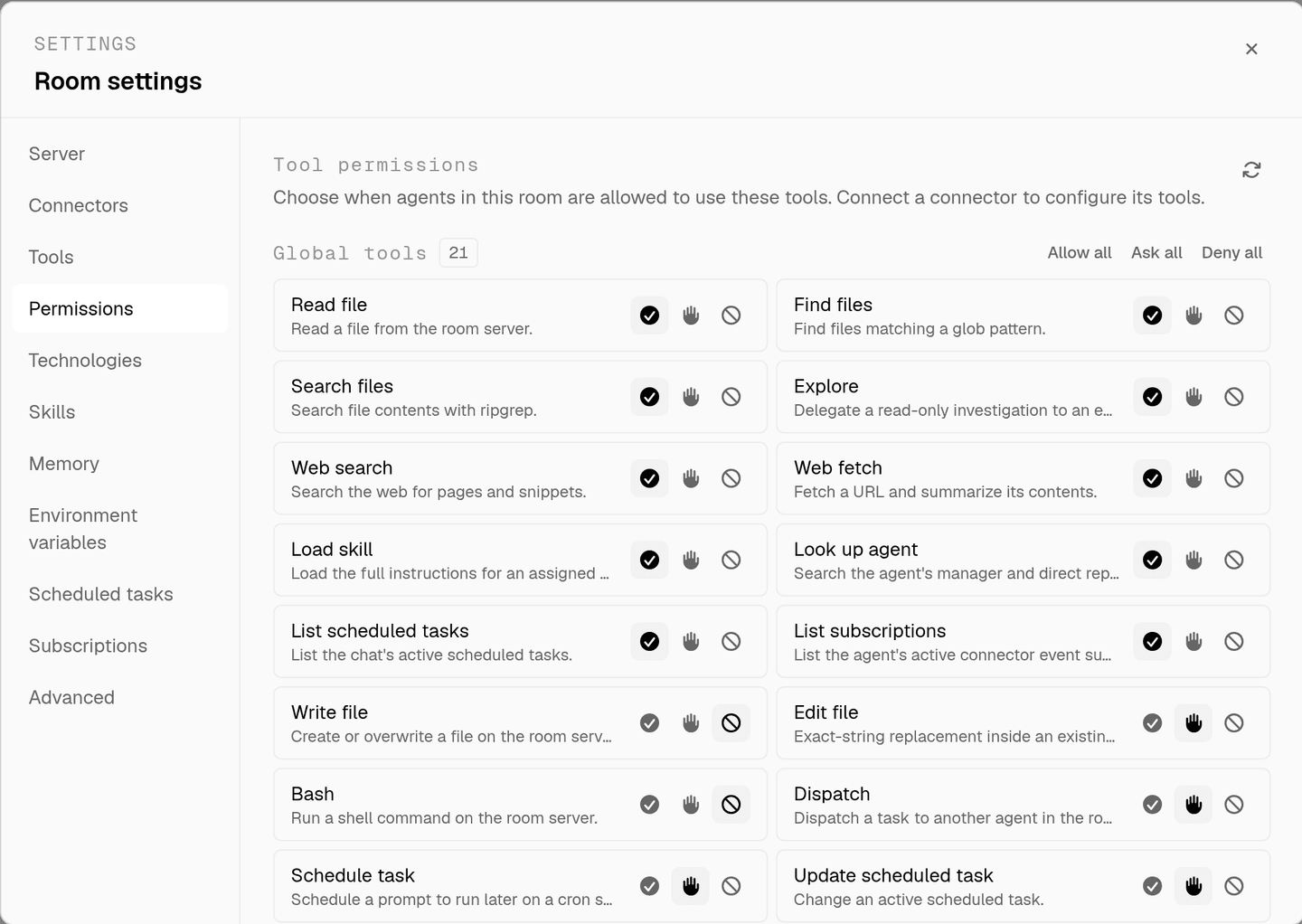
the full approval model, including what agents ask you mid-run, is on human in the loop, and room isolation is on isolated rooms.
faq
can an ai agent triage sentry issues?
yes. sentry_search_issues runs sentry query syntax, sentry_get_resource reads one issue by short id with its status, assignee and culprit, and sentry_update_issue resolves, ignores, unresolves or assigns it. the update is a mutating tool, so it asks before it runs.
can the agent see the actual error, not just the title?
yes. sentry_search_issue_events lists the individual events behind an issue, sentry_get_issue_tag_values shows which releases or browsers it hit, sentry_get_event_attachment pulls an attachment into the chat, and sentry_get_replay_details and sentry_get_profile_details read the session replay and profile metadata.
does it stop at reading, or can it fix the bug?
the room owns a server, so the same agent that read the stack trace clones the repository onto it, reproduces the failure over bash, writes the change, runs the tests, and opens the pull request. that is the step a monitoring assistant cannot take.
can an agent create projects or mint dsns?
sentry_create_project, sentry_create_team, sentry_update_project and sentry_create_dsn sit behind the create teams, projects and dsns scope, which is off by default. leave it off and those tools do not exist in the room. turn it on and each call still asks first.
how does an agent react to a new error as it happens?
sentry_subscribe attaches it to a project or a single issue. new, resolved, assigned, ignored and unresolved issues, new errors and issue comments then wake the agent in the chat where it subscribed, so a regression can be investigated while it is still happening.
spin up your first room.
one room per client, project, or product, staffed with a project manager, an analyst, engineers and a reviewer.