start using Notion with your agents
sign up, open a room, and authorise Notion from its connectors settings.
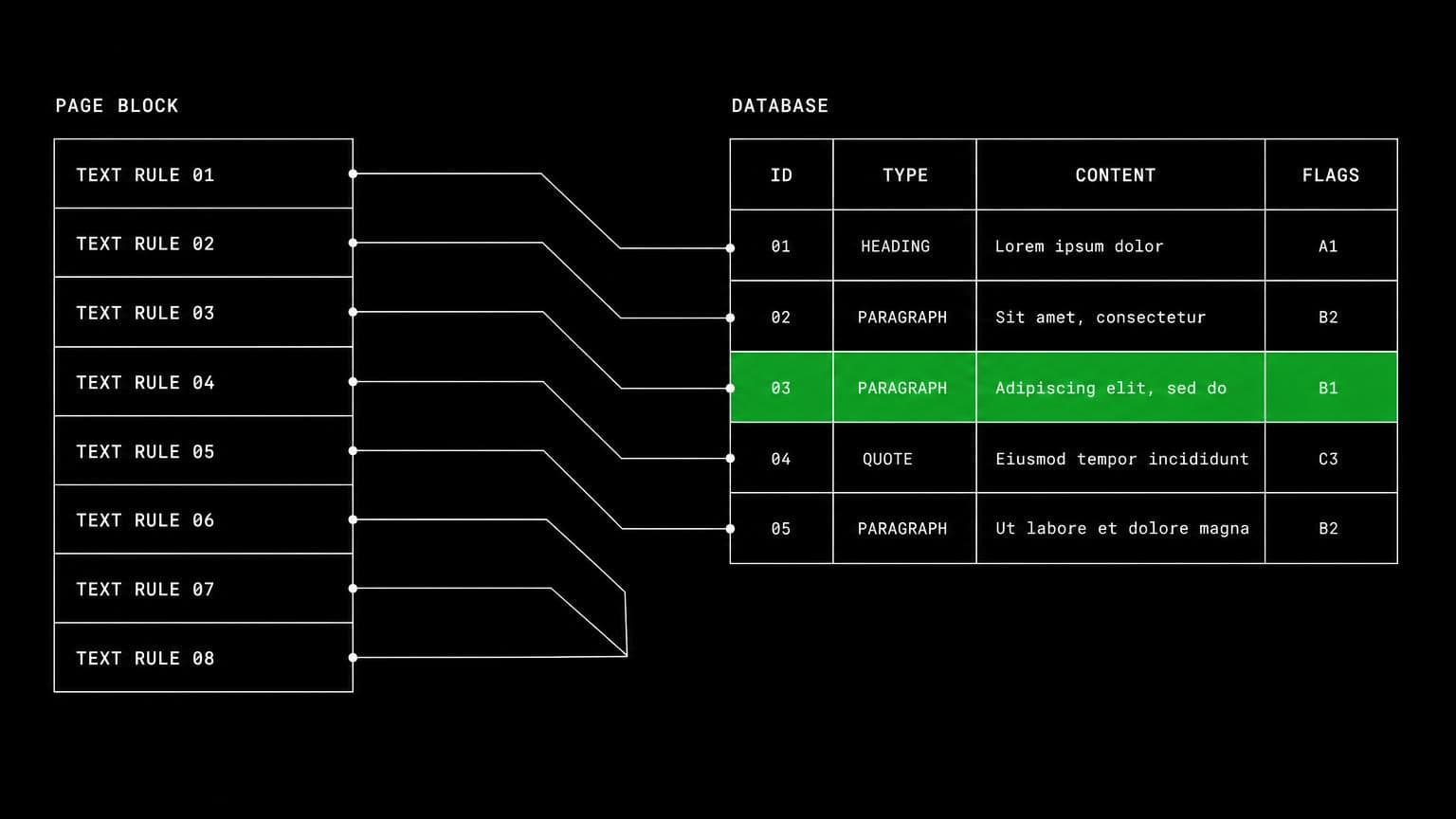
ai agent for notion: query the database, write the page back
connect notion to a room and its agents search the workspace, read pages as markdown, query data sources, create and update pages, and post comments.
- read tools
- 9
- write tools
- 10
- scopes
- 4
notion holds the parts of a project that never make it into a ticket: the spec, the decision log, the table someone maintains by hand. connecting it to a room lets an agent read that context properly and write back into it in the same structure.
reading a workspace, not scraping it
notion_search finds pages and data sources shared with the integration, and notion_fetch reads a page with its content as markdown, or a database, a data source, a view, or the bot's own identity. notion_query_data_sources runs filters and sorts over rows, notion_query_view runs a view's stored query so the agent sees what your team sees, and notion_query_meeting_notes searches ai meeting notes by title, attendee, or date. notion_get_comments and notion_get_users fill in the discussion and the people.
writing back in the same shape
notion_create_pages creates one or many pages under a parent, notion_update_page changes properties or markdown content, and notion_move_pages reparents them. notion_create_database, notion_update_data_source, notion_create_view and notion_update_view reach further into structure, which is why they share the same approval gate as everything else that changes state. notion_get_async_task polls the long-running operations notion hands back rather than pretending they finished.
comments as a lighter default
post comments is a scope of its own. a room can grant read plus comments and nothing else, and agents will answer on the page where the question was asked through notion_create_comment without ever being able to edit the page itself.
example tasks
- 01
read the spec page and write the implementation plan back underneath it.
the agent fetches the page as markdown, works out the plan against the repository on the room server, and creates a child page with the result.
notion_searchnotion_fetchnotion_create_pages - 02
go through the bug database and mark the ones already fixed in main.
it queries the data source with filters, checks each item against the repository, and updates the status property on the rows that are done.
notion_query_data_sourcesbashnotion_update_page - 03
reply on the roadmap page whenever someone comments on it.
the page subscription wakes the agent in this chat on new comments, it reads the thread, and it replies with the comment tool rather than editing the page.
notion_subscribenotion_get_commentsnotion_create_comment
what it will not do
an agent cannot delete a page, change workspace settings, or manage members. anything not shared with the integration in notion is invisible to it, and turning a capability group off in the room removes those tools from the agents immediately, with no reconnect needed.
what agents can call
every Notion tool an agent in a connected room can reach, split by whether it only reads or changes something. read tools are allowed by default, write tools stop for your approval, and the room's tool permissions can move any of them either way.
notion_searchSearch pages and data sources shared with the integration.
notion_fetchRead a page (with its Markdown content), database, data source, view, or the bot itself.
notion_query_data_sourcesQuery a data source's rows with filters and sorts.
notion_query_viewRun a view's stored filters and sorts and read the resulting rows.
notion_query_meeting_notesSearch AI meeting notes by title, attendee, or date.
notion_get_commentsRead the comments on a page or block.
notion_get_usersList workspace users or read one by id.
notion_get_async_taskPoll an async task returned by a long-running Notion operation.
notion_get_granted_scopesRead the connection's enabled capability groups.
notion_create_pagesCreate one or more pages under a page or data source parent.
notion_update_pageUpdate a page's properties, icon, cover, or Markdown content.
notion_move_pagesMove one or more pages to a new page or data source parent.
notion_create_databaseCreate a database with an initial data source and property schema.
notion_update_data_sourceRename a data source or change its property schema.
notion_create_viewCreate a table, board, list, calendar, timeline, or gallery view.
notion_update_viewRename a view or change its filters, sorts, and configuration.
notion_create_commentPost a comment on a page or reply to an existing discussion.
notion_subscribeSubscribe the agent to events on a Notion page, data source, or comment thread.
notion_unsubscribeCancel one of the agent's Notion event subscriptions.
what you grant
scopes are chosen when the room connects Notion, and they can be changed later by reconnecting. anything marked off by default stays off until someone deliberately turns it on.
- Read pages & databaseson by default
Search the workspace, read pages and their content as Markdown, read databases, data sources and views, run database and view queries, and read comments and workspace users.
- Create & edit contenton by defaultneeds content_read
Create and edit pages, move pages, create databases, change a data source's property schema, and create or edit views.
- Post commentson by defaultneeds content_read
Post comments on pages and reply to existing comment threads.
- Event subscriptionson by default
Let agents subscribe to Notion events (page, data source, and comment creations, content and property updates, moves, deletions, and lock changes) and receive a notification in the chat where they subscribed.
how to connect Notion
connecting Notion takes one oauth round trip, started from inside the room that needs it.
- open the room's connectors settings
connections belong to a room, not to your account and not to the team. open the room that needs Notion and go to its connectors panel. connecting it in one room leaves every other room untouched.
- authorise with a real account
any member of the room can start the oauth flow, and they authorise as themselves, so Notion records a real identity on every action instead of an anonymous shared bot.
- choose the scopes for this room
Notion grants a fixed set at install, and the room decides which of those groups its agents may actually use. turn a group off and the tools behind it stop existing for that room, no reconnect needed.
- the room's agents pick up the tools
every agent in that room can now call the Notion tools the granted scopes cover. mutating tools still stop for approval, and disconnecting takes the tools away again in one click.
data handling and security
the objection to an agent with write access is noise: a wrong edit, a wrong comment, a wrong merge. the answer is that nothing mutating happens without a person, and nothing crosses a room boundary.
- one connection, one room
the Notion credential is stored against the room it was authorised in. no tool in another room can read it, and there is no team-wide connection to inherit by accident.
- scopes bound at the tool layer
a Notion tool that needs a scope the room did not grant is not offered to the agent at all, so a model cannot talk itself into an action nobody authorised.
- approval before anything changes
mutating tools pause the run and wait for a human. you allow once, allow always for that room, or deny, and the agent carries on with the answer.
- an audit trail you can read
every call is a message in the room's chat with its arguments and its result, in the order it happened, so a surprising change is traceable rather than mysterious.
- revocation is one click
disconnect Notion and the tools disappear from the room immediately, along with the stored credential and any event subscriptions the agents had opened.
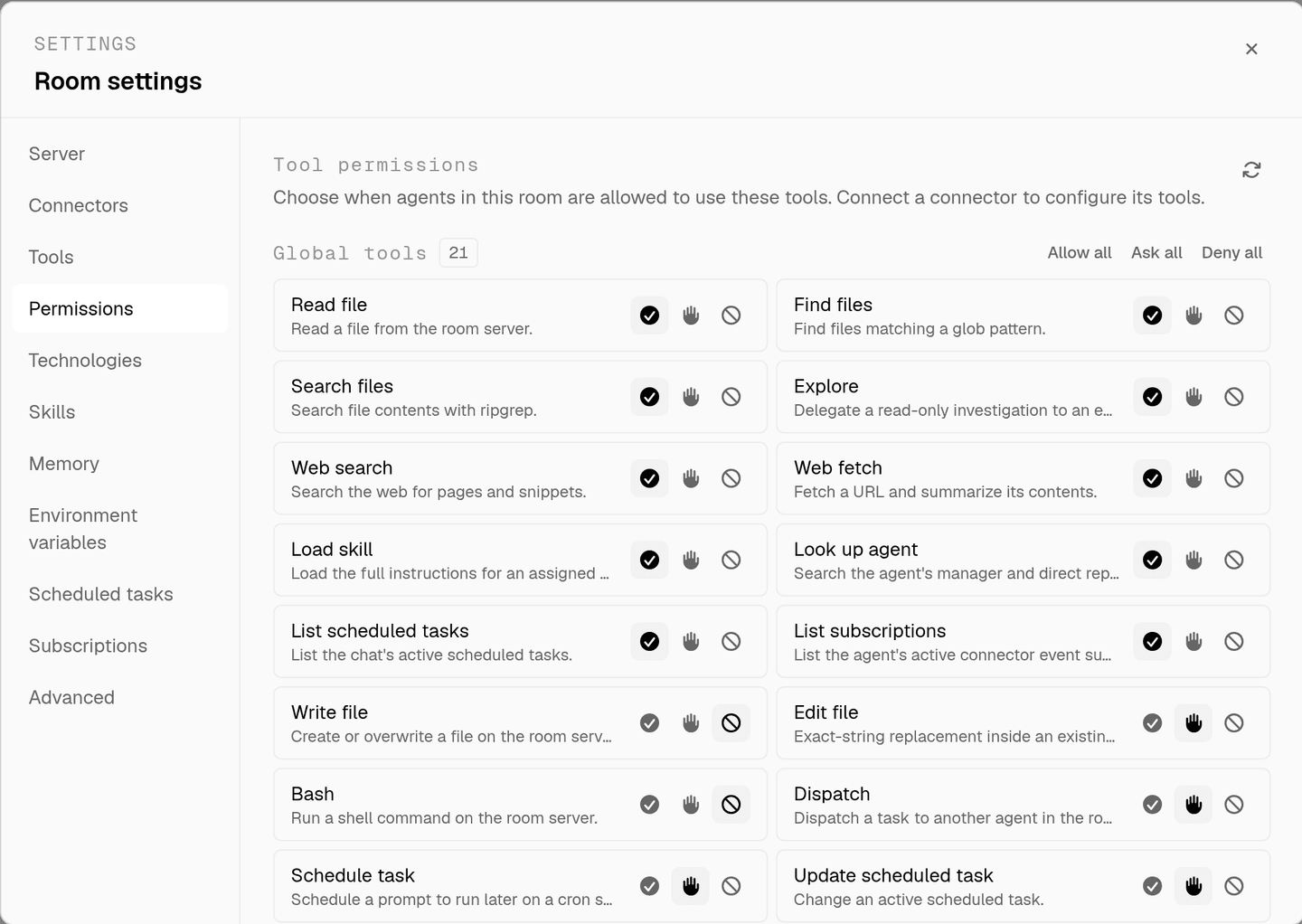
the full approval model, including what agents ask you mid-run, is on human in the loop, and room isolation is on isolated rooms.
faq
can an ai agent write pages in notion?
yes, with the create and edit content scope. notion_create_pages creates one or many under a page or data source parent, and notion_update_page changes properties, icon, cover, or the markdown content itself. both are mutating tools and ask before they run.
what does the notion integration actually see?
only the pages and data sources shared with the integration in notion. that sharing boundary is set in notion, not in aldena, so the smallest safe start is to share one workspace section and widen it once you can see what the agents do with it.
can agents query a database rather than reading pages one by one?
yes. notion_query_data_sources runs filters and sorts over a data source's rows, and notion_query_view runs a view's own stored filters and sorts. that means an agent reads your board the way your team sees it instead of reconstructing the query itself.
can an agent change a database schema?
notion_update_data_source renames a data source or changes its property schema, and notion_create_database creates a new one. those sit behind the create and edit content scope and stop for approval, because a property rename is felt by everything that reads the database.
can it comment instead of editing?
yes, and that is often the better default. post comments is its own scope, so a room can let agents reply on a page or a discussion thread through notion_create_comment while leaving page content entirely read only.
spin up your first room.
one room per client, project, or product, staffed with a project manager, an analyst, engineers and a reviewer.