start using Gmail with your agents
sign up, open a room, and authorise Gmail from its connectors settings.
ai agent for gmail: draft, label, and send on approval
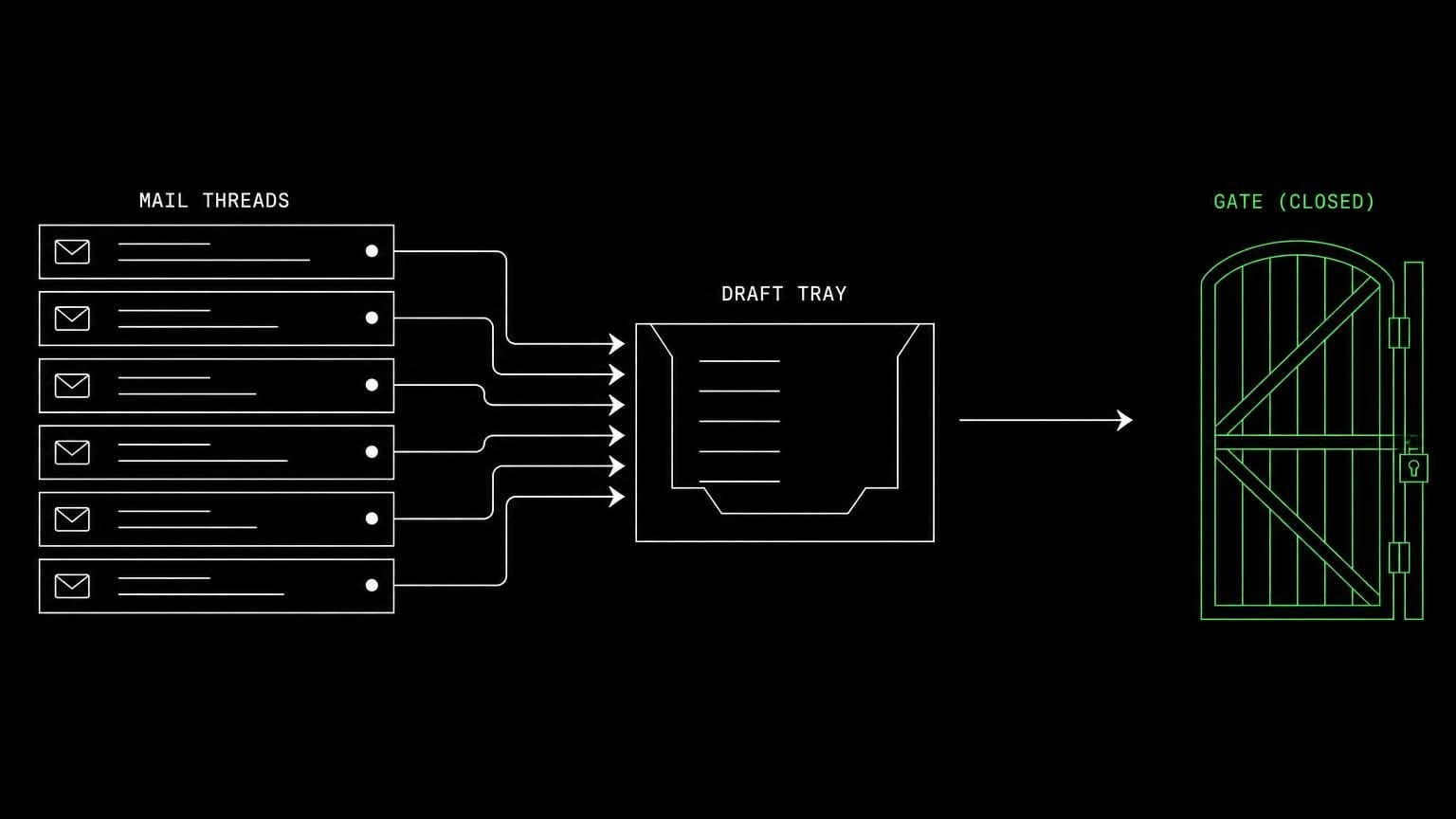
connect gmail to a room and its agents search threads with gmail query syntax, read messages, draft replies, manage labels, and send only on an opt-in scope.
- read tools
- 6
- write tools
- 10
- scopes
- 4
email is the connector where the difference between reading and acting matters most, so gmail splits into three scopes rather than two. read mail and labels covers search and reading. draft and label mail adds drafts and organisation. send email is separate again, off by default, and marked privileged, because a sent message cannot be recalled.
finding the thread
gmail_search_threads takes gmail query syntax, so an agent can ask for unread mail from a domain in the last week rather than scrolling. gmail_get_thread reads a thread with its messages, gmail_get_message reads one, gmail_list_drafts shows what is already waiting, and gmail_list_labels reads the mailbox's own labels rather than assuming yours match anyone else's.
drafting rather than sending
gmail_create_draft writes a message, optionally as a reply and with attachments, and leaves it in the mailbox for you. this is the setting most rooms run in: the agent does the reading and the writing, you do the sending. gmail_create_label, gmail_label_thread, gmail_unlabel_thread, gmail_label_message and gmail_unlabel_message keep the mailbox tidy while it works.
when you do want it to send
with the send scope on, gmail_send_message composes and sends in one step and gmail_send_draft sends something already prepared. both still stop for approval unless the room allows them outright. gmail_get_granted_scopes lets an agent check what it actually holds before it offers to send anything.
example tasks
- 01
go through yesterday's support mail and draft replies for the easy ones.
the agent searches the mailbox, reads each thread, and leaves a draft reply on the ones it is confident about, labelled so you can find them.
gmail_search_threadsgmail_get_threadgmail_create_draft - 02
label everything from the finance domain as accounting and tell me what is unpaid.
it creates the label if it is missing, applies it across the matching threads, and reports the invoices it found without touching the messages themselves.
gmail_search_threadsgmail_create_labelgmail_label_thread - 03
when a new message lands in the sales label, summarise it here.
the label subscription wakes the agent in this chat on new mail, and it reads the thread before writing the summary, without ever needing the send scope.
gmail_subscribegmail_get_threadgmail_get_message
what it will not do
an agent cannot delete mail, empty a trash folder, change mailbox settings, or manage filters and forwarding. attachments are read as metadata rather than pulled apart, and with the send scope off, nothing ever leaves the mailbox without you pressing send yourself.
what agents can call
every Gmail tool an agent in a connected room can reach, split by whether it only reads or changes something. read tools are allowed by default, write tools stop for your approval, and the room's tool permissions can move any of them either way.
gmail_search_threadsSearch mail threads with Gmail query syntax.
gmail_get_threadRead a thread and its messages.
gmail_get_messageRead a single message.
gmail_list_draftsList the mailbox's drafts.
gmail_list_labelsList the mailbox's user labels.
gmail_get_granted_scopesRead the connection's granted scopes.
gmail_create_draftCreate a draft message, optionally as a reply and with attachments.
gmail_send_messageCompose and send a message immediately, optionally as a reply. Sent mail reaches its recipients at once and cannot be recalled, unsent, or edited afterwards.
gmail_send_draftSend an existing draft immediately, exactly as it stands. Sent mail reaches its recipients at once and cannot be recalled, unsent, or edited afterwards.
gmail_create_labelCreate a new user label.
gmail_label_threadAdd labels to every message in a thread.
gmail_unlabel_threadRemove labels from every message in a thread.
gmail_label_messageAdd labels to a message.
gmail_unlabel_messageRemove labels from a message.
gmail_subscribeSubscribe the agent to events on a Gmail label or the whole mailbox.
gmail_unsubscribeCancel one of the agent's Gmail event subscriptions.
what you grant
scopes are chosen when the room connects Gmail, and they can be changed later by reconnecting. anything marked off by default stays off until someone deliberately turns it on.
- Read mail & labelson by default
Search threads, read threads and messages and their attachments' metadata, list drafts and labels.
- Draft & label mailon by defaultneeds mail_read
Create drafts (including replies and attachments), create labels, and add or remove labels on threads and messages.
- Send emailoff by defaultprivilegedneeds mail_write
Let agents send mail from this mailbox, either composed in one step or by sending a draft they prepared. Sent mail leaves the mailbox immediately and cannot be recalled or unsent. Leave off to keep agents at drafts you send yourself; when on, each send asks for your approval unless you allow it in the room's permissions.
- Event subscriptionson by default
Let agents subscribe to Gmail events (new mail, sent mail, label changes) and receive a notification in the chat where they subscribed.
how to connect Gmail
connecting Gmail takes one oauth round trip, started from inside the room that needs it.
- open the room's connectors settings
connections belong to a room, not to your account and not to the team. open the room that needs Gmail and go to its connectors panel. connecting it in one room leaves every other room untouched.
- authorise with a real account
any member of the room can start the oauth flow, and they authorise as themselves, so Gmail records a real identity on every action instead of an anonymous shared bot.
- choose the scopes for this room
the scopes are ticked before you are handed to Gmail, so the consent screen asks for exactly what the room needs and nothing more. a scope that depends on another cannot be ticked alone. the granted set is fixed once the connection exists, so widening it later means reconnecting.
- the room's agents pick up the tools
every agent in that room can now call the Gmail tools the granted scopes cover. mutating tools still stop for approval, and disconnecting takes the tools away again in one click.
data handling and security
the objection to an agent with write access is noise: a wrong edit, a wrong comment, a wrong merge. the answer is that nothing mutating happens without a person, and nothing crosses a room boundary.
- one connection, one room
the Gmail credential is stored against the room it was authorised in. no tool in another room can read it, and there is no team-wide connection to inherit by accident.
- scopes bound at the tool layer
a Gmail tool that needs a scope the room did not grant is not offered to the agent at all, so a model cannot talk itself into an action nobody authorised.
- approval before anything changes
mutating tools pause the run and wait for a human. you allow once, allow always for that room, or deny, and the agent carries on with the answer.
- an audit trail you can read
every call is a message in the room's chat with its arguments and its result, in the order it happened, so a surprising change is traceable rather than mysterious.
- revocation is one click
disconnect Gmail and the tools disappear from the room immediately, along with the stored credential and any event subscriptions the agents had opened.
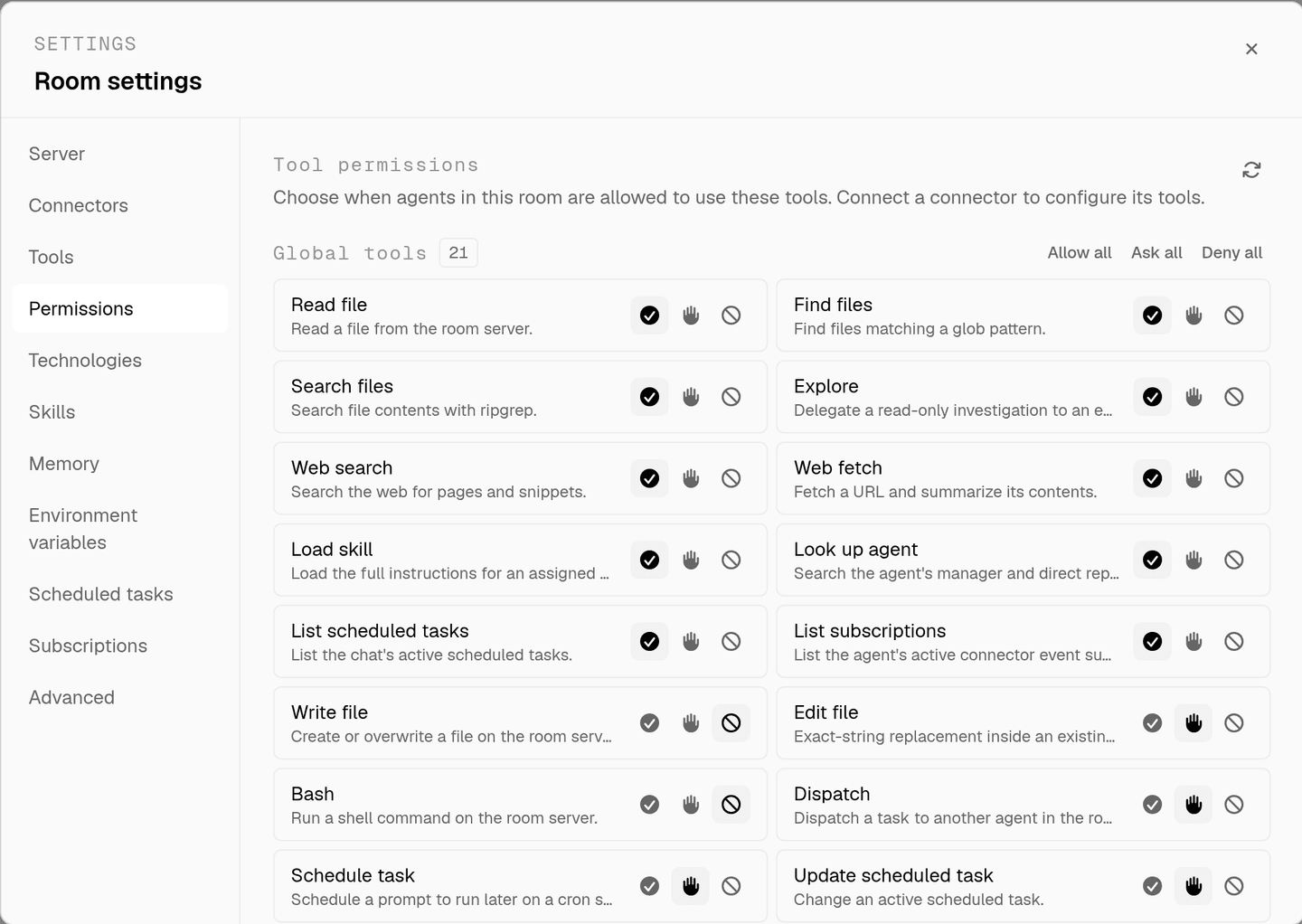
the full approval model, including what agents ask you mid-run, is on human in the loop, and room isolation is on isolated rooms.
faq
can an ai agent send email from my gmail account?
only if you turn on the send email scope, which is off by default and marked privileged. leave it off and agents stop at drafts you send yourself. turn it on and each send still asks for your approval unless you allow it in the room's tool permissions.
why is the send scope treated differently from the others?
sent mail leaves the mailbox at once and cannot be recalled, unsent, or edited. that is the one action on this connector with no undo, so it sits behind an opt-in scope that only a team owner or admin, or the member who connected the account, can turn on.
what can the agent do with read access alone?
search threads with gmail query syntax, read threads and messages and their attachment metadata, and list drafts and labels. that covers triage, summaries and finding the thread where something was agreed, and it changes nothing in the mailbox.
is gmail available on every room?
gmail is gated per room and turned on by request. until access is granted for a room, the connector shows a request link instead of an authorise button, so the mailbox tools simply do not exist for that room's agents.
can an agent organise a mailbox with labels?
yes, with the draft and label mail scope. gmail_create_label makes a label and gmail_label_thread, gmail_unlabel_thread, gmail_label_message and gmail_unlabel_message move mail around. those are mutating tools, so they ask before they run.
spin up your first room.
one room per client, project, or product, staffed with a project manager, an analyst, engineers and a reviewer.