what it actually takes to self-host an always-on ai agent
the real bill of materials behind a self-hosted ai agent: gateway, sandbox, memory, browser, auth, and cost. and what changes when that job is someone else's.

the mac mini on the desk is an infrastructure project
A lot of engineers are buying Mac minis right now. The plan is the same each time. Keep a personal AI agent running around the clock, on a machine you own, in a corner of the desk. Cloudflare's engineering team took that idea and published Moltworker, a self-hosted AI agent running on their developer platform. They took Moltbot, an open source personal agent, and moved it off the desk and onto Workers, Sandboxes, R2, Browser Rendering, and Zero Trust Access.
It is a strong piece of engineering writing. It is also the clearest list I have read of what an always-on agent needs underneath it.
The agent loop itself is a few hundred lines of code. Everything around it is infrastructure, and that infrastructure is what keeps the agent working at three in the morning while you sleep. The parts list barely changes with the platform you pick: a model gateway, a sandbox, persistent memory, a browser, an auth layer, and a bill.
I run a platform that operates this class of infrastructure for whole agent teams, so I read the Moltworker post closely. For each part on that list I will say what it takes to build and run yourself, and then what the managed version looks like.
a model gateway, so the brain stays swappable
The neatest detail in the Cloudflare build is how little the agent had to change. Setting ANTHROPIC_BASE_URL sends every model call through their AI Gateway. Moltbot's own code stays exactly as it was.
A gateway then does three jobs a hardwired provider call cannot. It keeps API keys in one place instead of spreading them across env files. It gives you one balance to buy credits against, so you are not holding an account at every provider. And it logs every request, so you can see what the agent spent and what it spent it on.
Those are the requirements for this layer, whatever you build it with. Keys in one place. Spend visible in one place. And model swaps that need no redeploy, because an always-on agent will outlive the model it launched on.
Self-hosting this layer means one of two things. You run your own proxy and keep it patched. Or you call a provider SDK, a software development kit, directly. Then you rewrite that code the first time the provider deprecates something. Plenty of people skip this layer on day one. Nobody who has run an agent for six months still thinks it was skippable.
a sandbox, because the agent will run code
An agent that only chats needs none of this. An agent that acts installs packages, edits files, and runs the code it just wrote. It needs somewhere to do that, and that somewhere should not be the machine holding your SSH keys.
Moltworker runs the agent inside Cloudflare's Sandbox SDK. Those are containers with an API for creating directories, executing commands, and running generated code. They are isolated from the Worker that supervises them. Compatibility turns out to be a smaller problem than people assume. Cloudflare cites an experiment in the post. They ran the 1,000 most popular npm packages in that runtime. Around 1.5 percent genuinely failed, once build tools and browser-only libraries were excluded. That is their figure, measured at the time they published.
Sandboxing is the step self-hosters skip most often, and skipping it is the most dangerous. Docker on the machine you already use is a packaging convenience, not a security boundary. Generated code is untrusted input, always.
Doing this properly takes four things. An isolation layer you trust. Resource limits, so a runaway build cannot take the host down with it. Egress rules, so the agent cannot send your data anywhere it likes. And a plan for cleaning up the containers that collect when an agent works all day. None of it is unusual. All of it is work. If you skip it, the machine at risk is the one holding your credentials.
persistent memory, because compute forgets
Containers are designed to be thrown away. That is a problem for an agent whose whole value is that it remembers you. Moltworker mounts an R2 bucket into the sandbox as a filesystem partition. Conversation history and everything the agent has built up then survive every restart. The rule is that compute can die at any moment and the state must not.
The harder question is what to store. Agent state is really three different things: a transcript of what happened, durable facts the agent learned, and the working files it produced. The easy design treats the transcript as the memory. It fails the same way every time. The transcript grows without limit. Search over it gets noisier. The agent starts repeating something it half-said three weeks ago, as if it were still true.
Building memory for agent teams taught me to do the opposite. Memory has to be written on purpose, one short fact at a time. It also has to be capped, so that writing a new fact forces an old one out. A short list of facts the agent keeps current works better than a long transcript it has to search. That holds whether the storage behind it is an R2 bucket or anything else.
a browser, because half the web has no api
Sooner or later a personal agent is asked to use a page with no API behind it: a booking flow, a dashboard, a form. This is the most involved engineering in the Cloudflare post. Their Browser Rendering service gives you a remote headless Chromium over an API. Headless means the browser runs with no window on screen. The team then built a proxy for CDP, the Chrome DevTools Protocol that browsers expose for automation. That proxy runs from the sandbox, through the Worker, out to the remote browser. They exposed it to the agent as a skill. Moltbot then drives what it thinks is a local browser, with no changes to Moltbot itself.
Look at the length of that chain before you decide to copy it at home. The self-hosted version is a headless Chromium running next to the agent. It uses a lot of memory, it crashes, and it needs its own security patches. More sites now detect and block automated browsers, so pages that worked last month stop working. It can be done, and it will cost you hours every week. Of the six parts here, the browser is the one I would hand to somebody else first.
auth, because always-on means always reachable
A self-hosted agent is a service on the public internet. An admin UI, API endpoints, webhook receivers, all standing open around the clock. Moltworker puts Zero Trust Access in front of everything. Policy is enforced at the edge. The origin then validates the issued JWT, a signed token, on every request instead of trusting the network. That is the right design, and it covers half the problem.
The other half is what the agent may do with the credentials it already holds. Home-built setups usually copy the first half from a checklist and skip the second one completely. The second half is the one that decides whether you can leave the agent running while you sleep.
An always-on agent needs its own rules for tool calls. Some calls should run freely. Some should stop and wait for a person. Some should be blocked outright, and anything you cannot undo belongs in that last group. If you build nothing else beyond the Cloudflare parts list, build this.
the bill, and the line item nobody prices
Cloudflare is honest about cost, and the numbers favor them. As the post describes it, the sandboxes need a paid Workers plan. The AI Gateway is free, and R2's free tier covers a personal agent's state comfortably. Those are Cloudflare's published prices at the time they wrote that post, and provider pricing moves. The hardware path works out differently. You pay for a Mac mini up front, then electricity forever.
Either way, within a few weeks the token spend is larger than the infrastructure cost. Know that before you spend a weekend optimizing the wrong line item.
Neither invoice prints the largest cost, which is your attention. Self-hosting makes you the site reliability engineer for a service with one user. Chromium needs patching. Keys need rotating. The disk fills up. A provider changes an API. You are the only person who can deal with any of it.
If tinkering is the point, that is the hobby working as intended, and I mean that without irony. If output is the point, this time is pure overhead, and it grows every time you add a capability.
how this works in aldena
I built aldena to be this same stack, with the setup already done for you. There is one structural difference. aldena runs a team of agents rather than a single assistant. Part for part, the mapping is close to one to one.
The gateway layer is model choice per agent against one prepaid balance, charged at the provider's list rate. Every supported model is priced on the model pricing page.
The sandbox is the room, which is aldena's word for one project workspace. Every isolated room gets a dedicated server. It comes in a couple of sizes and is billed by the hour, with the current specs and rates on the pricing page. Inside it, agents clone the repository, run commands, and install what the project needs, from node and docker to postgres, chrome, and playwright. Those last two are the browser piece, a real Chromium the agents drive on the room's own machine.
Memory is two durable layers, one private to each agent and one shared by the room. Both are capped by design and both are readable in a Memory tab. That is the write-on-purpose rule from above, shipped as a feature (agent memory).
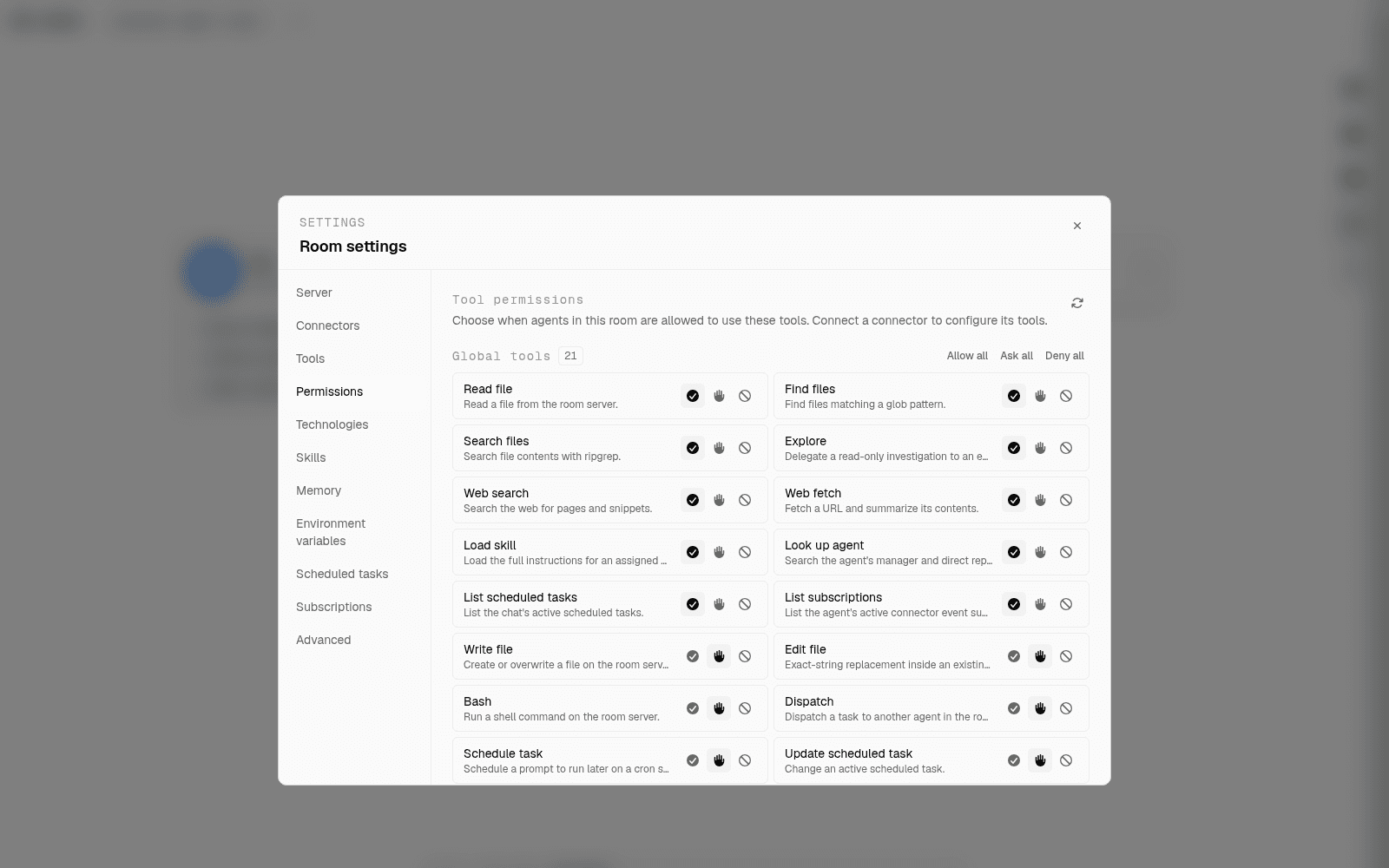
The auth layer is where I have the clearest rules. Every tool an agent can call carries an allow, ask, or deny policy. A paused run waits for your answer without losing its place. Engineering work arrives as an open pull request. The merge tool sits under the same policy, and the delivery role does not merge its own request (human in the loop).
Always-on work follows the same rules. Agents schedule their own recurring work, and a Scheduled tasks tab lists every one of those jobs, with an off switch. Delivery goes where the work belongs, into a connected account such as GitHub, Jira, or Slack. Each connection belongs to one room, so one project's credentials never reach another project.
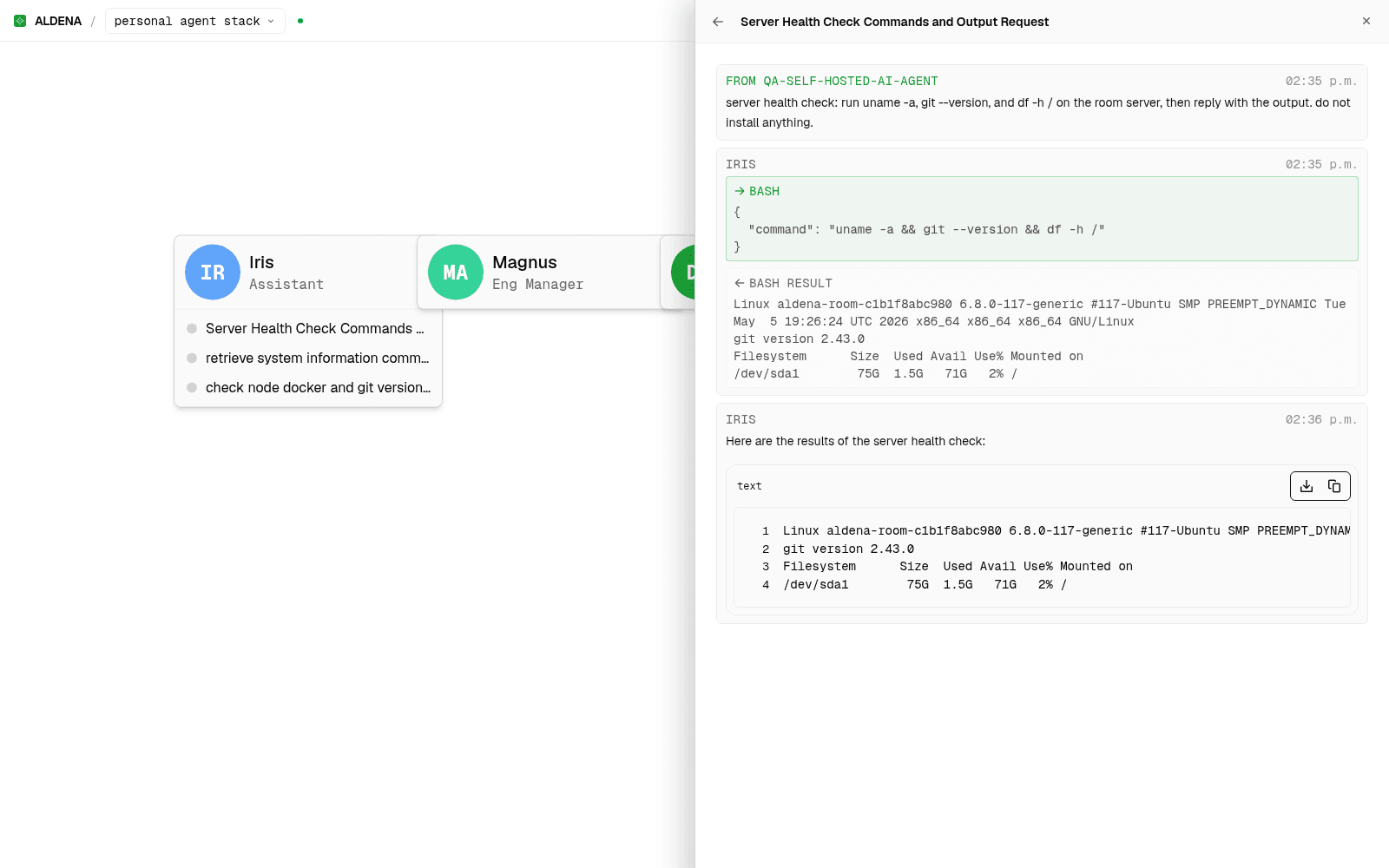
The team difference matters more than any single layer. A self-hosted personal agent is one worker with one context. A room holds a roster of prebuilt roles arranged in a hierarchy. A request goes out to the specialists who should handle it, and the results come back reviewed. I cover that properly in how to build an ai agent team and ai agent orchestration.
The bill behaves the way infrastructure should. Model and server usage meter against the prepaid balance. When the balance runs out, work pauses instead of running up a bill you did not expect.
when self-hosting is still the right call
Build it yourself when the stack is the point. Maybe you want to own every layer, learn how the pieces fit, or keep state on hardware you control. If so, the Moltworker writeup is the best current guide to the work involved. Cloudflare says plainly that it is a proof of concept to learn from rather than a product. You will finish it understanding agents better than any managed platform can teach you.
Hire the team when the output is the point. Use the CDP proxy section of that post to decide. If reading it made you want to build one yourself, self-host and enjoy every minute. If it made you tired, buy the infrastructure from somebody else. Use the six pieces above as your checklist for judging whoever sells it to you.
spin up your first room.
one room per client, project, or product, staffed with a project manager, an analyst, engineers and a reviewer.