start using RabbitMQ with your agents
sign up, open a room, and install RabbitMQ from its technologies tab.
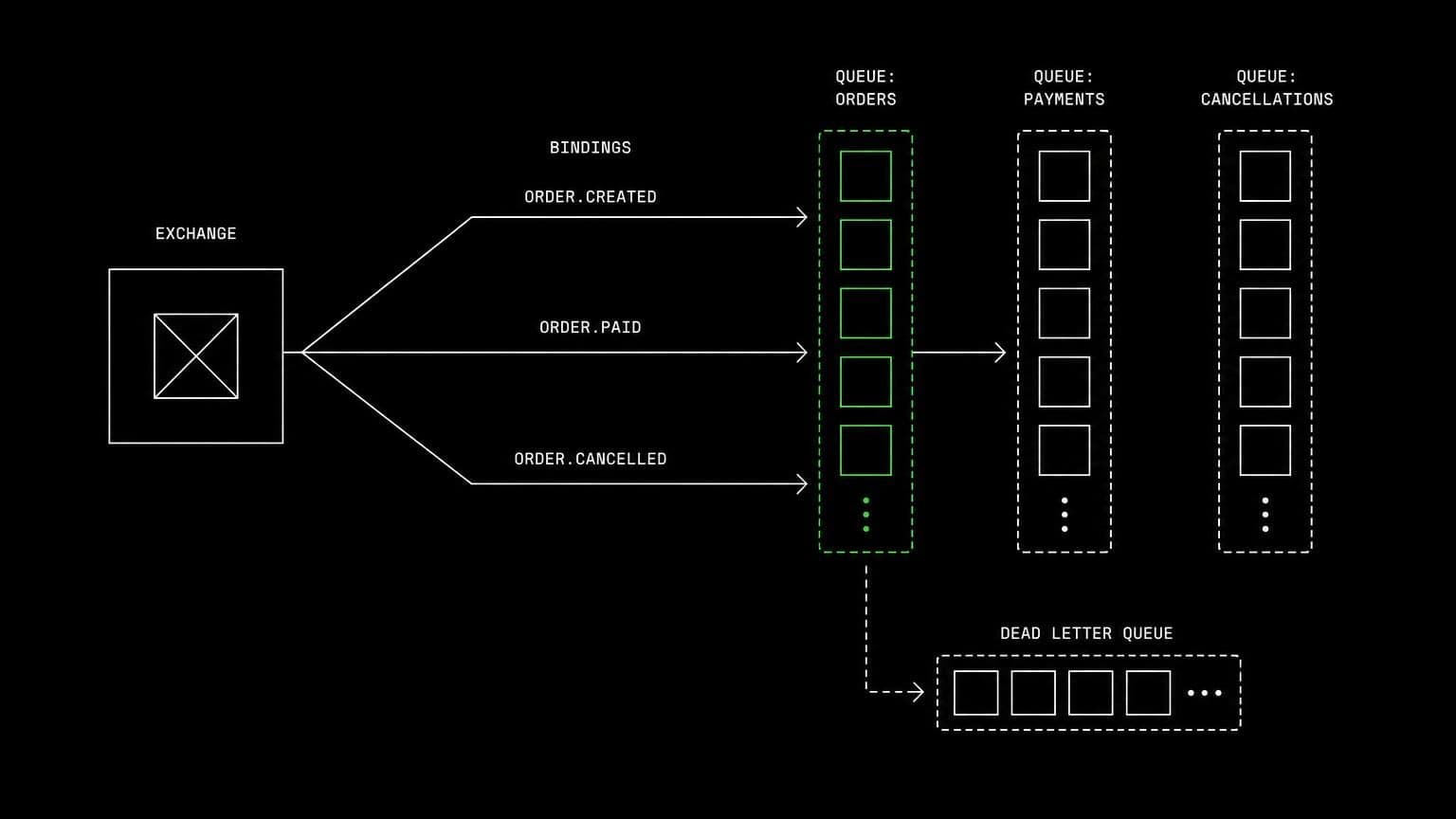
rabbitmq ai agent: a live broker for testing queues and consumers
install rabbitmq on a room's server and its agents publish messages, run consumers, inspect queues with rabbitmqctl, and prove a retry path actually works.
- runs on
- room server
- installed
- per room
- category
- broker
message queue bugs are delivery bugs, and delivery is what a fake broker gets wrong. installing rabbitmq on a room's server means an agent can publish a message and watch what actually happens to it.
what agents do with it
once it reports installed, the broker is running on the room's machine and rabbitmqctl is on the path. agents publish into an exchange, run the project's consumer, and inspect queues, bindings and unacknowledged counts. when a message does not arrive they check whether the routing key matched the binding rather than adding logging and hoping. when a retry loops forever they watch the dead letter path do its job or fail to.
proving the failure path
the useful test is not the happy one. an agent can kill a consumer mid-message on the room server and confirm the message is redelivered, or acknowledge early on purpose and show the message being lost. those are experiments a live broker allows and a mock cannot.
example tasks
- 01
messages are disappearing between the publisher and the worker. find out where.
the agent publishes on the room's broker, inspects the bindings and queue depths with rabbitmqctl, and shows the routing key that matches nothing.
bashreadedit - 02
prove the retry and dead letter setup actually works.
it publishes a message that fails on purpose, watches the redeliveries on the room machine, and confirms where the message lands after the limit.
bashgrep
what to know before installing
the room needs a paid server tier, and the broker plus erlang plus an application is a case for the 8 gb tier. the install is one of the longer ones in the catalog because of the erlang packages, and it streams its status from the technologies tab as it runs.
how to install RabbitMQ
RabbitMQ is installed per room from the technologies tab, not once per team and not on your laptop.
- give the room a server
technologies are installed on real hardware, so the room needs a 2 GB, 4 GB, or 8 GB tier. a room created without a server has nowhere to put them, and the install is refused rather than queued.
- open the technologies tab
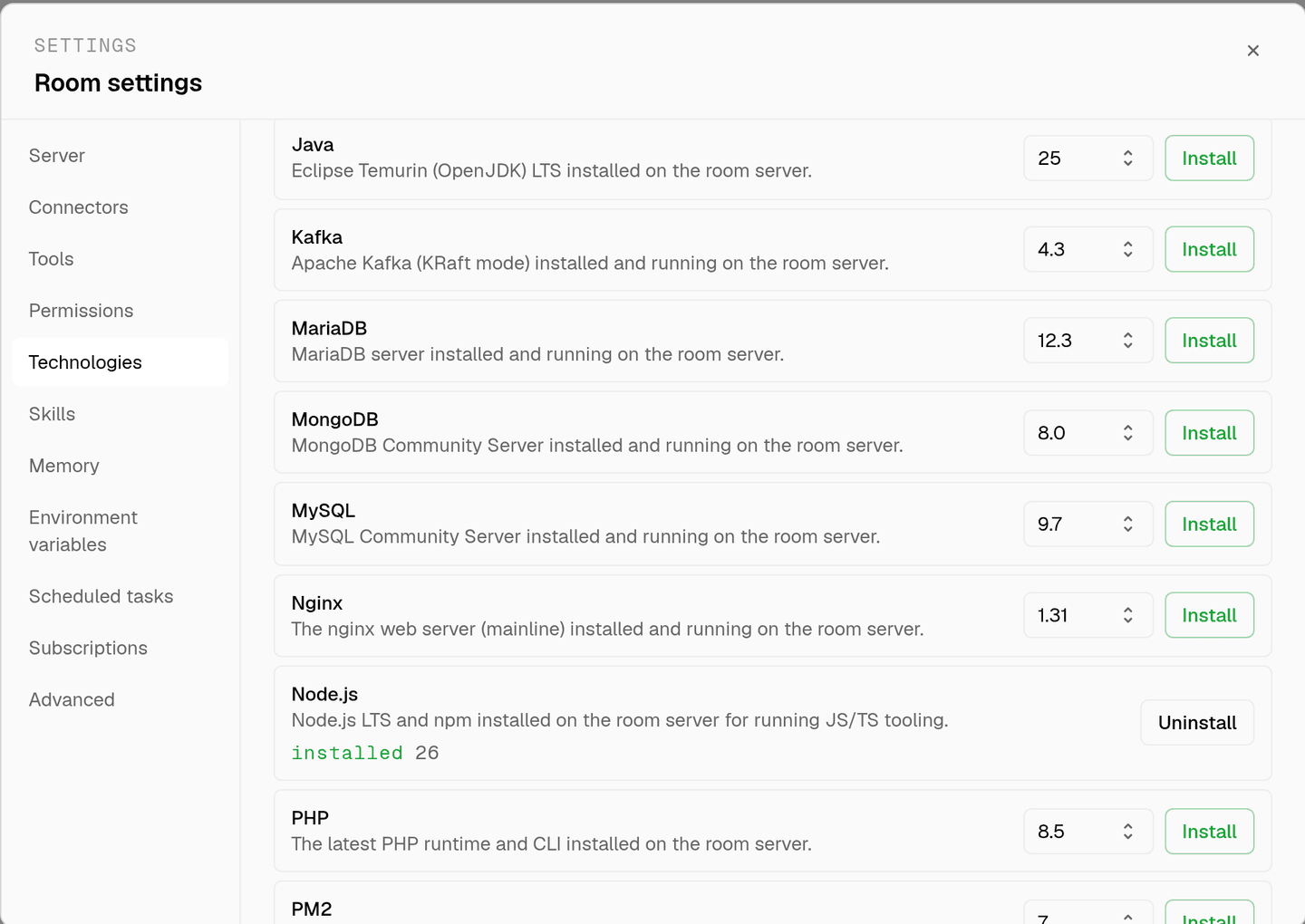
room settings lists every installable technology with its status. pick RabbitMQ and the install is queued for that room's server alone.
- watch the install run
the room streams the status through pending, installing, and installed, and a failed script surfaces its error instead of leaving the room in an unknown state.
- agents use it through bash
once it reports installed, every agent in the room reaches RabbitMQ with the bash tool, on the same filesystem as the checkout they are working in. uninstalling runs the teardown script and takes it away again.
where RabbitMQ actually lives
each room owns a server for its whole life, and the technologies tab is how you decide what is on it. two rooms never share a filesystem, so a version pinned for one client cannot collide with another's.
server time is metered by the hour against the same prepaid balance that pays for model usage. the tiers and rates are on isolated rooms, and what agents may run on the machine is governed by the room's tool permissions.
faq
what does installing rabbitmq on a room give the agents?
a running rabbitmq broker on that room's own machine, with rabbitmqctl on the path. agents publish messages, run the project's consumers, and inspect queues, bindings and unacknowledged counts instead of reasoning about them.
why does message work need a real broker?
because the failures are in the delivery semantics. a message that is acknowledged too early, a binding that does not match the routing key, a dead letter exchange that was never declared. all three are visible on a live broker and invisible in a unit test with a fake.
does it install erlang too?
yes. the install pulls the erlang packages rabbitmq needs and then the broker itself, enables the service, and verifies it is actually running before reporting success. that is the heaviest part of the install and it is handled for you.
does the queue state survive between sessions?
yes. the room's server stays with the room for its life, so a declared exchange is still declared next time. uninstalling stops the broker, removes the packages, and clears its data and log directories.
spin up your first room.
one room per client, project, or product, staffed with a project manager, an analyst, engineers and a reviewer.