start using Node.js with your agents
sign up, open a room, and install Node.js from its technologies tab.
node.js ai agent: agents that install, build, and run your js app
install node.js on a room's server and its agents get node, npm and npx through the bash tool, so they install dependencies, run scripts, and start the app.
- runs on
- room server
- installed
- per room
- category
- runtime
node.js is a technology, which in a room means a real install on real hardware rather than a capability an agent claims to have. once it reports installed, node, npm and npx are on the path of that room's server and every agent in the room reaches them through the bash tool.
what agents do with it
the useful pattern is the loop, not the single command. an agent clones the repository onto the room server, runs npm ci when a lockfile is present or npm install when it is not, runs the package script the project actually uses, reads the failure, edits the file, and runs it again. because the process runs on the room's machine, the agent sees real stack traces and real exit codes instead of reasoning about what the code probably does.
the matching skill
node.js ships with a skill of the same name. skills load only for the agents you assign them to, so the engineer who works your monorepo carries the guidance on npm ci and package scripts, and the analyst in the same room does not. try to assign the skill before the technology is installed and the assignment is refused rather than failing later mid-run.
example tasks
- 01
install the dependencies and get the test suite passing.
the agent installs from the lockfile, runs the suite, reads the failures, and fixes them on the room server before reporting what changed.
bashreadedit - 02
start the app and tell me what the health endpoint returns.
it starts the server on the room machine, waits for the port, calls the endpoint from the same box, and reports the real response body.
bashgrep
what to know before installing
the room needs a paid server tier, because there is nowhere to install node on a room without one. installs are queued per room and stream their status, so a failed script surfaces its error instead of leaving the room in an unknown state. uninstalling runs the teardown script and takes node, npm and the npm cache with it.
how to install Node.js
Node.js is installed per room from the technologies tab, not once per team and not on your laptop.
- give the room a server
technologies are installed on real hardware, so the room needs a 2 GB, 4 GB, or 8 GB tier. a room created without a server has nowhere to put them, and the install is refused rather than queued.
- open the technologies tab
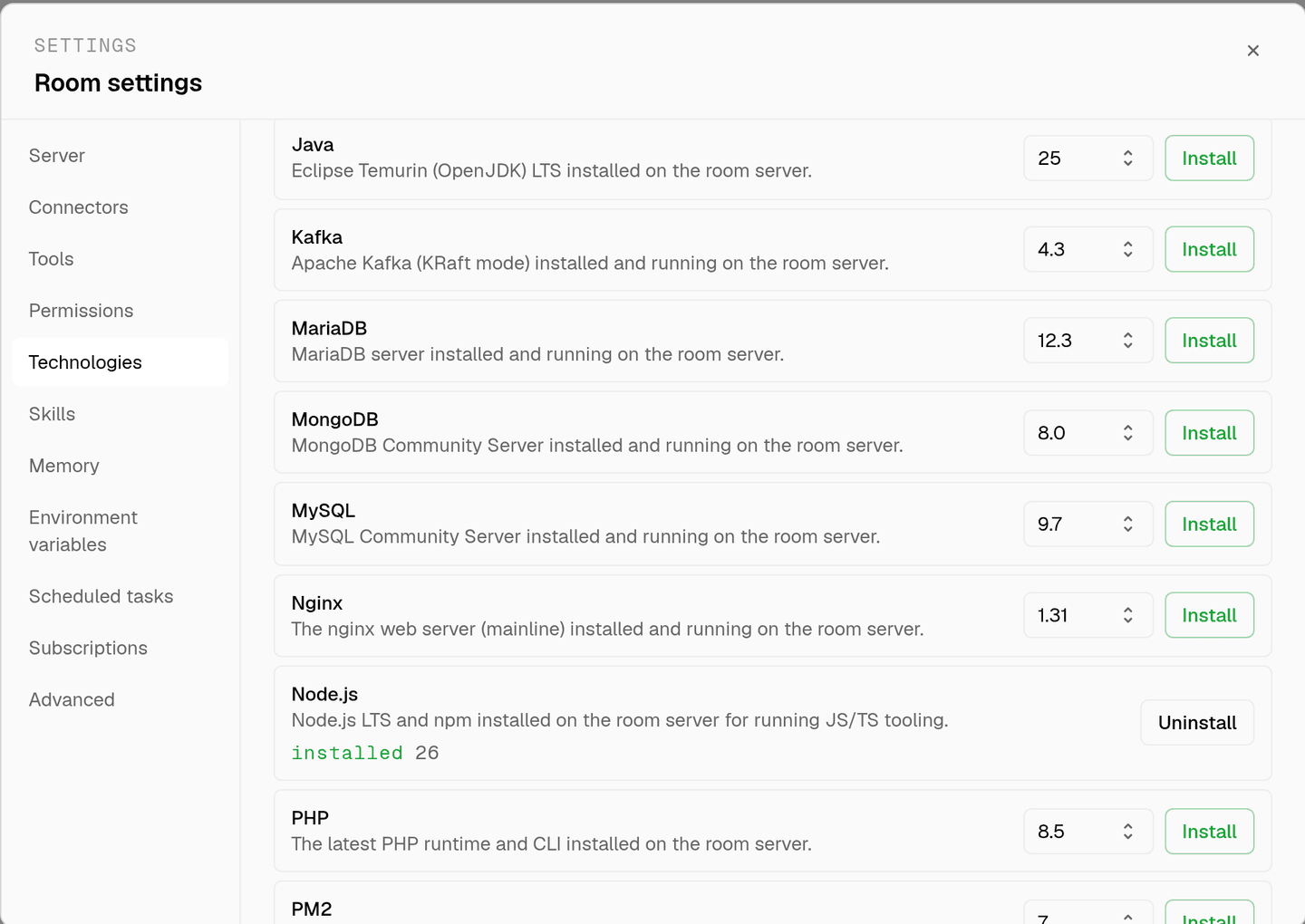
room settings lists every installable technology with its status. pick Node.js and the install is queued for that room's server alone.
- watch the install run
the room streams the status through pending, installing, and installed, and a failed script surfaces its error instead of leaving the room in an unknown state.
- agents use it through bash
once it reports installed, every agent in the room reaches Node.js with the bash tool, on the same filesystem as the checkout they are working in. uninstalling runs the teardown script and takes it away again.
where Node.js actually lives
each room owns a server for its whole life, and the technologies tab is how you decide what is on it. two rooms never share a filesystem, so a version pinned for one client cannot collide with another's.
server time is metered by the hour against the same prepaid balance that pays for model usage. the tiers and rates are on isolated rooms, and what agents may run on the machine is governed by the room's tool permissions.
faq
what does installing node.js on a room actually give the agents?
node, npm and npx on the path of that room's server, reachable through the bash tool. agents install dependencies, run package scripts, and start the app on the same machine that holds the checkout, so a build failure is something they can see rather than guess at.
is node.js installed once for my whole team?
no. technologies are installed per room from the technologies tab, on that room's own server. one room can run node while another has only python, and neither install touches the other, because two rooms never share a filesystem.
which version of node gets installed?
the install script pulls the current lts line from nodesource and prints node --version at the end, so the run log records exactly what landed. if node is already on the machine the script exits early rather than installing over the top of it.
do other technologies depend on node.js?
yes. pnpm, turborepo, playwright, agent browser and pm2 all check for npm first and refuse to install without it, with a message telling you to install node.js in the room first. installing node.js before them avoids that round trip.
spin up your first room.
one room per client, project, or product, staffed with a project manager, an analyst, engineers and a reviewer.