start using MongoDB with your agents
sign up, open a room, and install MongoDB from its technologies tab.
mongodb ai agent: a mongodb server on the room's own machine
install mongodb community server on a room's server and its agents load fixtures, run queries and aggregations, check indexes, and test against a live instance.
- runs on
- room server
- installed
- per room
- category
- datastore
document databases are unforgiving of assumptions, because the shape of the data is whatever was written. installing mongodb on a room's server gives an agent the one thing that settles those arguments: the ability to run the query and look.
what agents do with it
once it reports installed, mongod is running on the room's machine. agents point the application at localhost, load fixture documents, and run finds and aggregation pipelines against them. for an aggregation that returns the wrong count, an agent runs the pipeline one stage at a time and reads what each stage emits, which is how the stage that drops documents gets found rather than guessed.
indexes and explain
an index that exists in the migration is not an index that exists in the database. with mongodb on the room server an agent lists the actual indexes, runs an explain, and reports which query is still doing a collection scan. that is a claim it can back rather than a suggestion.
example tasks
- 01
the aggregation returns fewer orders than the dashboard. find the stage that drops them.
the agent loads sample documents into the room's mongodb, runs the pipeline stage by stage, and names the match that is filtering on a field some documents never had.
bashreadedit - 02
check every query in the repo has an index behind it.
it lists the indexes on the room's instance, runs explain over the queries it found in the code, and reports the ones still scanning the collection.
grepbash
what to know before installing
the room needs a paid server tier, and mongodb beside an application is a reason to choose the 8 gb tier. the install adds the mongodb apt repository, installs the server, and enables the service, streaming its status from the technologies tab as it goes.
how to install MongoDB
MongoDB is installed per room from the technologies tab, not once per team and not on your laptop.
- give the room a server
technologies are installed on real hardware, so the room needs a 2 GB, 4 GB, or 8 GB tier. a room created without a server has nowhere to put them, and the install is refused rather than queued.
- open the technologies tab
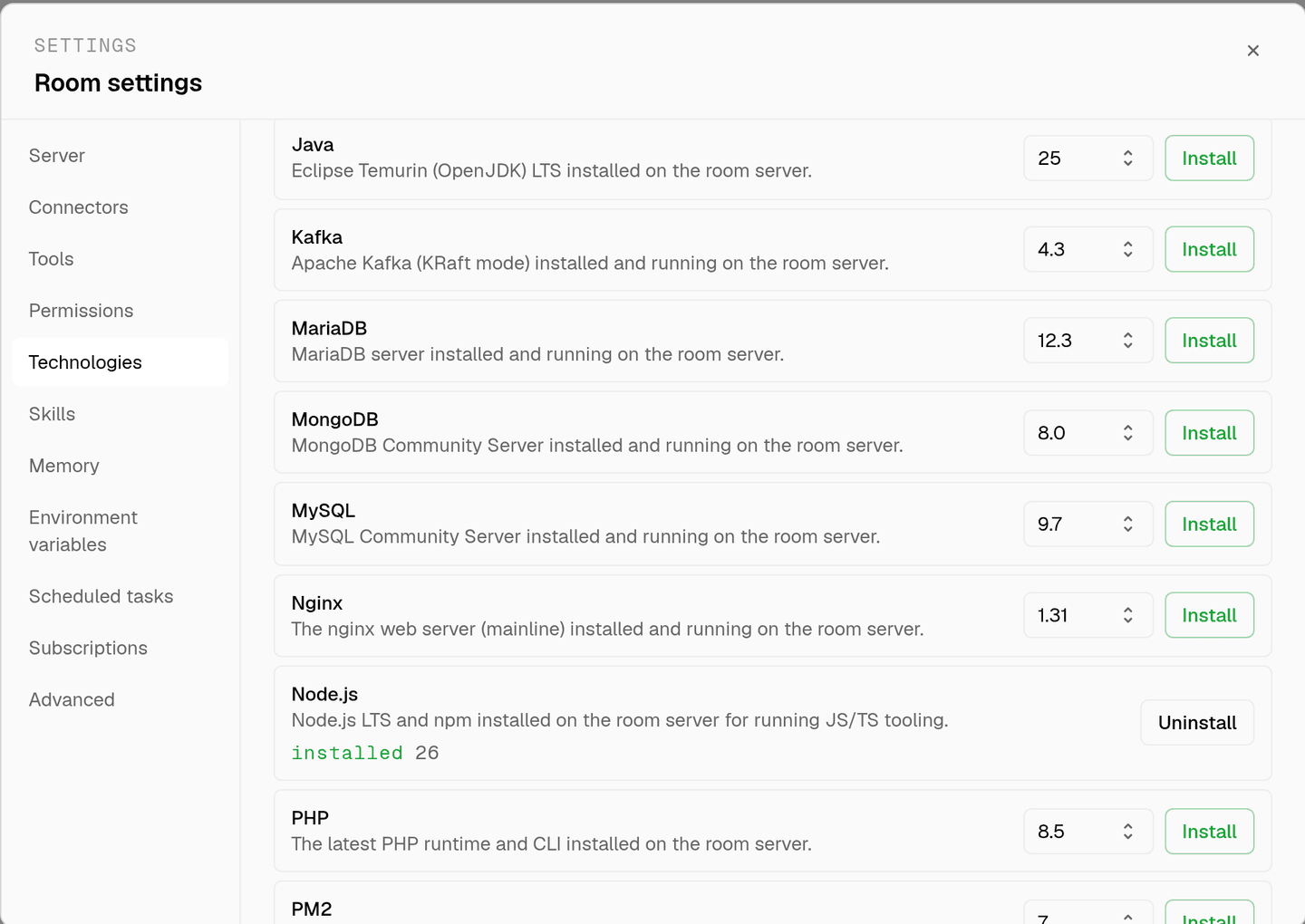
room settings lists every installable technology with its status. pick MongoDB and the install is queued for that room's server alone.
- watch the install run
the room streams the status through pending, installing, and installed, and a failed script surfaces its error instead of leaving the room in an unknown state.
- agents use it through bash
once it reports installed, every agent in the room reaches MongoDB with the bash tool, on the same filesystem as the checkout they are working in. uninstalling runs the teardown script and takes it away again.
where MongoDB actually lives
each room owns a server for its whole life, and the technologies tab is how you decide what is on it. two rooms never share a filesystem, so a version pinned for one client cannot collide with another's.
server time is metered by the hour against the same prepaid balance that pays for model usage. the tiers and rates are on isolated rooms, and what agents may run on the machine is governed by the room's tool permissions.
faq
what does installing mongodb on a room give the agents?
a running mongod service on that room's own machine, plus the mongodb tooling on the path. agents point the application at localhost, load fixtures, and run queries and aggregation pipelines against real data instead of a stubbed driver.
is this connected to my production cluster?
no. the install puts a mongodb server on the room's server for development and testing. a production cluster is only reachable if you deliberately put its connection string in that room's environment variables, and that credential never leaves the room.
can an agent test an aggregation pipeline properly?
yes, and this is where a live instance pays off. an agent loads representative documents, runs the pipeline stage by stage, and reads what each stage emits, which is the only reliable way to find the stage that quietly drops documents.
does the data survive between sessions?
yes. the room's server stays with the room for its life, so a loaded dataset is still there next time. uninstalling from the technologies tab stops the service, removes the packages, and clears the data and log directories.
spin up your first room.
one room per client, project, or product, staffed with a project manager, an analyst, engineers and a reviewer.