start using Apache with your agents
sign up, open a room, and install Apache from its technologies tab.
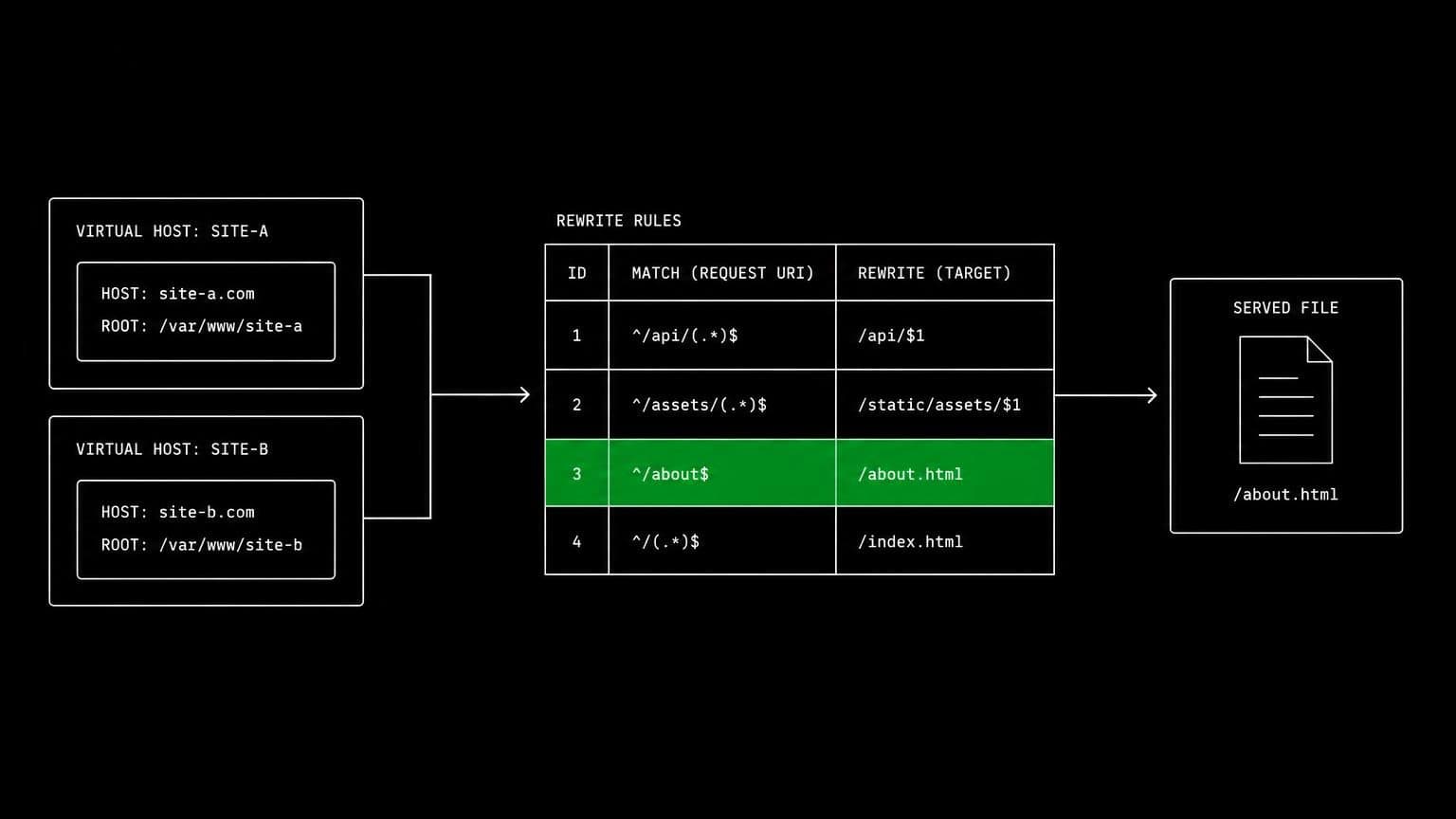
apache ai agent: agents that edit the vhost and check what it serves
install the apache http server on a room's server and its agents edit virtual hosts, enable modules, restart the service, and check what a request returns.
- runs on
- room server
- installed
- per room
- category
- server
apache configuration is layered: a main config, virtual hosts, enabled modules, and directory blocks that can each override the last. installing apache on a room's server means an agent can find out which layer won by asking the server.
what agents do with it
once it reports installed, apache is running on the room's machine and apache2ctl is on the path. agents edit a virtual host, check the syntax before restarting, restart, and then request the url from the same box. the error and access logs sit on the same filesystem, so a 403 becomes a specific directory directive rather than a guess, and a rewrite that misfires shows which rule matched.
the case for a live server
rewrite rules, module ordering and per-directory overrides are the three parts of apache that reading cannot settle. an agent that can enable a module, restart, and make a request resolves all three by observation, on a machine nobody else depends on.
example tasks
- 01
the rewrite for the legacy urls is not firing. work out why.
the agent checks the module is enabled, applies the rule, restarts apache on the room server, requests the old url, and reads the log to see which rule matched.
editbashread - 02
the static directory returns 403. fix the permissions and prove it.
it reads the error log, adjusts the directory block and filesystem permissions on the room machine, restarts, and confirms the file is served.
readbashedit
what to know before installing
the room needs a paid server tier. apache is light enough for the 4 gb tier beside an application. it binds the same default port as nginx, so a room that installs both needs one of them reconfigured before the second will start.
how to install Apache
Apache is installed per room from the technologies tab, not once per team and not on your laptop.
- give the room a server
technologies are installed on real hardware, so the room needs a 2 GB, 4 GB, or 8 GB tier. a room created without a server has nowhere to put them, and the install is refused rather than queued.
- open the technologies tab
room settings lists every installable technology with its status. pick Apache and the install is queued for that room's server alone.
- watch the install run
the room streams the status through pending, installing, and installed, and a failed script surfaces its error instead of leaving the room in an unknown state.
- agents use it through bash
once it reports installed, every agent in the room reaches Apache with the bash tool, on the same filesystem as the checkout they are working in. uninstalling runs the teardown script and takes it away again.
where Apache actually lives
each room owns a server for its whole life, and the technologies tab is how you decide what is on it. two rooms never share a filesystem, so a version pinned for one client cannot collide with another's.
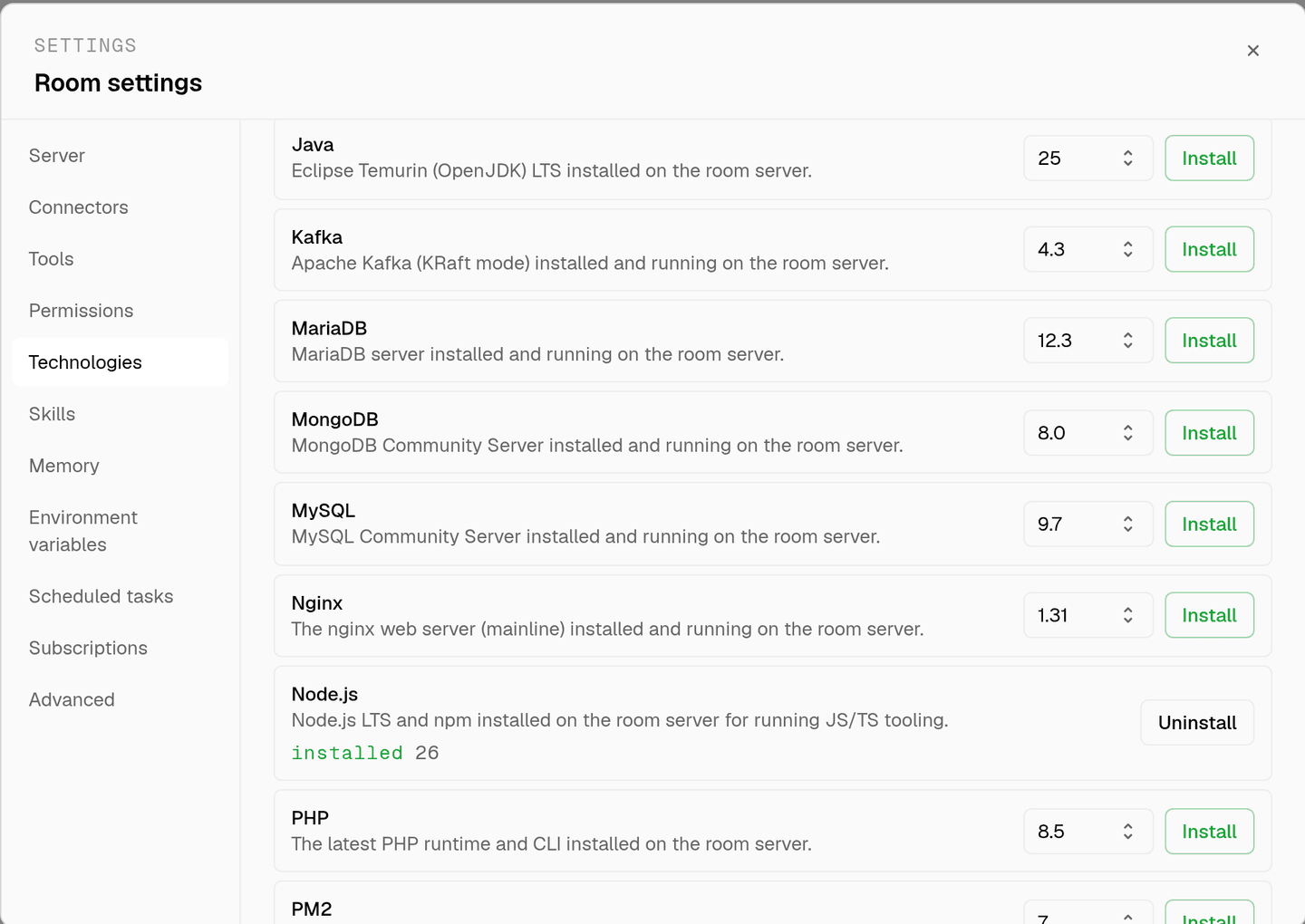
server time is metered by the hour against the same prepaid balance that pays for model usage. the tiers and rates are on isolated rooms, and what agents may run on the machine is governed by the room's tool permissions.
faq
what does installing apache on a room give the agents?
the apache http server running on that room's own machine, with apache2ctl on the path and the config under its usual directories. agents edit virtual hosts, enable modules, restart the service, and call the site from the same box.
can an agent debug a rewrite rule properly?
yes, and this is where a live server earns its place. rewrite rules are almost impossible to verify by reading. an agent applies the rule, restarts, requests the url, and reads the log to see which rule actually fired.
is this for hosting a public site?
no. it runs on the room's own server, one machine per room and nobody else's. we publish nothing from it and put no domain in front of it, and an agent's requests come from that same box, so this is about checking the server's behaviour rather than serving visitors.
does the config persist between sessions?
yes. the room's server is provisioned with the room and stays with it, so an edited vhost is still in place next time. uninstalling stops the service and removes the packages, the config directory, and the logs.
spin up your first room.
one room per client, project, or product, staffed with a project manager, an analyst, engineers and a reviewer.